 6:56
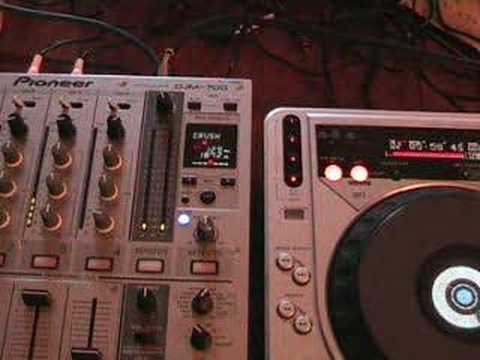
A look at the CRUSH feature on the Pioneer DJM-700 mixer
Contents of the video
0:00 First of all I want to take you back to the 1980s, early 1980s
Alright folks, Jonathan here. In this video we're going to be looking at a feature called the Crush feature on the DJM700 mixer. Now first of all I want to take you back to the 1980s, early 1980s. Now I had this huge big box, it was called a Ghetto Blaster. If you opened that up and I used to open everything up just to see what was inside it basically because it was fun and I always used to try and make sure that I knew how to put it back together. Except when it was, of course, my mum and dad's appliances and they used to shout at me because there was always screws missing, but we won't go into that. So, if you open one of those old ghetto blasters up, you had 6,000 components and believe me, it was amazing. Nowadays, the modern day ghetto blasters, you open it up and there's a silicon chip and a couple of batteries. That's about it. What happened? Now I'm not exactly sure what the components were,
Over a period of time, when you used to turn the volume up and down, sometimes you used to have like a crackly, fuzzy sort of sound. A crushing sort of, ah, crush. That sort of sound. Now it could have been because maybe the resistors or capacitors were on the way out, could have been because the actual slider was a bit rough, but that's almost the sort of sound you will get in this mixer. The only difference is there aren't people inside the mixer going, oi, it's crush time, let's ruin the thing for half a second. It's just the software inside will make that particular sound. So what we'll do, we'll hold tight and we'll have a closer look. There you go. OK, there you go. There you can see it. That's the crush feature. So what we'll do, we'll just wang the camera out a little bit. And what you can actually do, you can actually set this here so you can have the crush sound to 1 over 1. In other words, you'll get the crush sound...
It'll be in beat with the beat, one over one. In other words, you hear when you hear the beat, boom, boom, boom. Also half, so you have a bit like a train I suppose, or a quarter, but then you can go two over one, so two beats, four beats, excuse me, eight, sixteen, thirty-two and sixty-four. Right, so what we'll do is we'll set it first of all to one over one and As usual with regards to the effects on this particular mixer, you've got a dialer here so you can set to which channel you want the effect to be used on. In this case we're using channel 3, so this CDJ here is set to channel 3. We're on the crush and when we press this button down here and it starts to flash, that means that this particular feature is being used on channel 3. So we'll play the music and we'll have a listen. Here we go.
2:43 Half, one over two, so you
Press play, not two. Do it. Okay. Now, bearing in mind now we're one over one, so let's just press the button and see what happens. So you can hear that crushing sound. One, two, three, two, like that. What we'll do now is we'll go to half, one over two, so you can hear it. It's almost like an echo. And a quarter. It's defined there. Oh, there you go. You can hear it's more defined there. Back to one over one. So again, let's just pause that. So again, what you can actually do, you can set it so you can actually use this, let's say, in time with the music. For example... Let's say the vocals, you've got the vocals for, for example, say, I don't know, say 32 bars or 16 or whatever bars. Well you can set this so you can just have the crush going up and down in relation to the actual bars with the music. Now also what you've got here, like with all of the effects, you've got this dial here so you can actually have the level of that particular crush to the maximum so you can only hear that.
4:21 This is what happens when you set it to minimum
Or, you can have it to minimum so you can't. Now, this is what happens when you set it to minimum. I'm going to set this up here to 2 over 1. I'm going to press play with the music. And then what I'm going to do, I'm going to press here. You can't hear anything at all, but watch what happens when I move this. Just put the volume down. We can change the frequency of the crush. So, have a listen. That isn't flashing, it means that the effect, any effect in fact... Traktor Thank you for watching.
This transcript was produced automatically from the audio of the video and may contain mistakes.





