 8:41
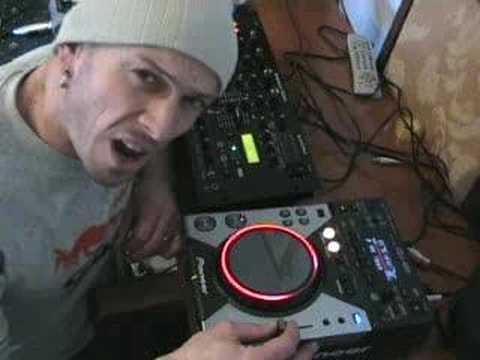
A look at the Pioneer CDJ-400
Contents of the video
0:00 Bit of history
Alright folks, Jonathan here. Yes, it is a CDJ-400. Yes, one of these will be given away as a prize. And yes, in my wacky sort of way, I'm going to give you my interpretation of a very small demo of it and what I think of it. Now first of all, let's look at a bit of history here. Let's say for example we have a piece of tech or a piece of kit made today. And that particular piece of kit, anything that doesn't matter, is say 500 euros, dollars, pounds, whatever. It doesn't really matter. There's a lot of technology put into that piece of kit. Let's say for example, say five or six years later, the same company make something else. But it's exactly the same thing, say for example, the first piece of kit was a CDJ turntable. Five or six years later they make another CDJ turntable but that CDJ turntable is slightly cheaper. Now then, this is the idea. Because technology is moving so fast there's a lot
More technology gone into the second item, so it may be better quality, there'll be more features and it'll be more user-friendly. Now that's my interpretation with this, because you've got the likes of the CDJ-800. Damn good piece of kit, this is the CDJ-400, so you think well the 800's better. Now in my own personal opinion I think this is better than the 800 because you can do more with it. It's got vinyl mode like the 800. It's a similar sort of size to the 200, but the 200 does not have vinyl mode. What is vinyl mode? Alright, if you're not familiar with a proper vinyl turntable, you put the needle on the record and you move the platter without the motor working and you can manipulate that piece of vinyl as you want to. In other words, if you spin it fast with your finger, the record will go like that. If you spin it slowly, like that.
So we can do exactly the same with this. At the moment it's at pause mode, it's on vinyl mode, have a listen. Goes right back to the beginning. Now then, from a turntablist point of view, you can do scratching on this, but at the end of the day, if you're a proper turntablist, you're going to buy vinyl turntables. What I'm going to do now, I'm going to put my finger on, on the actual platter, press down slightly, find the beginning, two things here, one... It's to listen to the sound when I move it very, very slightly to see if we've got digital sound. Haven't really got a digital sound there, quite a lot of CDJs you have. And also the other thing is when I move my finger at this particular point, my finger is staying at that point. Some CDJs what happens is as you move your finger you seem to be following the beat all the way around. But with this guy it stays in that point, at that particular point which is very good. Now also...
You've got plus or minus 16 on the, sorry I'll start again, you've got plus or minus 6, plus or minus 10, plus or minus 16 and wide on the pitch control. So in other words, if you set it to plus or minus 6, it means that when you move the pitch control to the minus position, you'll be going down 6, you move it up, you'll be going up 6. Same with 10, up and down 10, 16, up and down 16 and wide, you go to minus 100 or plus 100. So if I go to wide, you can have a listen, here we go.
3:43 Plus or minus 16
Now one thing I will stress, and that is, if you are a DJ that likes to do a lot of mixing, I can't stress this enough, don't go to plus or minus 16. Definitely 8, 4, at the very most plus or minus 10. Here's the deal, this is so logical. Let's say you want to do a really good fine mix. If you're on plus or minus 16, because there is plus from the centre point, To say the minus position, you've got 16 in between this area, you're going to have to fine tune that and move the pitch control tiny minuscule amounts. If, let's say you're on plus or minus 6 or 4, it means you've got more control with that pitch and you're able to fine tune it better. Anyone out there mixing will understand what I'm talking about, sorry. So what I'll do, I'll pause the camera and we'll have a closer look, hold tight.
Okay, like I said, we'll look at a few of the features in brief. So we'll start the music off. First of all, we've got a sampler. So, here we go. We'll take that out. Now also what we've got here is a beat loop. What this will actually do is loop the sound in triplets. Again with the jog wheel. At the moment we're on CD mode, we're not on vinyl mode. So I can use this now to just pitch bend to change the speed very slightly. Clockwise. To speed it up, anti-clockwise to slow it down. If we go here onto jet, have a listen. There's a roll feature. I'll just move that down so you can see what I'm doing. Hold on, let's move the actual camera up slightly. Basically what this does, it takes away certain frequencies. So there now we've got just bass, it's taken away all the mid and top. So we've got that underground sort of vibey sound. And we can build. So like in the mix, you know, you can even build the track by yourself.
6:55 For scratching purposes, if we start it off again
Take your finger off, and... Also you've got a hold button there so you can hold the sound as you want it. If we go into vinyl mode, we go into a bubble effect. So for scratching purposes, if we start it off again. We've got a trans, this is quite cool. I mean this is similar to the DJ cutting. What the DJ would do, he would have one hand on the crossfade, the other hand on the turntable, and the crossfade would be moving like that. So you'd be hearing that, well basically that sound, what's happening, it's almost like the sound's going on, off, on, off. Now again, there's a lot more to this than meets the eye. What you have got here, which is basically the new generation I suppose of CDJs, you've got a USB input. So in there, if you wang that open, you can stick your iPod in there and use all your music off your iPod, off a flash drive, you can bung your laptop in there, your PC, your hard drive.
And apparently this can be used with the DJS software as well, so you bung your DJS software in your PC and you can have a couple of these and you can just use them like normal CD players. Also it plays MP3s as well which is quite cool and again you would use this, the MP3 dial here for if you're using an MP3 CD and also if you've got your flash drive in there you can go through all your files like so. So I'm only just getting used to this. A very brief Insight into this guy. It's the CDJ-400. If you want any more information, comments, etc. underneath. Thanks for watching. Practice and enjoy.
This transcript was produced automatically from the audio of the video and may contain mistakes.





