 11:05
Chauvet DJ COREbar4 Band DJ Bar or Club good for all events
Contents of the video
0:00 Jonathan here, the DJ Tutor
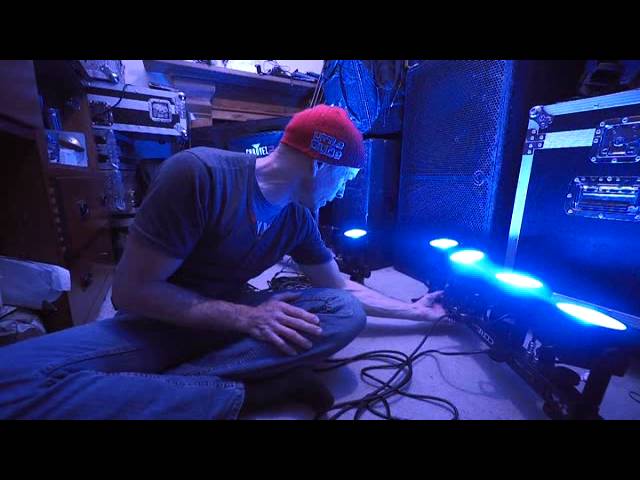
Alright ladies and gentlemen, Jonathan here, the DJ Tutor. Now mostly of course I do DJ lessons, learning how to mix, scratch, cut and goodness knows what. I also do lighting demos, but I do lighting demos with a slight difference. It's not big and bold Americanised where I say you have to buy it otherwise your brain will explode. What I do try and do though is say it how it is, ground level, thus I'm on the floor. These lights here are from a company called Chauvet, they're known as the Core Bar 4. I have done a product review on these, I think it was last summer. But what I do like to do prior to telling you that you've got to go and buy them if you don't your brain's going to explode and all your guts are going to fly everywhere, I like to give them a bit of a demo and run for their money. I have used the Core Bar 4 quite a bit at gigs. So here is the destruction manual.
Also known as the instruction manual. And if you're looking for uplighting or maybe you're a small band, maybe you have a small sort of roadshow, then I'm not going to say look no further, but I would like you to consider the Core Bar 4. Now what I've done for this video is I've set two of them up together. So they're running at the moment Master Slave, but also... They are running with the footswitch. Now, this comes with every single pack of Core Bar 4 you get. There it is. It's pretty self-explanatory. It's a footswitch. Presets, sound on, and blackout. If I press sound on, keep my finger on it, we get a good strobe effect. Presets, and we go to presets. Or alternatively, if you want to, we've got a sound, and if I just tap it like that,
1:53 Yeah, it sounds light
Yeah, it sounds light. There, like so. Okay, now these aren't fantastically bright and they're going to blind you. If you want fantastically bright lights, you're going to have to pay quite a lot of money. But as I said earlier, these are great for a small mobile gig, a band. Have a couple of these, stick them on the floor. Alternatively, you can put them on a tripod and away you go. So what Chauvet have done is they've made them so they can be floor mounted. They can be mounted on some form of light trussing rig. Alternatively, they do come with a tripod as well. So you can put them on a tripod. Now, what I've done, as I said, I've set them up on the foot switch. Some people don't really like to just plug and play. Now you can plug these in and just let them do sound to light by themselves, which is great, but during the course of the evening there comes a point when you think, do you know what? I want them to just be green. I'd like them to just be red or just be blue, not...
Just flash all night. So you can do that pretty much with preset like that and it's full-on brightness or press it again and you've got a new color so let's say you're at a wedding function and the bride wants it red then there it is or alternatively Bit of a green feel there, little bit more cold feeling, but this could be a nice sort of feel for let's say, alright, let me finish, you're outside in the cold, you come into the entrance and it's green, you still feel cold, but then you walk into a marquee that's white bright, you're going to all of a sudden feel warm. So again, let's take this a step further. Your lighting not only can set the feel and vibe of the room, you can release the energy. You can give the whole room a load of energy. You can make people feel warm even though it's cold by just lighting. Alternatively, middle of the summer.
5:22 Four heads on each one
The DJ Tutor is available for purchase at Ellaskins.com As I said, from a band's point of view, you don't want to be fiddling with the DMX controller, but what you can do is if you're a guitarist, you can just press down on the foot switch and away you go. Now the Core Bar 4 is very ingenious because it's quite small, it's relatively light, comes in a pack like that. That's it. That's where the foot switch goes. That is where the cable goes. And of course, your core bar 4 sits in there. So if you are, let's say, a solo act and you don't want to carry loads of gear around, then consider the core bar 4. OK, four heads on each one. Now I've got two set up at the moment just to show that it's very simple to set up. Now what I've done, I've gone from this one here into...
The other core bar 4 over here. Now what I had to do is I had to, and it's, I don't really want to edit this or chop and change so I will explain what happened. I went to menu and while I was scrolling through menu I went to different channels, sound and you can see this one's doing different things. Now here I've got, I'll just press enter. No, if I do that again, so I need to explain exactly what I'm looking at here. Okay, so I'm going through different presets. We've got sound, auto, five and E-CH. That could be three, it's upside down. Three dash CH. Now press enter. It's very important that when you scroll through, you need to press enter because you could scroll through and get to a setting that you like. But if you don't press enter,
We'll go back to the original setting. So I said enter. I've now got there, I've got 1p or depending on which way it is, it could be 6-1 but I'm upside down and my videos are very random. I suppose really what I wanted to show you there was how easy it was to set this one so this is now complementing the other one. Now I used a DMX cable. Ideally, you do need to use a DMX cable, also an XLR cable. I went from the out of this core bar 4 into the in of the other one. That's really important. You don't want to go from the in here to the out there because what you're doing then is this one is really the main This one is the unit that will be giving the information to that one. And if this one has got the footswitch, then you could have sort of problems and issues. So ideally, not ideally, definitely, you need to have this footswitch in the master and then the XLR cable, your DMX cable out from that one into the next cool bar four.
8:30 2 or 3 foot away from your mixer, your RCA cable is fine
Now digressing slightly, some people ask me with cabling when they're plugging in from a mixer what's the best one to use, RCA or XLR. RCA if you're just going from your CD player, of course you'd have to anyway, CD player into the mixer, but let's say if you're going from your amplifier and the amplifier is directly underneath your mixer, don't worry I'm not going on a tangent here, I will explain. If your amplifier is pretty much... 2 or 3 foot away from your mixer, your RCA cable is fine. But if the amplification and all of the other gubbins is like the other side of the dance floor, you do need to go XLR because it's a balanced cable. What that means is that if there is any interference, the interference won't get into the audio. I'm not going to go in depth here but trust me, that's why virtually every single nightclub will only use XLR going into
The amplification. So XLR cables, also known as DMX cables. Now this one here is around about sort of eight foot long. So if you want to, you could have 20 foot long. So you can go from one head into the next head. I've got four of these and I have used them at gigs where I've gone master with a foot switch into one and then out of that All of these in a room, I've set them up so they're pointing in different directions and then I'm behind the console, all of a sudden the bride and groom start to dance. You've hit the footswitch and you've got a nice flow of lighting from red, green and blue and so on. But it's not red, green and blue one of them, red and blue, black and yellow the other one, well you know what I mean. They've all gone from red to green, they've all gone from green to blue and so on. Now that looks professional. It's taking away the cheesy disco where you turn up...
Plug everything in and it's just flashing lights. And on the odd occasion, the DJ's gone, hmm, I'll just pull that plug out so the laser will stop working. Well, you don't have to worry about this. So, to answer a couple of questions, and I have had them in the past, you know, I don't want to use a DMX controller. What can I do? What's the next best thing? Well, the Core Bar 4 is giving you that because it's giving you pretty much the smaller version of a DMX controller There will be a link in the description to the core bar 4 from Chauvet as well. Practice and joy. Thank you.
This transcript was produced automatically from the audio of the video and may contain mistakes.





