 17:54
Chauvet DJ Intimidator SPOT DUO Moving head light Mobile DJ
Contents of the video
0:00 Entire room in light, so long
All right, ladies and gentlemen, you have in front of you a set of Intimidator spot duos from a company called Chauvet. First of all, a bit of history. Now, moving heads have been around for quite a few years, and that's a moving head. There you go. It looks a bit like a cannon. It moves 360, and it can near enough cover an entire room in light, so long as, of course, you set it in the correct place and you give it the correct program or you let it do. A programme so it will fill in an entire room. Now, many years ago when moving heads came out, they were hyper, hyper expensive. One light, you could pretty much buy a small family car, brand new. Second hand, you could buy a very decent second hand car. Then, after a few years, all of a sudden there was one or two companies, mention your names, who decided to make them a lot cheaper and they did make them cheaper.
But they were downright terrible. They didn't last very long, I'm pretty sure they used dichroic bulbs in them that always blew and they were just absolutely terrible. But they were still very expensive. Now of course with modern day technology and LED technology prices are coming down but also the quality is getting a lot better as well. Now what Chauvet have done is, I'm pretty sure when they were there maybe trying to decide how to make them They thought, as a DJ thought, now a DJ likes quite often to buy two sets of. So you have a stereo, not only stereo sound, but you've got stereo lights. You've got one light over there and one light over there. So of course what they thought is, well instead of just making one unit, why don't we make two and fit them together? Now alright, there is a certain...
2:15 Alternatively, you can always have one either side
There's a certain problem here because of course you buy one of those, you've got two lights, you need another one to go the other side. But at least you've still got two. So what you could do is you could have this as your centrepiece. So if you do have the likes of a goalpost, now a goalpost for a mobile DJ, you know what it is. If you don't, it's a structure that goes either side of you and above you. So you could have that centre stage above you and program it so the lights are moving on the crowd. Alternatively, you can always have one either side. Now again what Chauvet did is they thought okay it's fair enough we can make this light but we need to make it user-friendly for the mobile DJ so this is what we did if we have a look in there we can see a big hole now they didn't think oh we've got a bit of space let's make a hole or well you know what we don't want to put any components in that let's just make a hole
They made it so you can fit this onto some form of bar. So you can fit it that way or that way, try not to drop it. You'll notice we've got a couple of holes, one there and one at the top. So if I just put this baby down, comes with a bracket and you attach there and there and there you go. Now you'll notice as well, you've got a hole in the centre and long ones here. Well, again, use your head. You've got one there to fit into a relevant hole you've got, let's say, in your structure. And then of course here, quite often you could have a hole there, there and there. It's always a good idea to have two so it's firm. So you could have one either side and secure them or one in the middle and one here so because you've got one here it's not going to move. Now also very quickly as well, this is very important and this is law in the UK.
We have the safety loop here. Now by law in the UK, any lights in any nightclub and really also any DJ, mobile DJ who is a little bit more professional should have a safety cable as well. So that's what that's for. Alright, daylight at the moment. I'm going to pause the camera, wait until it's a little bit darker and then we'll get these babies to run. You can set different ways of using them. So there are different shows. If you're not savvy with the likes of DMX, just a few presses on the control panel here and you can set different shows. So no DMX, it doesn't matter. You can have one show say for example for one evening or maybe halfway through the evening, set another show. What I'm going to do in this video
We're not going to do DMX, we're going to do Master Slave so you can see them working together. Alright? I'll pause the camera. Sorry guys, I can't help but do this kind of thing. First of all please excuse all the shit on the table but this is family life. Right, look at that. There's one and there's one I destroyed earlier. No just kidding, I didn't destroy it but take this kind of clip as I'll do it so you don't have to. In other words, open If there's one thing you may have to do, and I say may, is you may have to take this off. That's because maybe after a certain amount of use you could get a bit of residue not on the top of the lens, I'm not going to turn this upside down because the screws are still in there, I'll just explain that in a little bit, but maybe on the underside.
5:38 No need for damp, just a dry cloth is good
But maybe on the top as well, it's always a good idea just to, before and after as well, every gig, just give the lens a bit of a wipe with a cloth. No need for damp, just a dry cloth is good. And then also on the underside, you just get not every gig for the underside, maybe once every two or three months, but again it's dependent on how much you use it. It means that you will keep the lens in perfect condition and also the light intensity in perfect condition as well. Now you'll notice very quickly as well... All the screws are still in there. What I've tried to do is unscrew and lift it out. That's because I know which screw goes in which hole and I know where the screws are. Bang! There you go. Alright, so why have I done this? I've done this so you don't have to. I love looking inside of things. In fact my mum and dad hated it because I used to destroy things when I was younger. Luckily I don't do that now but it's good fun to look inside. Right, so I'm just going to put the camera there. I'm going to bring that up here.
And let's just zoom in very slightly so we can see what's going on. Now there is the aperture. The aperture is the terminology for the hole where stuff comes out of. And the stuff we're talking about here is the light. Now the Spot Duo will use a 10 watt white LED. This guy here, have a listen. That's our metal heat sink. That will take away the heat. We have two wheels, we have a colour wheel there and we have a gobo wheel. Now gobo wheel is, if you can just see there, we can see sort of almost as though it's a flat piece of metal with shapes cut out of it. So of course what happens is the light shines first through the colour wheel and then That light then is turned into a different colour, in turn passes through the gobo and then through the aperture here, through the lens and that's how you get your beautiful pictures, or sorry, your shapes. Now the wheel here, the colour wheel, the lenses are called dichroic. They're sort of like a mirror but they're not. What happens is that they're lenses that are coloured, sorry, pieces of glass that are coloured.
8:01 It's almost, it's just one wheel
With very subtle colours, so we can see here, we've got, if I just turn it like that, we've got a nice purple, bit of a red going on there, bit of a blue and red, yellow I believe there, orange and that one there is nothing at all, so we can get white light. So of course the beauty about this is that every Gobo can have every single colour. A lot of the cheaper models We'll just have maybe a colour wheel with the gobo attached and that's it. So it's almost, it's just one wheel. Cheaper again, it's just one gobo, end of story. So there you go, that's it. So what I'm going to do now is just fit it back together. And very important, please don't do this, alright? I've done this because I can. If you do something like this, and let's say all of a sudden...
10:02 It isn't, don't worry about it
If your spot duo starts going wrong, then if the manufacturer or the shop found out in any way, shape or form that the unit had been tampered with and you'd tampered with it, that could void your warranty. So please don't do this. I'm doing it so you don't have to. Alright, so what we've got, we've got three pieces. One of these fits on the top. Let me just move the camera like that. One fits on the top like so. And then the other one on the underside. And then of course this piece here. It isn't, don't worry about it. What's happening is inside here we have motors, quite often they're called stepper motors, and what's happening is they're just configuring themselves. For example, that light at the moment, one's over there, one's here. So of course there's a certain program that is already ready to go. So of course what has to happen, these lights have got to get ready so they may move around like this and jiggle about a bit, and all of a sudden they could be in that position, they'll light up and then just start doing their show.
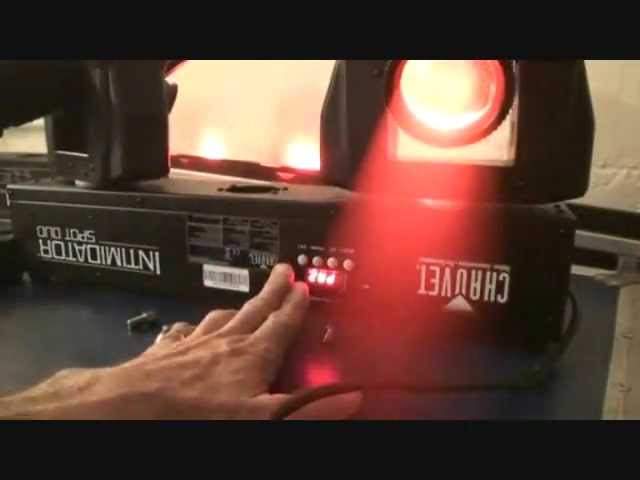
You do think there's something wrong, don't panic, there isn't. Looking at the control panel, to the left of that we've got MIC and four small holes. Four small holes, underneath there there's a small microphone that will pick up any sound in the room. So if you are using the Spot Duo, say for example Sound to Light, then the moving heads will move when you have sound. And that could be any sort of audio signal. It could even be your voice or you tapping on, let's say, the Spot Duo. Below the readout here we have menu, up, down and enter. We press the menu and we go through the different programs. We can also go up and down through the programs and as soon as we get to a program we want, we press enter. If you don't press enter then it will go back to the default where it was to begin with. Right I'm going to plug it in for you and you should see them sort of move around a little bit. There you go. So don't worry about that.
They're supposed to do that. Right, we'll get the smoke out in a little bit. What I've done though is I've now set them to master slave. That is the master unit, that's the slave. So I've gone from the DMX out from that one into the DMX in to the next one. And I could go from that one into the next and so on. So this guy here, this first spot duo, is the one picking up the sound and then of course whatever this one does... The other will follow. So I'll demonstrate that now. I'll just tap this one here. There you go. Right, the images you're looking at now aren't very good because, I mean, the lights are right next to the wall. Again, having a colour wheel and a Gobo wheel means that every single Gobo can be all the colours. That is quite spectacular. Now again, what I've tried to do here is we've got...
13:47 In or out, and that is for one purpose and one purpose only
It's still relatively light outside and this proves how bright they are. These are just 10 watt LEDs. If you do see one or two of the images slightly blurred, that is because... Let me just pause the camera. If we have a look here... Oh, it got me. You can see... That scared the living shits out of me, that did. What you can do, you can actually screw... I'm going to be careful. You can screw the head... In or out, and that is for one purpose and one purpose only. So the image can be a lot more defined. It's dependent of course on where you are. For example, you could be in a room and you want the image to be perfect against a far wall. So you turn that while the unit of course is on but not sound to light. And then you can get a much better image on the wall. So if we just have a look down there, there you go.
Check it out. That is so cool. Like I said earlier, we've got the unit that's just off camera. That is the master at the moment and this one here is the first slave. So let's have a look what we need to do. Press menu, we can see SON1, bearing in mind the display is upside down at the moment. So what I'm going to do now is go up with SON2, press enter and now we're on a completely different show.
15:07 Again, different ways of setting them up at the moment
Again, different ways of setting them up at the moment. They're just sort of tabletop mounted but of course you can have them upside down, you can have them sideways and you can have them say on for example a tripod. Now again be very careful but we've got the hole there. What you could do is you could have one unit on some form of tripod with two heads facing downwards then you could have another unit above that with two facing upwards. So I can imagine having 4 moving heads either side of your light show would be absolutely stunning. Small point, put your mind at ease. You can be rest assured that if you did, for example, just set up the Duo on a flat surface, it's not going to move anywhere. It's quite heavy. The only thing I would suggest is make sure whatever surface you put it on, it's solid. It's not going to wobble about because if you've got a wobbly surface,
The wobbly surface could counteract the movement, so of course you're not going to get the true movement that you should be getting. Again, alright, I would only set up a light like that on a flat surface if I knew 100% that no one, and I mean no one except myself or a roadie could go anywhere near it. I would never put something like that on a flat surface. In a working environment, because once a few people have had a couple of glasses of shandy, then some people are a little bit, oh look at that, let's have a poke and a prod. And before you know it, hmm, maybe it's not working. So just be wary there. Probably in my next video on the Spot Duo, we'll go through the control panel here. But again, what we can do is we go through the menu and when we get to...
A certain program we can go up and down and press enter. Of course if you don't press enter then what will happen it'll just go back to its default, in other words the last program you were on so for example there I can leave that do whatever I want but until I press enter it will just carry on doing what it was doing originally which at the moment is Astoslave. Okay what I'll do in the description of this video I'll put a hyperlink Thanks for watching and I'll finish off with practice and enjoy.
This transcript was produced automatically from the audio of the video and may contain mistakes.





