 28:18
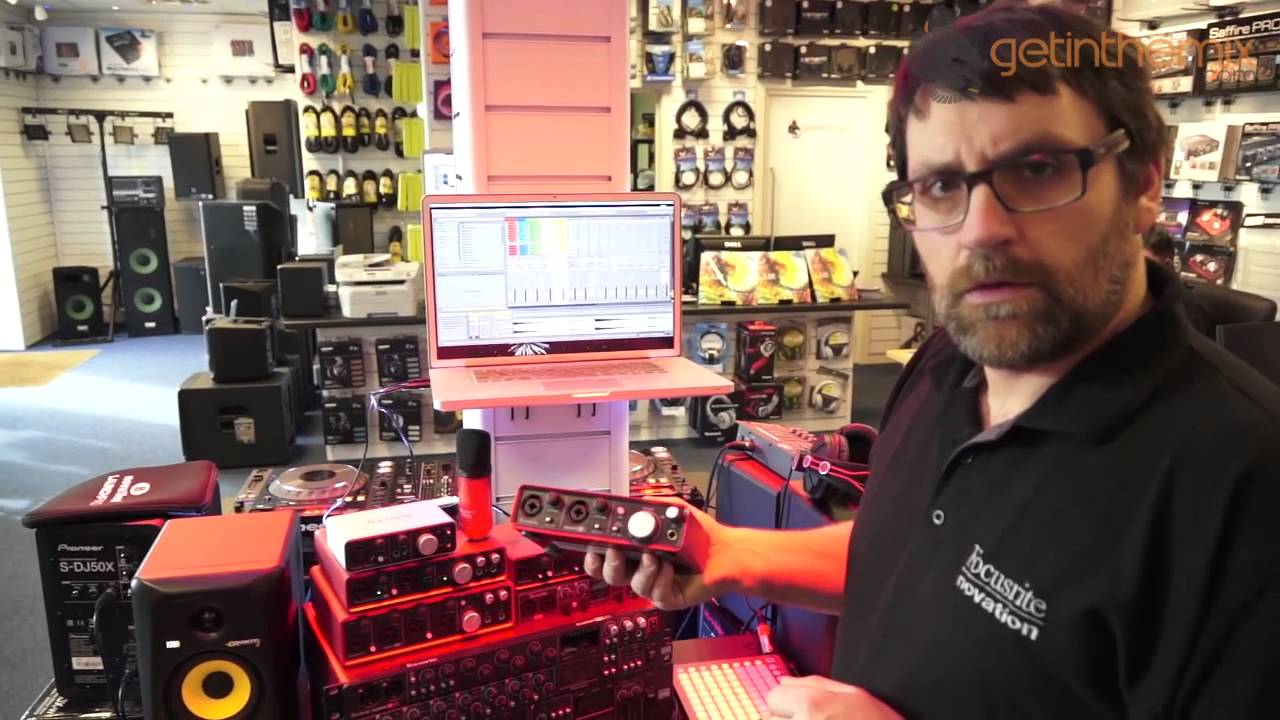
Chris from Focusrite gives information on what kit to use. DJ Producer Re-Mixer
Contents of the video
0:00 How can I get that one step higher?
All right guys, we're getting the mix and I have Chris here from Focusrite Novation who's got some rather nice bits of kit to show you. Now first of all, before he says anything, a lot of DJs are always asking me how do I get to work in a nightclub? How can I progress? How can I get that one step higher? To be quite honest with you, you could be the best mixer in the world but if you do want to start to get into the bigger clubs, the manager demand that you produce and make your own music. Now, it's up to you if you want to do that but my advice is to try and get into production. Try and get into starting to make your own tunes. Now Chris here has brought along to get in the mix some bits of hardware. He'll also show you some software but how using the hardware you can start to produce
And tell me Chris, let's say you've got a DJ out there. They don't know anything about production. They haven't got the foggiest but what they want to do, they want to find a piece of hardware and software that will get them say on level one. Yeah, of course absolutely. It can be really quite confusing when you're initially looking at producing your own music. There are so many choices, so many different manufacturers and so many different options there. So obviously I represent Focusrite. I've got a whole load of Focusrite audio interfaces here I mean the starting point, I mean well really the first thing is you're gonna need one of these things. You know that's going to be the kind of the initial thing. Yeah so let me butt in here right? A lot of people are asking okay MacBook should it be a laptop for music production? Yeah. What do you recommend? Okay you know in real terms it doesn't matter if it's a laptop, if it's an old beat or PC tower or anything like that. Anything that's got a processor, a decent bit of memory, decent sized hard drive.
2:08 What would you recommend for RAM?
Yeah. You know is gonna be fine. Okay so when you say decent memory, hard drive really you're looking at a good processor and the RAM. So what would you recommend for RAM? 8 or above? Yeah well I mean most computers these days are coming with at least eight gigabytes of RAM. Sure yeah. I mean the great thing, the best thing to do really is sort of think about the software that you want to work on initially. Yeah. And then go onto their website and check out the minimum spec requirements. Yeah. And usually there'll be a nice list or you know recommended eight or something like that. Yeah. And also processors as well and that sort of thing. I would say, I feel quite safe in saying that any sort of system that's been built in the past sort of three or four years really should be up to spec to be able to run music software. Okay do you think as well it's advisable for someone who wants to concentrate a lot on music production to buy a PC, a laptop just for that purpose?
I think that's a really good question. I mean obviously this is tower debate, it's quite an interesting one I guess. I think you've got to think about long term really. Yeah. Sure if you're going to just start off and you've got a PC lying around that you think okay that's got enough RAM, that's got enough processor, I can make some music with that. Brilliant. Yeah. But at some point you may want to start thinking about taking that out and even perhaps doing live PA, you know live performance of this stuff. Yeah. Now I wouldn't recommend lugging around an old tower PC and monitor screen. Start how you mean to go on? Well it depends. I mean obviously it's down to budget of course you know.
Sure yeah. So if you know for example a MacBook Pro like this. Wait I'm going to take the camera off the stand now so we can have a look at items. So you know a MacBook Pro of this kind of nature here, you know this was not cheap I have to admit. It wasn't a cheap computer when I bought it. Yeah. But it's brilliant for me because it's you know it's a nice big laptop. Yeah. I can take this wherever I want. Yes. You know I have a hard drive with a load of tunes on if I ever want to DJ. Yeah. I've also got my
Music production software on here. In this instance I'm using Ableton Live yeah. Is that live or live suite? This one is actually live suite. Okay. So this is the full-blown package. Yes. But one thing I should say actually about our Focusrite and Novation products is that they all will come with a copy of Ableton Live Lite. So how much are they saving then because that you know the Ableton. Well Ableton Live Lite is the kind of the bundled package that you would get with you know with hardware purchases. So all of the Focusrite interfaces here you know come with Ableton Live Lite. So pretty much buy the box and you've got everything there as long as you've got the computer with the right spec you've got everything there to get going making music. So you can so you can even just with the Lite version you can still make tunes? Absolutely yes. Great okay. It's a very powerful piece of software Ableton Live Lite. I mean of course you know if you get progress further down the line you can always follow an upgrade path to get the larger version of the software. Yes. And suite is an incredible package it does cover you know pretty much everything that
You need. Yeah. But if you're just concentrating on getting going and just starting off you don't really need to break the bank in terms of getting the software. You know if you've got the right piece of hardware which is important this is obviously what we'll be talking about but you will have everything that in that box to get going with. Okay so we've discussed what the DJ needs to do to get to that next level. So all of a sudden you've got a DJ in the bedroom at home and they've gone I want to produce. Yeah. They've got the software. What would you say is the first good bit of hardware for them to get? Okay the very first thing I would probably recommend is going to be an audio interface. Yeah. Okay now if you're working on a tower computer you may not even have this but if you look on the side of the Mac here we have two pokey little 3.5 millimeter sockets. Yeah. One for headphones and one for a microphone or line input. Yes. Now they are useful if you're gonna watch YouTube videos or if you're going to you know I don't know Skype with people and that sort
7:38 It is left and right?
Of thing but in music production terms really they are not up to spec. To be able to give you the quality of outputs sound outputs and most definitely not the quality of inputs when you're actually going to record. Sure got you. So the first piece of equipment I would suggest for anybody starting out is going to be one of these types of boxes here. Right. You see now I didn't know that. Right okay yeah. So this is good. Exactly. This is brilliant. So but as I say I mean it can be so confusing. I mean this is just a sample of what we do at Focusrite. This isn't the whole range. Look at all of those. And there's still a lot. Looks like it's come out of some starship. Well exactly yeah well the back of my van but yeah anyway. Yeah fair dues. So run us through it. Presumably here you've got cheap to relatively expensive so you've got a DJ, tight budget that you know they need good quality audio what do they get? Okay the first one I'm going to start off with is this wee fellow here. This is the Scarlett 2i2. This is by far and away
Well these days by Focusrite and the point of this is that it's a very straightforward and simple interface. You get two inputs and two outputs. Fair enough. It transfers all the audio data into your computer via USB and is bus powered so there's no power supply socket on the back. Yeah. That's not needed. The benefit of this is that you're getting high quality Focusrite microphone pre-amplification. Yeah sorry very quickly is that two inputs stereo or two inputs mono? These are two mono inputs. Gotcha good. And two mono outputs so it's just two in and two out. So it is left and right? Yeah exactly. It's name is 2i2 yeah and that refers to the number of inputs and outputs that it has. Yeah. Specifically but as I say the real benefit to this is what we've got at the front end here the Focusrite microphone preamps. Yeah. Now some of you may have come across Focusrite before, some of you may you know it might be a brand new name or manufacturer to you but we're a UK manufacturer they've been around for close on 30 years now. Yeah. So
We've been involved in building a lot of high-end studio equipment. But as time has gone on and the computer music making on the computers become much more ubiquitous you know we've managed to bring this sort of technology to a lot more people by producing an interface like this one which is a little over £100 and gives you high quality. In fact this is you know I would say close on studio quality that you can just put into your laptop bag take around with you and you've got the inputs and outputs you've got this audio signal going and coming out of your computer at high quality. Okay quick question there's a program I'm sure you're familiar with it called Audacity. Yes absolutely yeah. Right do you think if someone wants to record a good quality set do you think it's advisable for them to get something like that just to record to Audacity as well? Okay so to record directly into Audacity? Yeah. Absolutely I mean if you're working for example with CDJs or vinyl or anything like that and you want to capture what you're doing into Audacity, Audacity is a brilliant
Software. Yeah. But I still need a method of getting that audio signal into the computer. Yeah so of course like you said that isn't good enough.
It's not going to be good enough no there are a couple of important parts about what we have here first thing is the microphone preamps yeah this is the thing that actually boosts the signal of the microphone and turns it into a quality signal that can be captured yes the second thing is the conversion that these boxes do yeah and what they do is they take this what we would call an analog signal if you like sort of electronic impulses from the microphone being generated and they convert this into digital information yeah now a box of this sort of quality does it at a very high spec yeah so you're guaranteed to get a really high quality recording directly into your computer great okay now the things to be aware of here we've got these little knobs here these are gain controls there's exactly the same sort of gain controls as you find on a mixer so little trim pots there you can set the level so it's just right you're not going to be clipping you're not going to be distorting and what we've got here you can't really see at the moment but we have got what
12:38 Click track, reference, drummer
You like yeah it goes red you're clipping you're getting too much of a signal right when it's green it's a nice clear signal it's going in yeah so what's happening is this is receiving the signal converting that into audio into data if you like for the computer yeah transferring that via the USB cable to the computer yeah and the computer can then act as a big tape recorder great that's fantastic that's the idea behind these boxes so there you go so very quickly again in brief if you're a DJ you've got a set of decks and you just want to mix on audacity check out one of them absolutely now this is the 2i2 two inputs two outputs yeah now let's think about a specific scenario you know fit for your for your viewers yeah okay okay I'm producing music and you know I'm doing that that's great I'm getting audio signal in an audio signal out the computer but what if I actually want to use you know maybe some DJ software program like Traktor or some such thing like that yeah and I want to then start to take the computer out and actually do
Performance stuff right I've got my two outputs which will feed the club PA system mm-hmm how do I queue up a record mm-hmm I'm limited to two outputs on this one this is the 2i2 so let me show you this next interface and this I think is it's perfect for the sorts of things we're talking about this is called the Scarlett 2i4 and no prizes for guessing what this one has yeah if that's a two in two out this one is two in and four out yeah so we've got the same mic pre's the same quality mic pre's the same quality conversion in here converting it to data now if I flip around this time yeah we have our balanced outputs which can then feed the front of house PA system if I choose to if I prefer to use a you know a traditional DJ mixer I have two sets of phono outs mm-hmm so within Traktor I can set up deck A to come out of one and two deck B to come out of three and four take those signals feed them into your traditional mixer yeah and then obviously you know mix in the usual way with that but
Also if I spin around on the front here you'll see we've got a headphone socket yeah now again I have a switch here which allows me to listen to through the headphones outputs one and two or outputs three and four okay so imagine this if I set this to outputs three or four and with within my DJ software I set up a cue mix or a cue bus you know a few outputs and set the outputs for that to three and four here by just flipping this switch I get my the headphones nice that's now on if that's not affecting anything that's going to the front of house to the club PA system I'm using that to queue up my next track mm-hmm so this particular interface is perfect for DJing with and you know it's perfect for music production as well of course we've got the same quality inputs as I say same quality conversion but now we have an extra set of outputs which then allow me to set up a cue mix now in a recording studio environment there's another reason for this as well
15:38 Thunderbolt connection, firewire, apple
And quite a lot of people are actually start to use the computer as a live instrument I'm actually playing within bands mm-hmm now if you're doing that and you're in a traditional band perhaps with a drummer say something like that mm-hmm the drummer is what the compute is basically a calculator that is bang on the beat yes okay that never wavers from the human eggs isn't humans a human so a human needs some sort of reference point to stay in time yeah so another thing that we can use an interface like this for is to set up what we call a click track which is effectively a metronome just the regular beats that we can set the computer software to send out mm-hmm and I can send that click track out of this yeah directly to you know a drummer or anybody who may need that point of reference yes and again I don't want the click track to be heard by the people in the order sure yeah so I can send it out as an alternative output directly to the drummer here yeah and again we've got that frame of reference
Even though the drummer may be slightly out he'll always be in because he's got the reference he's got the reference yeah great so if he goes out of time then perhaps needs to do a bit of practice fantastic okay so that's the 2i2 and 2i4 as you can see we've got a whole range of stuff here as well yeah now we have two specific ranges of interfaces from focus right we have the scarlet range mm-hmm these will connect to your computer via USB yes I've mentioned but alongside that we have our SATA fire range now the Sapphire ones I've got some examples here these are the bigger units and we have here a liquid sapphire 56 this is actually an octa pre and I do have somewhere which I seem to put down so I'm not quite sure with I've got him a sapphire pro 24 now the sapphires are based around firewire technology yeah on the scarlet see USB mm-hmm so that brings out an interesting question as well why should I choose perhaps a firewire interface over a USB in
Interface yeah it's one faster than the other or on paper USB is slightly faster than the firewire chip that we use yeah USB 2 is 480 megabits per second geek alert firewire is 400 we use firewire for 100 in our interfaces that's 400 megabits per second yeah but the way it handles data is slightly different okay with USB sends data through in sort of chunks mm-hmm with firewire it's a constant stream which is actually a better and a better system for transferring audio data mm-hmm now this is really when we get into large sort of track counts really yeah so if I'm just doing two in two out USB is absolutely fine two in four out USB is absolutely fine mm-hmm in actual fact USB 2 is at the level now where we have here this Scarlett 18i6 this box can actually cope with 18 inputs and 20 outputs so you know that's a lot of in and out that's a lot of data to cope with as well it is but USB 2 is okay with that yeah firewire
Is just a different type of connection now firewire you would traditionally find on an Apple Mac mm-hmm and you know and basically what you've got there is you've got your own dedicated way of getting the audio in and out of your computer mm-hmm if you're doing any sort of audio recording that is the critical data or if you're playing out live even you know that is the critical data you don't want that to start to get corrupted or mess up while you're playing live mm-hmm and you know one of the things that fire one of the benefits that firewire can give you is the fact that on the side of my computer I have three USB sockets but I have as well a firewire input as well yeah and on that I am allowed to plug my firewire interface directly into there and it's going the audio is going in and out on its own terms it's not being touched by any of the other USB data perfect now there's a really important point to make because in recent times Apple have actually removed firewire off their MacBook Pros so a lot of people are saying more
Why should I still bother with a firewire interface if there's not even firewire on my computer mm-hmm Apple have basically exchanged the firewire connection for what's called a Thunderbolt connection is that because of their latest they're going yeah I mean every so often Apple will come through with a new type of interface to plug into their machines yeah now the great news is that all of the Sapphire interfaces work perfectly with Thunderbolt as well okay so even if you've gone for a brand new Mac that only has a Thunderbolt connection on it you can still use that Thunderbolt connection to plug in your Sapphire interface and there is no no difference in performance whatsoever between you know between using it with firewire or with Thunderbolts yeah and so what that means is that I'm freeing up my valuable USB ports for connecting other things like perhaps DJ controllers and that sort of stuff but I'm also having my own describe it as a pipe if you like of audio going in and out of the computer through that Thunderbolt connection
20:42 Start build, double click, screen
Okay right so I'm trying to think how you guys are probably thinking and there's a question that's probably going in your mind now even though this is really weird because I'm recording this video without anyone even watching it yet but trying to look forward we've got a DJ out there wants to make their own tunes and they want a bit of hardware in front of them so to mess around with so I'm thinking launch pad absolutely right so can you explain please the launch pad how it's integrated into the software absolutely yes yeah okay so here I've got a range of Novation controllers as we said at the beginning you know I represent both Focusrite and Novation yeah in fact we are the same company that the guys that designed all the audio interface equipment sit directly opposite the guys who design all the Novation controller keyboard synthesizers and controllers yeah so here we've got actually the brand new launchpad mini mm-hmm now this is
The smaller version of the original launchpad and at first glance it looks quite unusual you know we look at this and think well what on earth does this mean you know it's a box with it with 64 square buttons on it some circular buttons that doesn't look like you know black-and-white notes that you find on a keyboard how does this work well this all ties in with well really with a piece of software called Ableton originally yeah now Novation and Ableton have worked very closely in the past and let me just explain a bit about what we've got here with Ableton this will make the launch pad make a lot of sense I'm going to press the tab button on my computer here and this gives us what I would class as a you know a classic or traditional DAW view mm-hmm and what we have here is a timeline that runs across and you can actually see that represented in numbers here with bars and these represent the bars of music yeah okay so if I hit play you'll see in a second this time line runs across the reason that it's
Doing that is that we're dealing with kind of music composition and traditionally music composition has a start point and an end point yeah now if we equate that to perhaps DJing you know your start your set and then you know you want to take it off into different directions you want to have the ability to improvise with it yes so the very clever guys at Ableton decided to kind of break the mold really so alongside having this traditional window where you can do all sorts of things cut copying pasting and arranging of the track and getting everything in its right spots they also created this view and this is what we call the session view and you'll see here I've got a whole load of sort of blocks if you like building blocks in this area looks a bit like a spreadsheet on first glance but these blocks are actually samples of sound so I'm just going to stop all of these clips so we don't get any unwanted stuff but if I just double click on for example this this drum kit here it says house one just double click on that you see at the bottom here I have a sample I've got
Waveform that everybody be familiar from you know from DJing software we kind of recognize what one actually means and this is actually just a single loop of a drum beat so if I just trigger this with my mouse you know we get a nice beat there the clever thing is that Ableton is very clever at working out tempo and you'll notice that this is just gonna cycle around and it's just going to be perfectly in time with itself it knows what it's doing I need to increase the tempo I can just put it up to 1 3 5 why not sped up no problem you know it's so similar to how you kind of you know your beat matching within you know DJ software yeah Ableton is able to work out the tempo stuff and allow you to play with that but the point is now that I've got a whole load of different samples in here and they're different colours I've coloured them you can actually colour code them which makes it nice nice and easy to see yeah but the point is here that if I use my mouse I can trigger things and start to build things up put a bit of bass on
And that's great but if I'm just using my mouse I'm kind of limited to just triggering one clip at a time so a few years ago we worked alongside Ableton to kind of produce a device that is gonna give us the ability to control what we have on the screen here yeah but in a hardware format and that's how the launch pad was born so these lit buttons here a bit difficult perhaps to see in this particular light but these lit buttons represent the actual clips of music that we have on the screen right now I can use my these buttons here to move up and down and as you see here if you look on the screen as well I get a green band and that's I don't know if you can see that but that's basically representing what we've got on the screen so this is now I've got a performance tool to be able to play this stuff live great I'm not locked into a timeline I can improvise so I can start off with this kit and then build this up with this loop here
And then say okay well that's nice a crowd are enjoying that but now I think it's time we gave them a bit of this and then maybe bring it back again I mean these samples are ones that I've taken from sample packs there's tons and tons of content out there available again I should say with all the notation focus right stuff you do get you do get our gigabytes worth of free samples in the box as well so again you know these sorts of samples they're readily available when you can test their hardware and but what we can do now is we can actually start to use these sorts of devices to build our own kind of performance stuff up as well I'll just quickly show you this this is a thing called kill the robot this is one of the guys at the office who's created this I'm just gonna very quickly send this out to my launchpad mini record enabled he'll be all right with this being on the web money so he'll be alright with this track going oh absolutely I beg your passing yeah I was just in his setup yeah I mean basically
Yeah this is this is readily available in fact if we put the files up there so right there I can actually get hold of them now if I just turn this to in I should get getting some light action here okay so you pretty much made that into a keyboard now haven't you exactly so each of these buttons now represents an actual sample so here I've got a kick drum hi-hat yes there yeah so and now I've got some chords running up the side here so they're coming the mixer exactly right that's it so what we can do is this I mean the great thing about the the launchpad really is the fact that you know okay if you want to start making music you know back at school it would have been starting here on these black-and-white notes yeah but we you know we're in a different age now and we've got this kind of we've got the ability to kind of just unify everything yeah this these are just buttons you can set up whichever sound you want to be heard on whichever of these buttons great so you know it's um it's just it just becomes a unifier really
Anybody can get going I mean there are some incredible videos of people doing this sort of performance based yeah live as well live as well yeah and again you can incorporate this in with a set so you know I can um I'll just stop the clips and then I'll just trigger this one okay and then if I go back to my uh track here so you know obviously you get headphones on yeah and all this is just done on the fly yeah and if you want to get a bit clever I can't actually do this bit properly yet but you can actually build in the melody stuff as well and so you know it's just a really great way of just kind of getting everything together yeah all right guys this this video has been relatively long but but if it was a proper tutorial it would last forever wouldn't it there is this there's so much to find out so to relate back to the beginning of this video how do you take your set to the next level
Into a nightclub you don't have to have to it you must but it's highly advisable that you take up producing your own tracks you don't have to just play your own tracks you can incorporate them into your mix but the crowd managers do like to hear new styles of music they do like to hear that tune that no one else has got and by doing your own production you can make the tune that no one else has got right it's been a pleasure thank you very much indeed just just mention now how can people get a hold of you how can people find out can you give us info on the web on your website absolutely all of this stuff we've looked at it's freely available to look at at novationmusic.com also focusrite.com yeah but also you know we're here with the guys that get in the mix Total Music and have a look at their website all of this stuff is available up on there as well great so you know get information from there if you need any sales advice and that sort of thing give the guys here a call and they'll be happy to help you fantastic all right thank you very much practice and enjoy nice one
Get remixing
This transcript was produced automatically from the audio of the video and may contain mistakes.
Related videos
-
WHY Vinyl and WHY Is Now the Time to Go Old School
He admits at the start that this one might annoy people, and some of it should be argued with. The practical half is excellent. The claim…