 4:13
Citronic MP X10 overview Video 1
Contents of the video
0:01 First overview video of the Citronic MPX10
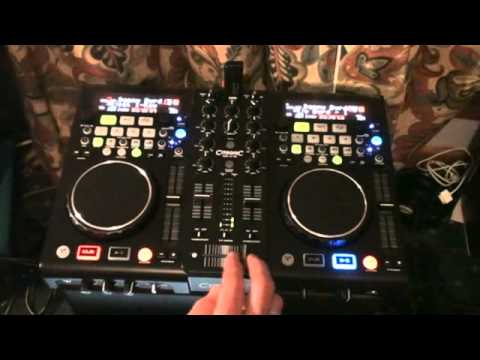
Alright guys, first overview video of the Citronic MPX10. In this video we're having a basic look at the unit. Future videos will be going into more depth into the usability functionality of USB, CD vinyl and also the PC program comes with it. So, I've said it in a nutshell there really haven't I? Alright, this guy's 3-in-1. USB at the top, also at the back. Also, if you want to, you can plug in two external CD players or alternatively, two vinyl turntables. Platters on the top and also not forgetting, this guy comes with VirtualDJ. Also comes with a data management program. What it does, it scans your USB device and writes contents files making it easy for you to search by title, artist, album or genre. And at the end of the day, as we know, if you've got
1:23 Tone control, I believe it's the tone control, let's have a look
There are quite a few files on your hard drive or your thumb drive. It takes ages to go through them. If they're tagged correctly, it is a lot easier. Alright, on the front of the unit I will show in future videos better sort of angle but you have this guy here which is for your monitor, also known as your headphones, volume control and you can pan so from right deck to left deck. Very simple straightforward. Microphone off, on, switch over, talk over. We have what's known as Tone control, I believe it's the tone control, let's have a look. Mic tone, low and high, microphone level 1, there, microphone level 2. So we have two microphones, fantastic. Right, at the moment we're having, I think it's Danny Bird on here, so I'm going to set fader start to on. Says it all, fader start, when you flick over, the track will start automatically, and I like to go fader off.
2:45 It's like a monitor system
First things quite apparent to me is that it is built very sturdily. Inside the box you have two small wings that can fit either side of the unit, making it compatible for a 19-inch rack mount unit. Also it comes with two power sockets. For European use and for UK use. My personal opinion is what they should do is maybe just have one or the other because it's a bit of a waste. You know, it's no point having the two so maybe that's something to think about. Low, mid and high we have a master meter. We also have a relay there. Booth control, very good idea. In fact every single mixer full stop should have booth control. What is that? Well, it's like a monitor system. So in other words, normally you've got your master output, you want a booth control which is a separate volume for, let's say, small monitors for the DJ. We've got a whole bunch of effects we will go through in a future video, in-out so we can loop as well. Search through our files, search through tracks, etc. We have the percentage of the pitch, we have key lock and quite nice, good feel on the faders.
To me, they do feel as though they're not going to start falling apart in sort of six months. Also again we have a curve feature here so I will in future videos give you much more of a close-up but the way they've made this it looks to me as though it will be suitable for the likes of scratch turntablists because that crossfade Video 1. A very, very short video on this guy. It's from Citronic. What I'll do, I'll put a link in the description and take you to the website. It's known as the MP-X10. Practice and enjoy.
This transcript was produced automatically from the audio of the video and may contain mistakes.





