 8:54
Citronic MPCD-X1 DJ Review
Contents of the video
0:01 I have done a similar video like this about this particular piece of k
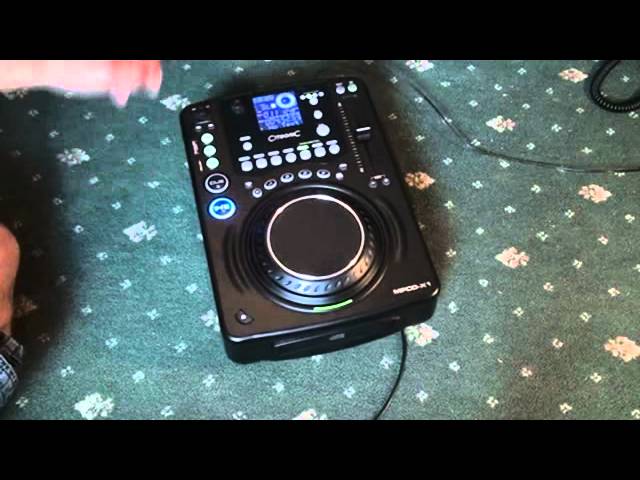
Alright guys, this is a new type of video and this is more about giving an opinion on an item. Now I have done a similar video like this about this particular piece of kit. It's from Citronic, it's a tabletop CD player. It's known as the MPC-X1. But there's a slight difference. A lot of people are asking me, Jonathan, what piece of kit should I buy? Should I buy X, Y or Z? Well hopefully videos like this now, and this is possibly the first ever video of its kind that I'll be doing, I'll be giving my own opinion on items and hopefully you'll be able to take that information and then go around the web and then based on the information I give you and other information through the likes of you looking through Google, you'll be able to then decide yourself if you want to buy certain products. So this guy here is a tabletop CD player.
It's known as the MPCD-X1. Now first of all, this is not a pro quality high end top of the range player but it is good quality, it does exactly what it says on the tin and if you are a new DJ and you're capable of looking after your kit and not bunging it around the room then there is no reason at all why something like this cannot last a very very long time. Now, it has got quite a few of the traits of the high-end players that any DJ demands. For example, we hit the cue. By the way, the track I'm using is by Pixielot. It's entitled Mamadou. And just to let you know, the mix is the Linus Loves Remix. I will put that in description for you. So straight away, hit the cue and it comes in straight away.
There's no slight delay there at all. Also, hit the cue and press play pause and it'll carry on playing. So straight away, my opinion about that is fantastic. That is what you want. Alright, the buttons are made of rubber but you've got no delay. There's no delay where the track comes in and also there's none of this slight delay that sometimes you can feel. If you hit the cue and there's a slight subtle delay in between hitting it and then a small mechanism underneath which then starts the track. Quite often it's within milliseconds, but if you want to hit that first beat at the precise point of number one, not a few milliseconds, then number one, this is fine.
2:49 These guys
Alright, so let's have a look at these guys here. So what we can do, we've got 1, 2, 3, 4 memory banks. So what we can do, we can press play, out, memory, number 1, get it out, and then number 2, out, and then memory, number 3, out, number 4, here we go. Alright, I'll just stop the music there. Now again, if you're, let's say, doing this kind of thing with your headphones on while the other track's playing, you of course then can get a perfect loop. If, let's say, you're doing it on the fly, then maybe expect it to be slightly off, but the better you get, the more precise those loops will be. And as you can see, I did on the fly and most of them are damn near perfect, so here we go. Right, there you go, there's the loops for you. Echo, flanger, filter.
4:35 We've got folder search and this guy will play MP3 as well
We can change the parameters of those as well, or we can hold the effect. Echo, scratch. Now I'll be honest with you, the scratch feature isn't the best I've ever used because you do have a digital sound there. But again, that's based on the actual price of the unit. Okay, we've got folder search and this guy will play MP3 as well. And pitch range is 4, 8, 16 and 100. Quick tip for you as well, if you are a DJ who likes to try and do a perfect, good quality beatmix, I suggest you go in the range of 4 and 8. When you get to 16 and definitely 100, you'll have very, very little control over the speed of the track and you'll find it, especially with 100%, almost impossible to beatmix. So you need to stick to 4, 8...
7:09 Number 8, we'll go to plus
All that say 16 if you feel a little bit more confident. So what we'll do now, we'll have a look at the pitch range. We've got a 4 and we can scroll through by just pressing the button just below the pitch range. Every time we hit it, we go from 4, 8, 16, 100, 4, 8, 16, 100. So first of all we go to 4 and the pitch on. We can hear the sound dip. That's because we haven't got Tempo lock on. Hit tempo lock on. Speed it up, slow it down. Get an 8. Got a slight double kick there as well, but that is the tempo lock kicking in. 16 as well. That's pretty good. When we go to 100, I'll just pause it there. A lot of the high end units you won't get so much of an echo, but... For this guy, that is quite a good effect, so you could use that as an effect. For example, if I have the pitch all the way down at 100, I can press play, pause or press play. So you imagine the beginning of a track and there you go, bang, straight in. Alright, we'll go to number 8, we'll go to plus and minus 8, press play. Pitch bend, speed it up or slow it down. Also here, we've got a function whereby
We can, let's say, just play one track, it'll stop and then we have to start the next track or it will continually go through the tracks. It will give you a BPM readout. Also, if we tap this button here, we can get the BPM readout as well. Alright, now I hope that's been a help. Also on the back of it, if we have a look, we've got power on off, we've got a digital out and we've got audio out right and left. At the moment, I'm going just directly into a powered speaker. So there you go, this guy here is from Citronic. It's known as the MPC-X1. My personal opinion about this is theoretically it will last a long time if you look after it. It's got all the functionality a DJ will need. A new DJ or a semi-pro DJ. If you are a pro DJ then this is not for you. But if you are a new DJ definitely consider it. Alright, I hope that's been a help.
Any comments or anything like that, bung them underneath, practice and enjoy. Thanks.
This transcript was produced automatically from the audio of the video and may contain mistakes.





