 4:08
CORTEX HDC-1000, Video1. A basic look.
Contents of the video
0:00 In this video I'm going to take a first look at this guy
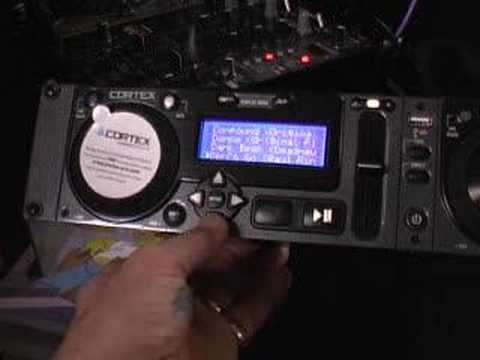
Alright folks, in this video I'm going to take a first look at this guy. It's from a company called Cortex and it's known as the HDC-1000. Now, it's not a twin CD player and it's definitely not a vinyl turntable. What it is, it's an actual unit that will enable you to play music from your iPod, maybe a hard drive or maybe a thumb drive. You've got USB port there. You've got one in the back. Now very quickly, the only reason I've got it on these tapes here is because the actual thumb drive in the back is a little bit too long. So if you are in a situation whereby your thumb drive's a bit too long to stick in the back, then all you've got to do is get a cable. So that's just by the by anyway. So this is video number one. It's a basic look at this piece of kit. So what I'll do now, I'll take the fisheye off the actual camera and we'll have a close look at one side. Now bearing in mind whatever I mentioned about the one side...
1:20 At the moment I've got a thumb drive in the back of this unit
We'll be identical to the other side, so excuse me a second. Right, like I said, video one, just give you a basic idea and by the way, I hope you like The Simpsons as well. Marvellous. Now first of all, there's two things you can do. One is you could just get your basic iPod or your thumb drive with a whole bunch of music on it, put it into here or in the back and it will play the music from that particular source. Alternatively what you can do, now I'll put the link to the side of the video. Cortex have got a website and they've actually got a program on the website that you can download onto your PC and that particular program will enable you to format the music a lot better for this particular unit. So in other words, the actual program is made for this piece of kit and again I will go into that slightly more in depth in future videos. Alright.
So at the moment I've got a thumb drive in the back of this unit. Now what we can do, we can search by songs. So if I scroll up and down, you can see there we've got a little cursor that will move up and down. So let's say we search by songs. If we go over, then we can scroll up and down and we can go through the actual song titles. If I go back, we can start, we can search by artist again. Right, and we can search by actual artists. If I go back again, we can search by genres, by albums, also by BPM which is quite cool. Now also what this unit can do, let's say for example, you're halfway through the night and it's happened to all of us. Someone comes up and says, oh excuse me, have you got that song called I Love You? Well, as you and I know, there are probably hundreds of songs called I Love You. So what you can actually do with this, and again I will show you in a future video.
2:41 Those specific tracks with I Love
You can get to a certain area and you can type in I Love You. What will happen then is that, let's say for example, you've got a thousand songs on your hard drive, then it's going to take forever to try and find it, theoretically. But by actually typing in I Love You, it will go to those specific tracks with I Love You in the title. That's quite important. So again, search by BPM, search by string. And also you can put playlists on this as well. So let's say for example now, I want to play a certain track. So, right, let's say for example by genres. So what we'll do, we'll go across, at the moment I've got electro, I've got house and that's it, tech house. So let's say we want to play a tech house track. And I bet you there's loads of people going like, oh that's not really tech house. Well, this is a demonstration. Alright, I've got track here entitled Dark Beat. So press enter. There, that's ready. Press play.
And off we go. That's how simple it is. Now, bearing in mind as well now, if I wanted to play that track on that side as well, I can do so. It's not a case of because I'm playing this track on this side, I can't play it on that side. You can play the same track on both sides. Pitch adjust, pitch bend and goodness knows what. So, bearing in mind this is video number one. We're just having a sneak preview on this guy, alright? Many more to come. Practice and enjoy.
This transcript was produced automatically from the audio of the video and may contain mistakes.





