 4:35
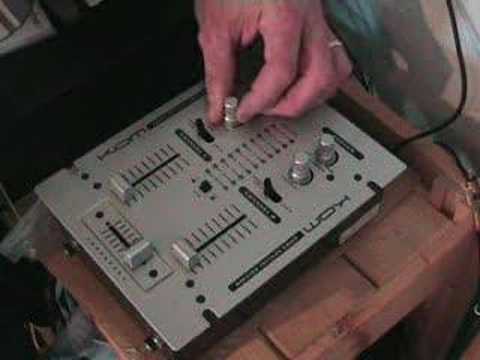
Demo of the KAM GM25 special edition DJ mixer
Contents of the video
0:00 It's the Cam GM25 Special Edition Mixer
Alright folks, in this video we're going to be looking at this guy here. It's the Cam GM25 Special Edition Mixer. Now it's small and sweet but it packs a punch. Right, there you go, I'll just hold the camera tight, move that so I can see what I'm doing. There's a little screen there. Right, first of all there's my hand and there's a CD so it'll give you a rough idea of the actual size. It's pretty petite but it does its job. OK, what have we got here? We've got an interchangeable crossfade. One beauty about this particular interchangeable crossfade is, guess what? When you've knackered it, you haven't got to think, oh dear, it's broken, I'd better phone up and order another one because it comes with a spare one. That comes in the box so for goodness sake, don't lose it. Put it somewhere safe. Okay, features. Two channels, two sliders but guess what? It's actually a seven channel mixer. I know you're scratching your head now but I'll explain that very shortly.
1:47 Player maybe, maybe player, turn
Alright, what we've got here is cue level. Basically when the cue level is set to 7 o'clock you won't hear any music at all through your headphones. As you increase the cue level up to 5 o'clock you'll get the full amount but bearing in mind just be careful of your ears. Cue assign, what that will do, let's have this sort of scenario. Let's say channel 2 is blasting through the PA system, your crossfades over, channel 1... This channel, but we will also be able to hear the channel being played through the main headphones. That's basically what the cue assign will do. Alright, we've got a mic gain, in other words, when the same as your cue assign and the same as the cue level. When the mic gain is set to 7 o'clock, nothing will come through the microphone. You won't get any sound at all. As you move this particular dial through 12 o'clock, etc.,
1 o'clock, the volume will increase on your microphone. But be wary, do not start wanging it up because if your PA is really loud, all of a sudden, if you turn it up too high, you could get lots of whistles and funny noises through your speakers. OK, above that we've got your master level. Basically, that will increase the main output from this particular mixer. OK, hold tight, we'll just turn it around. Actually, before we turn it around, I'll just show you here. Two inputs, there's your microphone input. And there's your headphone input. Alright, if we look at the back of it now, I said it was seven channels, so if I put that like that, okay, what we've got here is this first connection for your RCA cables. This will do a line input and a phono input. Your line logically is your, say, your MP3 player, your CDJ or maybe a DVD player even, maybe even a DAT player.
3:11 You need to set the button there to line
You need to set the button there to line. So this button here, set to line. Now this channel here will work line. If you switch that over to phono, now this channel here, the first one, will only work for a vinyl turntable. The second channel is just line. The third channel is exactly the same as the first channel. Cross here and this channel here will work a vinyl turntable. Switch it over, now this one will work a CDJ. The fourth channel will just work your CDJ, your line input. Record output here, basically what you can do here is you can go into say an actual recording unit. You can plug this in maybe to your laptop and record your set. And then this here is basically for your main output into your amplifier. You've got an on-off button. This here...
Very important, a lot of people always ask me, they say, you know, I'm always having buzzing sounds from my vinyl turntable. Well it's because you need to ground it. So that is there for one reason, your little thin wire coming from your vinyl turntable has to go in here, tighten that up and it will stop it buzzing. That is basically your power input. So there you go, a quick idea of what that guy can do. It's the Cam GM25 Special Edition 7 channel mixer and it's small petite. But it does the job. Practice and enjoy.
This transcript was produced automatically from the audio of the video and may contain mistakes.





