 6:07
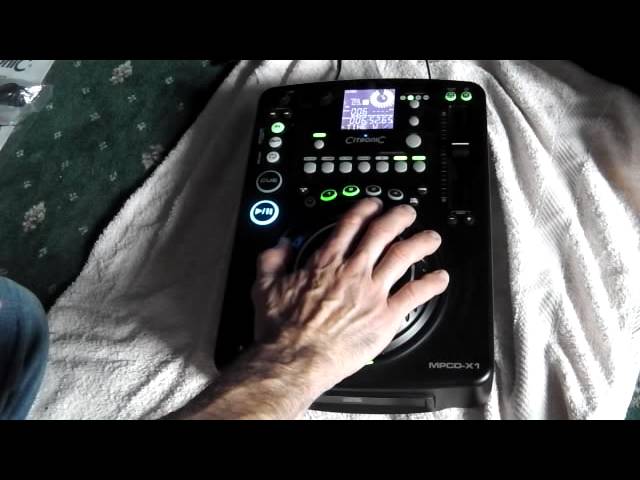
Demonstration of the Citronic MPCD-X1
Contents of the video
0:01 I notice or hear is no
Alright guys, second product review on this tabletop CD player from Citronic. It's known as the MPCD-X1. First thing, it's a forward slot loader and first thing I notice or hear is no vibration sounds, nothing like that which means theoretically that should last quite a while. Last thing you want is brand new CD player and all of a sudden you open it and it shudders so what's it going to be like after six months? Okay, this guy will play MP3s as well. At the moment I've just got a normal box standard CD in there. And if we hit cue, very precise, no lag whatsoever. If we go to track number two, I'm using the track select there. Spin through, forward or back clockwise to go forward, anti-clockwise to go back through the track. So if we go to say track number six, press down,
Exactly the same as the top CD plays, if I hit cue, keep my finger on it, track will still play, take it off, stop, hit cue again, it'll play. If I hit play pause while I've got my finger on cue, then the track will carry on playing. Okay, it's got scratch feature as well on here. Now, if you are a scratch turntablist, then this is not precise where scratching is concerned, but if you're a new DJ and you want a bit of a mess around, then it's a bit of fun. Touch sensitive jog wheel on the top as well.
1:52 There's a tiny little wobble there but to be quite honest not much
And a small point as well, the jog wheel on the top is very, very robust. It actually... Well, there's a tiny little wobble there but to be quite honest not much. It just feels very, very solid. Okay, we can loop. You can set the loops into your memory folders as well. We can have some echo, flange, filter or break.
We can change the parameters as well. If you want to know the name of the track, I'll put it in the description. Flanger. Good quality sound on the effects. Tap here for the BPM. Or we can hit BPM and get the BPM readout anyway. Excuse me. What's the point of having tap if we get BPM anyway? Well let's imagine you have got an old school track. A lot of old school tracks with people playing proper instruments as opposed to a drum machine. During the course of the track, it could vary in BPM. So let's say if you want to mix your next tune in at a certain point in the track, then you can tap along and it will give you the near enough exact BPM of that specific point in the track. As opposed to, let's say, a lot of modern day music, if it starts at 120 BPM at the beginning, it'll be 120 BPM all the way through. So carry on playing this. We've got break on still. Take that off.
4:13 Pitch range, 4, 8, 16 and 100
Pitch range, 4, 8, 16 and 100. Also we can have tempo lock, we can have the pitch on and off and we can pitch bend as well. If I do tempo off, get a 16, you can hear not only it's slowing down but the key of the track reducing as well, speeding up, key increases as well. So again, let's do another little effect. Imagine you want to finish this one off, bring the next tune in So I've got it at a pitch range of 100. And then, bang, start with your next one. Bearing in mind when you're on plus and minus 100, you do, if you decrease it all the way, you will actually stop the track because you are increasing it by 100% or reducing it by 100%. So theoretically, if your tune is 120 BPM... Guess what? It'll go up to 240 if you increase it, or it will just go down to zero if you go all the way down the bottom. So, good feel on the pitch as well. It's very nice and smooth. Okay, on the back, on-off, relay system, digital... Oops, sorry, relay system, digital out, and audio out. There you go. If you want any more information, what I'll do, I'll put a lookable link in the description, alright?
From Citronic, MPCD-X1. Practice and enjoy.
This transcript was produced automatically from the audio of the video and may contain mistakes.





