 8:44
Demonstration of the KAM DDX5000 vinyl turntable
Contents of the video
0:00 Up from the DDX4500 USB
Alright folks, Jonathan here. I've been asked to do a bit of a demo on this guy here. It's the DDX5000 from Cam. It's the next one up from the DDX4500 USB. So I'll pause the camera and we'll have a closer look. Alright, in this video it's basically a rough idea of its features and what it can do. What we've got here, we've got one button that says plus or minus 10, one that says plus or minus 20. When the plus and minus 10 is shining, basically what that means is the pitch, if you move it to the minus position, it'll do minus 10. Move it to the plus, it'll do plus 10. You press that one, the plus and minus 20, it'll do minus 20, it'll do plus 20. If you press them both together, it will actually do minus 50 or plus 50. I'll give you a quick demonstration on that. First of all, plus and minus 10. So we'll set the pitch to the centre position.
The actual track you're listening to is Room 5 featuring Oliver Cheapnam. It's a track entitled Make Love. So this is at minus and plus 10. Minus 10, plus 10, back to centre position. Now we're on plus or minus 20. Minus 20 and plus 20. Centre position. Press them both together, we actually now get plus and minus 50. So minus 50, and there you go, plus 50. Now we've got this guy here. If I stop that, quartz. Now basically when we're in centre position and you can see the light shining there, if that piece of vinyl is at 33 and a third RPM it means that when it's at centre position that platter will move exactly at 33 and a third RPM. If it's at 45 it will move exactly at 45 RPM. Now the reason for this button here is no matter where the pitch is, whether it be plus and minus 10, plus and minus 20 or plus and minus 50, wherever the pitch is, if you press that it will go
To the original speed, it'll either go to 33 and a third or 45. I'll give you a quick demo on that. So there we are, centre position, say we're on plus and minus 20, we're down there, press that, it goes back to the original proper speed the piece of plastic should be going at. Alright, there you go. Also here we've got reverse. Right, let's stop that. Shut up. Okay, we'll have a closer look at this area here. Now what we've got, you can see in a blurred manner, hold on, if I put me down there it might focus. OK, we've actually got start and break. Now what they will do is they will determine the actual start speed and the stop speed of the platter. So at the moment they're on minimum. They're both on minimum. So what I'll do now, I'll start this off and we'll have a listen when they're both on minimum.
2:56 The start to about halfway, let's have a listen
The start to about halfway, let's have a listen. Stop, and it stops straight away. So it went rrrr and then stopped straight away. What we're going to do now is set the break to 50%, to 12 o'clock. Okay, now what we're going to do, we're going to set them both to maximum. And stop. Now a good idea is that let's say you're playing your last record in the set and you've got a DJ after you. Quite a lot of DJs will do this. They'll be playing the track. Last record. Wang it out, and then the next DJ will come in, bang, straight in. Alright, another feature I do like about this, and a lot of modern day turntables are doing this now because it's so much blinkin' easier, and that is an LED for your pew light.
If you can take the thing out, well at the end of the day if it's stuck in there quite well then that's all the better. There you go an LED so if that ever does stop working it's literally two seconds out it goes and you put it back in and also you can move this around which is great because if it flies undone you can see what you're doing and zip yourself up so there you go so we'll move that back around there like that. Right we'll have a look over here now yes I know it's just the start and stop and the 33 and the 45 but check this out okay Theoretically, 33-45. If your vinyl's at 33, you press 33. If your vinyl's at 45, you press 45. If you press them both together, you can actually get 78. But check this out, right. This really should be going at 33. If I show you, we'll put that on there. So if we put it at 45, it sounds fast. But if we press them both together, like so, it will be even faster. But, like so. Alright, we'll add the break on.
Alright, now check this out. Now what I'll do, I'll put that at 50. Now have a listen. But, listen again. So that's pretty fast. Now also what you can do with a deck like this is because you've got so many variations with the speed, you could make a hip-hop track into a drum and bass track because basically you can make it so fast it'll sound like drum and bass. Alternatively, you could get a drum and bass track, slow it down, and you can make it sound like a hip-hop track. Also, small feature, Which is pretty neat. And that is this area here, you've got no chance of knocking the actual on-off button there. So that area is covered which is quite a nice feature. What I'll do now, pause the camera and we'll have a look at the back end of it all tight. Okay very quickly, that is where you'll put your RCA cables, that's your ground cable, and there is where you'll put your actual power supply. Very quickly, RCAs, a lot of turntables are doing this now, they're not actually wired in.
5:53 Hold tight and we'll actually have a look at a few
Because, you know, when I say 9 times out of 10, if you look after your turntable, then it's going to be fine. But occasionally, if it's wired in and the cables start to wear away, you've got to re-solder them in. So at least with this sort of turntable and this feature, if your RCA cables are knackered, you just take them out and put new ones in. That there is the ground earth wire. And for anyone out there who wonders what the small little wires for that... The ground earth wire has to go to the ground earth connection on your mixer. Right, hold tight and we'll actually have a look at a few more bits and bobs on this. Right, here you go. This area is basically where the actual arm is housed. Now the feature here, all of this area, is exactly the same as the USB 450, or sorry, the 4500. So it's nice, it's good construction. It's not plasticky, it's metal, it feels nice.
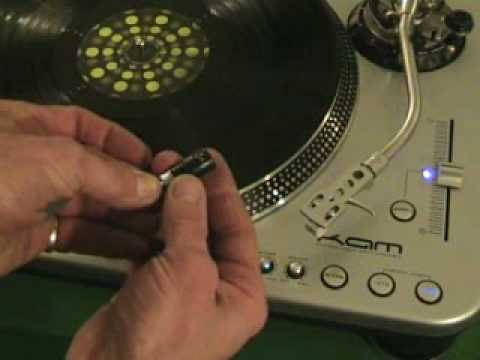
What you can do, you can lower or heighten the actual complete unit and of course you need to do that dependent on what style eye cartridge you've got. And also believe it or not, the actual thickness of your slip mat because quite a few modern day slip mats are a lot thinner than the older dodgy ones as well. Now here's a tip for you, quick tip. Do you find sometimes that you're not getting... The right sound out of one turntable. In other words, you've got an identical set of turntables but one isn't as loud. This is what you do. Make sure that's secure there. Take that off. Now can you see four pins there? Now sometimes you can get bits of rubbish inside there. If you're taking this on and off all the time, sometimes you get deposits on there so you're not getting a good connection. So what you need to do, take that, gently rub that on your jeans.
Maybe blow inside there, put that back in, and I bet you it'll start sounding a lot better and louder. All right, all in all, I think this is quite a nice deck. It's well constructed, it's very heavy, and it does exactly what it says on the tin. It's built theoretically to last, and also, what I'll do, I'll just put the camera there like that. We can see, sorry, D, C, 2, get me words out. Two start-stop buttons, so if I just move the camera even further to about there, there you go. So what we can do with this is we can have it in battle mode. So, hold on, put it like that. There you go, so you can do like that as well. There you go. And then you've got your two start-stops. Hold on, can I see what I'm doing? Yeah. Start-stop, start-stop, like so. And it's not on at the moment. There you go. A nice turntable and over the next couple of weeks I'm going to be giving this...
A bit of a run for its money. Thanks for watching, practice and enjoy.
This transcript was produced automatically from the audio of the video and may contain mistakes.





