 9:14
Demonstration of the Roll up and down on the DJM-700 mixer
Contents of the video
0:00 Roll feature on the DJM700 mixer
Alright folks, Jonathan here. In this video what we're going to do is look at the roll feature on the DJM700 mixer, but mainly the roll up and the roll down. First of all, what is roll? Well, what the mixer will actually do is just sample a tiny bit of the music, but what is roll up and what is roll down? What it will actually do, it will play that particular part of the music it sampled and it will start to increase the key, the tone of the music To make it go higher when you're set to roll up, but then it'll do the opposite. It will make the tone, the key, the feel go lower when you set it to roll down. So in other words, if you imagine you've got a lady singing. When you set it to roll up, all of a sudden she'll go from this nice female singer to someone that sounds like Mickey Mouse. Alternatively, if you set it to roll down, she'll sound as though she's a nice fantastic singer to someone that sounds like Darth Vader.
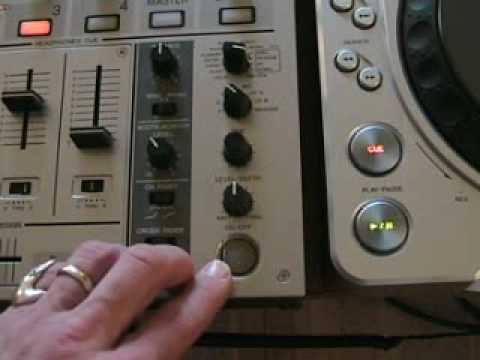
Well, there you go. Alright, so what we'll do, I'll pause the camera and we'll have a closer look. Hold tight. Right, first of all, we'll have a look at the features that we're going to be concentrating on, and this area here will be telling us if we're going to be rolling 1 over 1. In other words, when that's set to the centre position, what will happen is we will only hear the roll in one beat, so it'll just go down one beat or up one beat, but we can actually set it so it goes down or up two beats, four beats. The DJ Tutor is a great tool to use when you want to make your own music. With regards to the roll feature, this guy here does exactly what it says on the tin. This will select the channel we'll be using for the effect. So this CDJ player here is on channel 3 over there and then we will be using or we'll have this set to channel 3 and there's Madagascar who's just jumped on the turntable and he's now on my records. What are you doing mate?
2:24 We'll press stop on that
And then the other dial we'll be looking at, or not dial, sorry this button, basically when that's flashing it means that the effect will be working. So we'll press stop on that. Right what I'll do, I'll pull the camera out, you'll have to excuse me because it's just me and it's quite difficult doing everything at once. Right so what we'll do now, first of all we'll play the music, we'll have a listen with no effect at all. Now as you can see there... We've got that set to 1 over 1 and we can change that at any time by just messing around with these two buttons here. So we'll set that to 1 over 1. Now again, we're on channel 3, channel 3, 3 there, 3 there. And what I'm going to do now is I'm going to set this dial to roll down. We're on 1 over 1 and on the beat I'm going to press that button. There you go. Now could you hear that subtle difference in the sound? It was like...
Now what I'm going to do now, I'm going to set that to up. Let's have another listen. What's happening, it was sampling that beat and it was changing the sound one beat from the original sound and making it higher and then opposite when we were setting it to down it was taking the original sound and then starting the sound proper sound and then making it go slightly lower. Now what we'll do now is we'll set that to 2 over 1. So from 1 over 1 to 2 over 1. So now instead of just one beat, we'll have two beats. So we've set that to down and we'll press this button here. Let's see what happens. Now if I pause that, basically what's happening, it's like I said earlier, it's sampling those two beats because we're on the two beats here. The first tiny fraction of that beat is the original actual sound of that beat.
4:37 What we'll do now, we'll set that to 4 over 1
But then after a fraction of a second, the sound starts to decrease. Like that. And then the opposite applies with up. Like so. Now what we'll do now, we'll set that to 4 over 1. So what will happen now, it will be 1, 2, 3, 4. Like so. When we're set to down. Now let's have a quick listen. Here we go. It went... Let's do it again. Now what we'll do now, we'll set that to up. So instead of going down, it will go and again, and again. Now we'll set that to eight over one. So now what will happen, we'll have eight beats either going from the same position upwards or the same position downwards depending on whether we've set the roll feature to down or up. We'll set it to down first. And then we'll set this to up. And now, we'll set that to half. So we're only going to have half the beat to go down or up. And now we'll set it to up. Now we're going to set that quarter of a beat. So we're going to go quarter of a beat up.
6:37 A quarter of a beat down
A quarter of a beat down. Now we're going to set it to an eighth of a beat down, and then we're going to set it an eighth of a beat up. Now up. Let's wait until the beat comes back in. Swing it forward a bit. Typical, we had to get it at a break. Here you go. Now bearing in mind this is up. Now what we'll do, set this guy here so it's 1 over 16 now. 1 over 16. That was up. Now this is 1 over 16 down. Let's have a bit of fun with this. So there you go, let's just pause the camera. There you go, right, the track you were listening to was Peter Lutz, that's P-E-T-E-R-L-U-T-S featuring Barbara Tucker and the track was entitled One is the Original Mix. So there you go, that's one of the features. Now bearing in mind that was just a demonstration.
But again, it's like I said, with any mixer, it doesn't matter. If you've got effects on your mixer, the last thing you want to do is think, wow, I've got the roll feature and just go, roll, roll, roll, roll, roll, roll, roll, because it will sound atrocious. I guarantee you this, and that is any big good DJ in the world, wherever they are, will use the effects but they will use them subtly in the mix. Tiny amounts that will just change the music Change the mix. The last thing you want to do is just play with the roll feature all night because all that will happen is someone will roll you out the building. Excuse the pun. Practice and enjoy. Thank you. You can just hear the beat, basic tone, key feel, continual supply of me waffling. Alright folks, Jonathan here. In this video what we're going to be doing is looking at the roll effect. What's the roll effect? Is it going to roll? It's going to roll. Three, two, one.
All right folks, Jonathan here. In this video what we're doing is... Three, two, one. All right folks, Jonathan here. In this video...
This transcript was produced automatically from the audio of the video and may contain mistakes.





