 9:41
Denon DN-X1600 Mixer Effects
Contents of the video
0:00 Of the effects
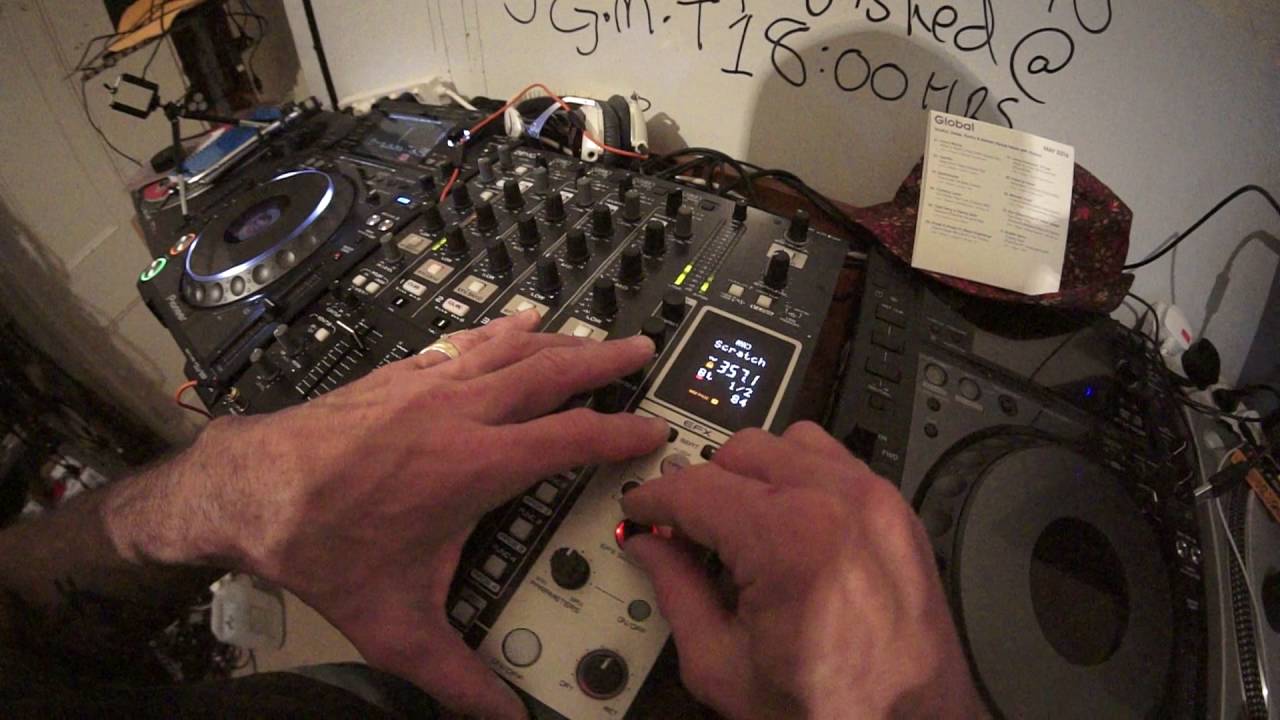
Alright guys, we've got the DNX-1600 from Denon, 4 channel mixer. In this video we're going to look at some of the effects. The track I'm using at the moment is Mr Lenny Fontana featuring D-Train, a track entitled When You Feel What Love Has. It's the original mix and this can also be found on the global releases May 2016 from CDPool. Okay, so how do we get the effects? First of all what you need to do is above the channel that you're using or for that matter any channel Just above the cue button we have EFX send. Just press that button, it will then be highlighted in red and that will then let that channel be used or you'll be able to use that channel should I say for your effects. Now very quickly as well, bottom right hand area of the mixer you'll find the effects. If I press the tap button down it can go to auto, press it again
And we go to, if I press it, tap. Now that means that if I tap the button, the tap button, it will give me any speed I want it to. So what that's actually doing is giving me the BPM. So if I tap it really slowly, you can see... We've got 62.5. Now, again, this is a rough kind of BPM. It's not going to be exact. So, again, as I've said with so many people, it's always better to use your ears and tap it really fast. Of course, we've got 357 BPM, which is pretty much turbo speed. OK, so we'll go back to the loop and we're on flanger. So I'm going to press the FX send and now we've got that flanger sound. So what we can do, we can actually change... The parameter of the effect by turning the parameters dial. That button of course, we've got a button next to it with on-off. Press that highlighted in green. Have a listen when I move this dial clockwise. It's a little bit like adding a filter over the effect. Anti-clockwise now from 12 o'clock position. Back up to the 12 o'clock. Also we've got a dial down here.
2:23 Bottom right hand corner, dry and wet
Bottom right hand corner, dry and wet. Set that to the 7 o'clock position. That's pretty much off. Now what that does is it will increase the overall amount of effect you're going to have over the track that's playing. Now generally what people will do is put them at about 12 o'clock. So general rule of thumb, 11 o'clock to 1 o'clock is a great position. The wet position, which is at 5 o'clock, is full on. Okay, so flanger. What I'm going to do now is we have a dial here, EFX select. So I'm now going to move that to our next effect. Press down and now we've engaged the filter. Okay, up here we've got a small button next to the cue button with time and back. is change the amount of time we have over the effect, but I think it's in actual milliseconds. So if I press these buttons here with either side of the beat word, to the left we are reducing the amount of time, to the right we're increasing the amount of time. Now of course I can press it once and move it one millisecond, quote me though, I'm pretty sure it's a millisecond,
4:38 Send and return of course that's th
Alternatively, if I keep my finger on that button, then it will skip through quite fast. Okay, that's a nice sound. That's a really good sound. That was quite good, isn't it? Amazing what you can do. Okay, that's on filter. Just look at what I'm doing there because you can get that sound. That's like a rusty kind of rough bassline sound for like, you know, sort of two-step. Okay, so change our effect. EFX select. Move that. Phaser, reverb, echo, reverb, loop, reverb, loop, pitch, beat break, oh we're back to filter sorry. Let's try another one. Scratch. Scratch is quite good because what it does is you get that sort of kick sound. I'm pretty sure what the computer inside here does is it will sample that kick sound and just add like a scratch over it so it's almost as though
It's processing that sound, it's recording it and then it's just giving a scratch over that sound as it plays. It's exactly like someone just moving the jog wheel just very quickly over the sound. Send and return of course that's there if you have let's say an external effects unit so instead of using the effects On the DN-X1600, you're going to use an external effects unit. And again, a few people always said, well, are there certain types of effects units you can only use with these mixers? Well, possibly. But most of the time, if the effects unit you've got has a send and return, and it's a regular line in and a line out. Then I would pretty much say you're okay to use it. Even other makes, you don't have to use Denon. You know, you can use pretty much any sort of effects unit. I've known people even use foot switches from guitars as some form of an effect. But please always check recommendations and look at the instructions of the effects unit you're using. And of course, look at the instructions on the DN-X1600.
To make sure the effects unit you've got is compatible. Okay, let's have a look. What else have we got? I know the one I do like is Ping Pong. Find that one. Delay Echo Ping Pong. So what this is doing, it's sampling the track while it's playing and then just overdubbing parts of that track. But again, what we can do, we can increase or decrease the amount that is sampled. Let's mess around with the parameters.
7:58 A good analogy is one chef in a restaurant makes a wonderful soup,
You see that? That's too much going on there, isn't it? Again, with effects, it's not about using the effect and just say, look, here's some filter. Bam! It's about subtleness, about not trying to change the track, just adding another layer to the track. If you were a producer and you were given... This track, you would not then just add loads of stuff all over it to make it sound terrible. What you would do is you would try and keep the track how it is, keep the soul, the vibe of the track and maybe add little other elements. A good analogy is one chef in a restaurant makes a wonderful soup, hands that soup to another chef. He or she is not just going to bung a whole pile of bloody chili peppers and sauce in it. They may add a little bit of salt and pepper to give it that extra kick. So, not like this. That's too much. Alright, I hope that's been a help. It's a great mixer built like a tank. It's from Denon. It's known as the DNX.
Thanks for watching.
This transcript was produced automatically from the audio of the video and may contain mistakes.





