 10:25
DJ Help Get noticed!! Open an account on Blogtv
Contents of the video
0:01 And it's by means and ways
Alright guys, people are always asking about promotion. In other words, how can you promote you? Well, in this video I'll show you and it's by means and ways of something called, there's loads of them but I generally use Blog TV. Now when I go on Blog TV, it's very random, it's rough and ready, loads of mistakes and I have a bit of fun and quite often I get drunk. But it's about just enjoyment. But one good point about Blog TV is it gets you noticed. Maybe good, maybe bad. But it will get people seeing you. So in this video, I'm going to show you how to set up your mixer and your decks and your webcam so people can watch you live on blog TV. But before we do that, here's a question. Why is it that when a baby cries, it gets to suck titties? When I cry, I don't get to... Right, excuse me.
Right, you will need a webcam and that webcam has to be plugged into your PC. Now also, you'll need one of these guys. That is a mini jack. That piece there is a converter from the RCA to the mini jack. Now I've gone out of the back of the mixer. You can either go record out or master out, it doesn't matter. But watch what happens when I put that into the pink input there.
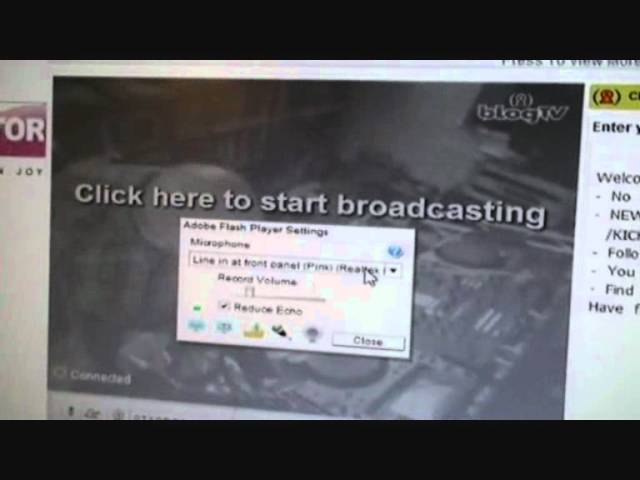
The screen goes dead. Then if you can see that, I've got mic in. I'm going to change that to line in. I'm going to click OK. It could be slightly different for other PCs. And I'm going to click OK there. Alright, this is Blog TV. Now once you've opened your channel and it's very easily done, if you're not familiar with opening accounts on the web then really I suggest you go outside and start planting summer flowers in the winter because everyone should know things like that by now but if you don't it is as simple as going to join the site, you put in your name, your email, a password and that's virtually about it. Top right hand corner. Excuse me. By the way, at the end of this video as well, I'll be showing you a little clip from one of my nieces, Melody. So I'm going to click broadcast now. Right, what have we got? We can see this screen here. Excuse me. That is huffing, sneezing and blowing. Right, let's have a look. What have we got here? Well, we can tweet.
2:42 This is the amount of people who've liked it on Facebook
This is the amount of people who've liked it on Facebook. That is the chat that we've got there, but also this T-chat for Twitter chat. So what you can do, you can log into Twitter and then you can go from the chat on BlogTV to the chat on Twitter as well, but you've got to log into that. There you go, sign in to Twitter, very simple. That's your chat. Now you'll see a couple of icons here. Start high quality broadcast. I will do this in a future video. Little bit more work, but you do get better quality picture. So I'm going to click there and I'm going to start the broadcast. Again we can share on Facebook or Twitter. Alright, so is your live broadcast going to be entertainment, music, news and views, travel, comedy, arts, spiritually, sports?
Tech games or maybe sucking titties. Sorry, so what I'm going to do, I'm going to hit music, click music and you should have something like that. Now this guy here, you'll have to click allow because what this is doing is the program is requesting access so it can get through to your webcam. So if you click allow and there you go, you can see that now. So what I'm going to do, I'm just going to turn the music off or turn the speaker off. What I'm going to do is, I'm just going to put that on there. You can see me, there I am. And you can see that, and you can see I've got a signal there. And I'm going to put that up, like so. Now then, what we need to do is we need to check to make sure we've got audio. So, bottom left hand corner, we've got that little microphone icon. If I click there, we can see that icon moving up and down. Green, amber and red.
5:03 Mind you, he's more ugly
So we can increase or decrease the volume there. Also, you can see here, microphone Logitech, so I could have the microphone from the webcam, but I wouldn't be getting such good a quality. So I need to make sure I'm on the input that I put the mini jack into, so I can close that. And then when I'm ready to go, I can click here, start broadcast, and there you go. My God, that bloke hasn't got any hair. Looks just like me. Mind you, he's more ugly. Right, let's say we want to do something... Right, what I'm doing, I'm actually... Sorry, I'm recording. I'm broadcasting right now. So if I want to, let's say if I go up to the top here, settings. Right, we've got all this stuff here. That's lots of stuff. We have edit profile, edit my page layout, edit my show details.
Manage my videos, edit my friends, edit my subscriptions, edit my statistics, edit my show schedule. Now this is a good one. If we go to there and click on that one, what we can do now is we can set a time and name the show when we want to go online. So for example, if we want to go online tomorrow midday, we just click on the day so it'll go to the 16th. And then I can choose the time. Now you will have different times. This is GMT because I'm on London, Dublin time. I would have thought theoretically when you open your account you will set it to the relevant time around the world where you are. It's a 24 hour clock so if it's midday of course I will go to 12. If I click that and if I just click the icon create, I've now created a show that will start tomorrow.
Thanks for watching, and I'll see you next time. The chatters and live shows, so Global, I believe that's Russia, He and D, so He and D, help me there please, please help me. That little icon there is for any messages, I can log out, I can log in. That's me, DJ Tutor, BlogTV, and I hope that's been a help. So I suggest you go and do a show. Also, very quickly, if I just go back to broadcast now. I'll show you how quick it is. Right, broadcast now. Start broadcast. Music. Allow. Click allow. And start broadcast. Bang, I'm on. Now you'll notice webcam is up there and you can see all of the kit. People like to see what you're doing. Something as well, if I just stand here and wave. Hello. There we go. If you can see. Hi.
7:51 Practice and enjoy, thank you
People like to see the person as well. There's nothing worse than just seeing a pair of hands, so try and make sure that people can see you too. Alright, enough of me, and the next little bit will be a small snippet from my niece Melody. Practice and enjoy, thank you.
This transcript was produced automatically from the audio of the video and may contain mistakes.
Related videos
-
How to Get a Better Fee for Your Mobile DJ Services
He disclaims it as not financial advice and notes that everything depends on where you are. Taken as a checklist of what justifies a higher…