 8:02
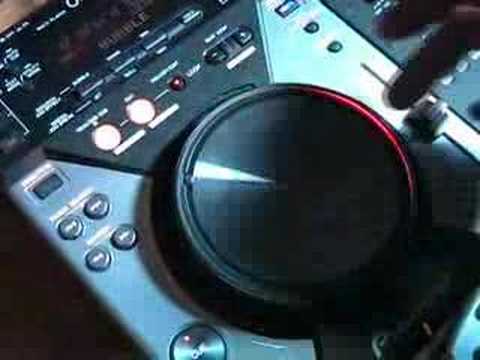
DJ Tutor shows Brian some of the features of the CDJ-400
Contents of the video
0:00 This video is going out to Chris from Essential DJ Productions
Alright folks, Jonathan here. This video is going out to Chris from Essential DJ Productions. Now what we're going to do, I'm going to show Brian now how to use this guy here. I'm going to show him all of the ins and outs, what it can do, what it can't do, and if there's anything else that maybe you know it can do, then put it underneath as a comment or even a video response. Right, Brian, pay attention. Okay, logical start and stop. But stop, press the cue. It goes back to the beginning. Yeah, it goes back to the beginning. But here's the deal. If we press start and then we press pause and then we press cue, it will start off where we pressed the play and pause. See? Do you get that?
Okay, so you can press pause, but you have to press cue if you want to go back to the beginning. If you just release the pause, you've created a new cue point, right? Yeah, you've got a new cue point. So the only way of going back to the beginning is just to go back, track, select, because we're on track 12, and off we go. Like so. And again, what we can do with this, we can edit it. So what we've got now, we've got it in vinyl mode. I mean, I did say this in another video. So with vinyl mode, we can speed it up by moving this side of the platter.
2:54 I'll hit it twice this time, da-da
We can slow it down by moving the side of the platter anti-clockwise and we can stop it by touching the top of the platter with our finger. Spin it forward, spin it back. Alright, now let's say we want to do a loop. So, we've got loop mode here and we can press. That's looped. Now, can you hear it slightly off? If we press loop out... We can trim it. We can trim it, yeah. Now watch. Listen. Totally off. Watch what happens. Have a listen. Too much. There you go. Now, check this out. Hold on. Now, what I did there, I listened to the beat. Now, again, this takes practice. If we've got 1, 2, 3, 4, 1, 2, 3, and I went da-da-da-da, and I hit it, have a listen. Right. 1, 2, 3, 4, 1, 2, 3, 4. So you hit that twice? Just once then.
I'll hit it twice this time, da-da. Now when you hear me go da-da, that means I'm hitting it and hit it twice this time, da-da, da-da. Now what I'm actually doing there, I'm actually hitting that particular button almost before the beat comes in. So there you'll get a proper true loop. Alright, so we're in loop mode. Okay, so what we can do, we can go out of that now and because we're in vinyl mode, we can use the platter as follows. Now we can also do direction, so we can reverse it. That's reverse mode. Okay, let's say we want to mess around and do a few effects. Bubble. That's with the finger on the platter. No, it doesn't work like that, does it? I'm going to leave this on. As you should. So we've got bubble. What if you press the hold button? Well, yeah, what happens there? You press... And hold on. It kicks it. Yeah, it's exactly the same with the others as well.
5:05 We can roll down, roll up, and wah
This is just a matter of having the hold button down and you can have the effects without changing the speed. Yeah, near enough. But if we go off final mode, then we've got more control over the effects without changing the speed in any way. We've got jet. Oh, right. That's like a phasing sound. Oh, nice. So you go off final mode to do that? Yes. Okay. And again, if you want to keep it, press hold. You can go forward and backwards, right? Yeah. Or the roll.
We can roll down, roll up, and wah. That's nice. That's the deep Chicago feel. Yeah, that's nice. And then you hold it. So what you could do now, you've got that playing, and then you could, for example, you could have this track here, and if you've got two of the same copy, what you could do, you could have this one here on the high end of the wah, so you can see this is the low part here. You could have this guy here on the high end. And you could slowly bring this one in and slowly bring that one out. It's just another little effect, it's something to mess around with. Hit the hold and we're back out. Now again, with this guy, master tempo. So what that means, when you move the pitch control, it'll basically change the speed but it'll keep the same key. So first of all, we'll change the pitch without touching master tempo, have a listen to the sound. That slows it down but also, you know, you can hear the tone drop quite considerably.
Same when we speed it up, but master tempo. Listen to the speed, but also listen to the key, the actual tone. That's a nice effect. You can hear a tiny bit of sort of a double beat where it's sampling itself, but it's not as bad as a lot of players I've heard, to be quite honest. Okay, and then also, tempo. We can either have... Where are we now? If I go to tempo. We can have plus or minus ten. Plus or minus 16, plus or minus 6. Now I've always said this to a lot of people and any questions, if you like proper decent mixing, you're not into turntablism but you want to get a good fine mix, do this please, only go to plus or minus 6, plus or minus 8 at the most because think about it, if this is plus or minus 6, I've got all the control here for minus 6 or I've got all the control here for plus 6.
If I go up now, say to plus 16, the equivalent of that earlier on, plus or minus 6, is probably now that much. Do you see what I mean? So you have got more control. So in other words, plus or minus 6, we go to plus or minus 6 and I can fine tune it like that. Plus or minus 16 and my fine tuning could be even smaller movements which is more difficult, alright? So that's quite important. Now again with this guy... It can play MP3s. Also, you know, you've got a USB connection there and in the back. So if you've got your little iPod, you can run your iPod in.
This transcript was produced automatically from the audio of the video and may contain mistakes.





