 8:44
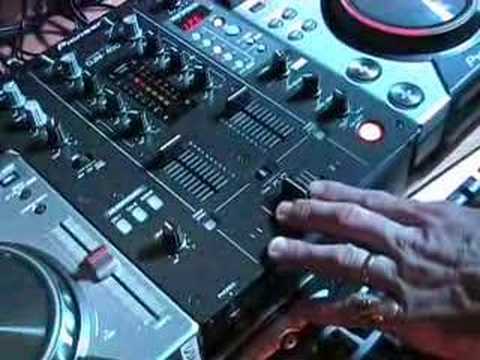
DJ Tutor shows Brian the DCJ-400 and DJM-400
Contents of the video
0:00 We're going to show Brian how to use those, aren't we Brian?
We're going to show Brian how to use those, aren't we Brian? Yes we are. Right, well give it a go. First of all the tracks you're going to hear on the left CDJ is Johnny Depth, Magnificent Feeling and then on the right CDJ you're going to be listening to a track entitled Mark Brown featuring Sarah Cranknell, The Journey Continues. So what we've done, we've got them set up and if Brian holds the camera now. Right, let me get the chocolate out of the way. Okay, alright. Alright, what I've done is I've near enough sort of beatmatched them. Now again this is exactly the same as any other CD player with a jog wheel. When you move that clockwise it'll make the music go faster but let's say the pitch control is here we could move that very fast and it will speed up but as soon as we stop moving the actual speed will go back to the original position where the pitch control is.
And the opposite applies if we move anti-clockwise, it will actually slow down. But as soon as you stop moving it, it'll go back to the original speed. So I'll give you a demo. So if you have a listen, you can hear that speeding up, right? If I take my finger off it, back to the original speed. Slowing down, original speed. Now what I've done, the reason I've chosen these two tracks is they work really well together. Now what you can do with something like this is you can almost have a mess around and edit the first track. By pressing just the cue, keeping your finger on the cue, it'll play the music. If I take my finger off, it'll stop it. Same with this one. So we could do this. Alright, it's a bit all over the place but again it's like, it's sort of experimenting. Now what I'll do, if you think about it now, if you listen to me tapping, near enough exactly the same thing. It's the equivalent of someone sort of scatting. Like that. So you can have a mess around. I mean that's just one of the features.
So what I'm going to do now, we're going to, I've sort of got them beatmatched, we're going to start them off together and then we're going to have a mess around with the jog wheel and make it go offbeat but then hopefully make it go back into beat. So we'll play them both together at the same time because they're beatmatched and they're in a reasonable key that works well together. Here we go. If we have a listen to the bass, there's the bass, you can hear that. And then this guy here hasn't got any bass kick but it's just got the mid and top, the hand clap.
3:40 Lower the bass a little bit
So what I'm doing now, this one needs to slow down. So I'm moving the jog wheel anti-clockwise and at the same time, near enough, I'm moving the pitch control down because if I just move the jog wheel it would sort of go in beat straight away but then it would go off beat again because I wasn't touching the pitch control. Fine adjustments now. Lower the bass a little bit. There we are that side, that side together. Now, there we've got a lot going on. You can see here a lot going on. So what we can do, if we take a bit of the bass off this one, there are less frequencies going into the actual mix, so now we can incorporate a little bit more mid and top to give it a bit more of a mid feeling. There's that side. See? That side. Now what we could do now, we can bring the bass in here and slowly take the bass off this one. Bang! Straight over.
Alright, now one thing I've got to say which is quite important. I do see if we can pan down here. I see loads and loads of DJs, right I'm going to pause it, doing this, right? That, like that. Now fair enough if the actual PA system is quite low because at the end of the day if it's not that loud it's not going to do much damage but let's have a listen to this with it quite high. Let's just go forward a bit.
5:52 It's always an idea to keep
I don't know if you can see there, we're going into the red. Now right there it means over. Now the reason it's got over there is because it's actually over. There's too many frequencies going into there. Now not only will it sound crap, but also there's a very good chance you'll start knackering your speakers and if you blow your speakers, guess what? You won't have any sound. So it's always an idea to keep... Put it this way, I've got a rule of thumb. I've got a good rule of thumb. And that is the bass maybe go to about one o'clock. You can go to 7 o'clock is no problem, 8, 9, 10, 11, 12, maybe 1 o'clock. Your mid, you can go low here to 7 o'clock because you're reducing it and when you go up here with the mid, you've got a bit more leeway. You can go a bit higher because there are still nasty frequencies in the mid but you're not going to knacker speakers as much as these guys. But then again, you could also knacker mid-range speakers so just be wary.
Same with treble. You know, you can go a little bit higher with treble, but you can also, well again, you can also go low with treble because you're reducing it. So mainly the bass is very important because a lot of DJs do like to have loads and loads of bass. So if you're going to use bass, maybe half twelve, one o'clock, like so. Otherwise, wang it down, there's no need to have it, okay? So what I did there, a bit of a transition from the one track to the other. And it was almost like a bit of a mash-up. So, how much time we got left do you think on this one now? I don't know, you tell me. Shoot, I don't know. Oh, just carry on for a little bit longer. Alright. We can split it up. We can split it up. Okay, right. We'll start this one off. Alright. Now this one here, CDJ 400, jog wheel. You can hear that speeding up. Oh, I pressed it wrong. Slow it down. Start again. Now also, with this, when you're on vinyl mode, if you notice...
If I touch the side, it will literally just speed up and it will slow down. But watch what happens if I actually touch the top. It's exactly the same as touching a vinyl turntable. And if you haven't touched a vinyl turntable, if you touch the top of the vinyl, while the platter is moving, you can scratch. And right, here's the deal. There's no digital sound there, which I like that. Alright, what we'll do, we'll stop this video, I'll upload this one, and then I'm going to give Brian an actual bit A bit of a tutorial on the ins and outs of the CDJ-400, what it can do, not so much what it can't do, because this guy is going to be lumbered with these and hopefully he'll be taking them to a gig.
This transcript was produced automatically from the audio of the video and may contain mistakes.





