 9:22
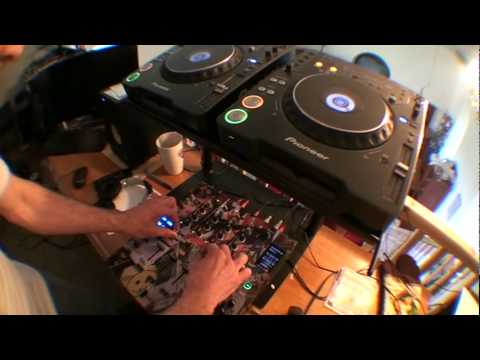
DJM-800, Demo , Using same toon on all 4 channels
Contents of the video
0:01 This guy is the DJM800 mixer
Alright folks, another demo mainly, not a tutorial, on a different way of using this guy here. This guy is the DJM800 mixer. Now what I've done is I've gone from this CD player into channel 1 and 2. I've gone left and right. This one here I've gone into these two channels and again left and right. So now in essence this is now a two channel mixer. I'm playing the same track, so I've got an identical track in both sides. So in a sense what we can do, here we can almost remix the track. Now bearing in mind this is a bit of a demonstration and again given a little bit more time you could probably put a lot more effort into it and make it a lot better. So the whole idea of this particular demonstration is to show you what you can do. Hopefully you'll be a lot better than me and take it to the next level.
The track I'm using is from a guy called Danny J Lewis. The name of the band is Enzyme Black and the track is entitled Take It and it's absolutely fantastic. It is a summer time tune, period. Alright, so what I'm going to do without further ado, I'm going to plug this guy here into the side of the camera so you can get the full potential of the stereo sound. Now very quickly here we've got the harmonic dial, probably not, or harmonic button, probably I'm not going to mess around with that too much. We have sweep, crush and filter. So when you see me press these I'm going to be messing around with the sound. Now these dials here will let me manipulate these different effects. But of course what I will be doing is manipulating this dial here, this channel, so only on the left side of that deck, on the right side of that deck, the left side of that deck.
2:22 Without further ado, I'll say practice and enjoy
And the right side of that deck. Now this can be done on the fly, think about it logically. If you've got your crossfade over that side and let's say for example you're playing a track here, all you need to do is get a track ready, put it in there and then mix it over and then of course get the same track, mix it in, while that one's playing press cue, cue it up and then with a bit of beat juggling on the cues press bang, play together. Off they'll go, and then you're in the mix doing a remix of a track live. This is how simple it is. Okay, so without further ado, I'll say practice and enjoy. Plug this do-free, and that's by the way is known as a mini jack. I'm going to plug that into the back of the camera, or side of the camera, and away we go. Here we go.
This transcript was produced automatically from the audio of the video and may contain mistakes.





