 5:54
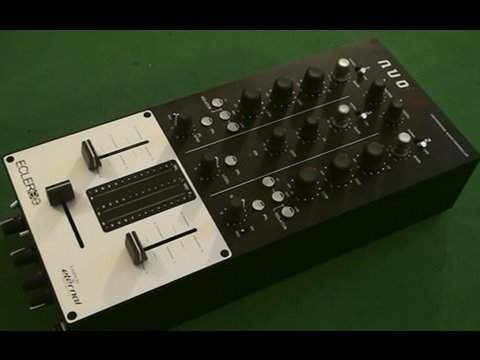
ECCLER NUO 2.0 Professional Audio Controller. Review
Contents of the video
0:00 This guy from Eckler
Alright folks, quick look at this guy from Eckler. It's known as the Nuo 2.0. It is predominantly a two-channel mixer, but not meaning to contradict myself, it's actually a three-channel mixer. I'll explain that in a minute. To give you an idea of size, there's a CD, so it's relatively thin. Now I would say this is ideal for your scratch turntablist. If you think about it, turntable either side, so you haven't really got much, you haven't got to go far in between your two decks. We have normal and reverse for the up-faders. We can change the shape of the way the sound comes in on the up-fader as well. First of all, what is normal and reverse? When it's in normal mode, means when the fader's down there, no volume. Bring it up, you start to get volume. Flick it to reverse, like so. When the fader's up there, no volume. As you bring it down, you start to get volume. So it's quite a nice little quirky thing there.
Similar sort of thing to your crossfade, you can set the shape of the crossfade normal and reverse as well. Now this guy here is your volume control for your headphones and when you switch that over to PFL it basically means you can only listen to what you're cueing up. As you bring this over you start to listen to the mix as well. Headphone input there. Hi-mid and low cuts. Now basically, or isolators as they're known here, what they will do is they will get rid completely of high, mid and low. What you need to do is you need to make sure you press in To get rid of that particular frequency, and you need to press the button again to get the frequency back in. Now you can do exactly the same thing by using the dials as well. Move them completely as far as they can go, anti-clockwise, and you will completely cut out low, mid or high. 12 o'clock ideally is where you need them. If you bring them clockwise to plus 10...
2:06 Did say three channels
Be very, very wary because if you've got a loud sound system there is an exceedingly good chance you could start to ache and knack your sound system. But even more importantly, speakers, even more importantly than that, your hearing. Be very careful. So, set those like that. Now, did say three channels. Channel one there, this up-fader. Channel two over this side, that up-fader. But in the centre, if I just pan a little bit closer... What we've got, you can see a 3 just coming into view now. And we've got micro, that's short for microphone. Switch that over and now that centre channel there is for your microphone. There's your level volume, you can PFL it, you've got low and you've got high and you've got your gain. But this is where it comes quite interesting because something like this, even though let's say...
Ideal for your scratch turntable list, a mobile DJ could use it and I've always said it's a good idea to have three separate entities for a mobile DJ just in case one goes wrong or let's say you've got one track playing, you're desperately trying to find another one and the track that's playing finishes and you think oh crikey you haven't got enough time but it's always a good idea to have let's say a track At the ready, so all you've got to do is press play, even let's say it may not be the right track to bring in, at least you will have a continual supply of music. So with this guy here, flick over to line, now that third channel in the middle has now become, let's say, a CD player, an iPod, you could use it. Okay, you can't use a vinyl turntable.
4:08 In other words you could record your set, you could listen let's say
But, not meaning to contradict myself there again, some vinyl turntables, the likes of the Newmark TTX1 I think, has a line output. So you could really use a third turntable, I suppose, vinyl. But let's say, switch that over there, there's your CD player. OK, you haven't got mid, but you've got high, low and that is your volume control as opposed to the up-faders. Right, I'll just... I'm going to set the camera like that and we'll have a look at the back of it. Now one thing I do like about this is there's 6,000 million output, well not 6,000 million, it's quite a few though. We have master out here which is RCA, we have balanced out RCA, and we have booth output and we have record. So in other words you could record your set, you could listen let's say... So there you go. What I will do, I'll put a clickable link in the description that will take you to a website where you can get far more information on this. So it's Nuo 2.0 from Ekler. Practice and enjoy. Thank you.
This transcript was produced automatically from the audio of the video and may contain mistakes.





