 7:45
EL-900RGB Laser from Laserworld Red Green and Blue Giving Full Color
Contents of the video
0:00 You've got in front of you the Laser World EL900 RGB
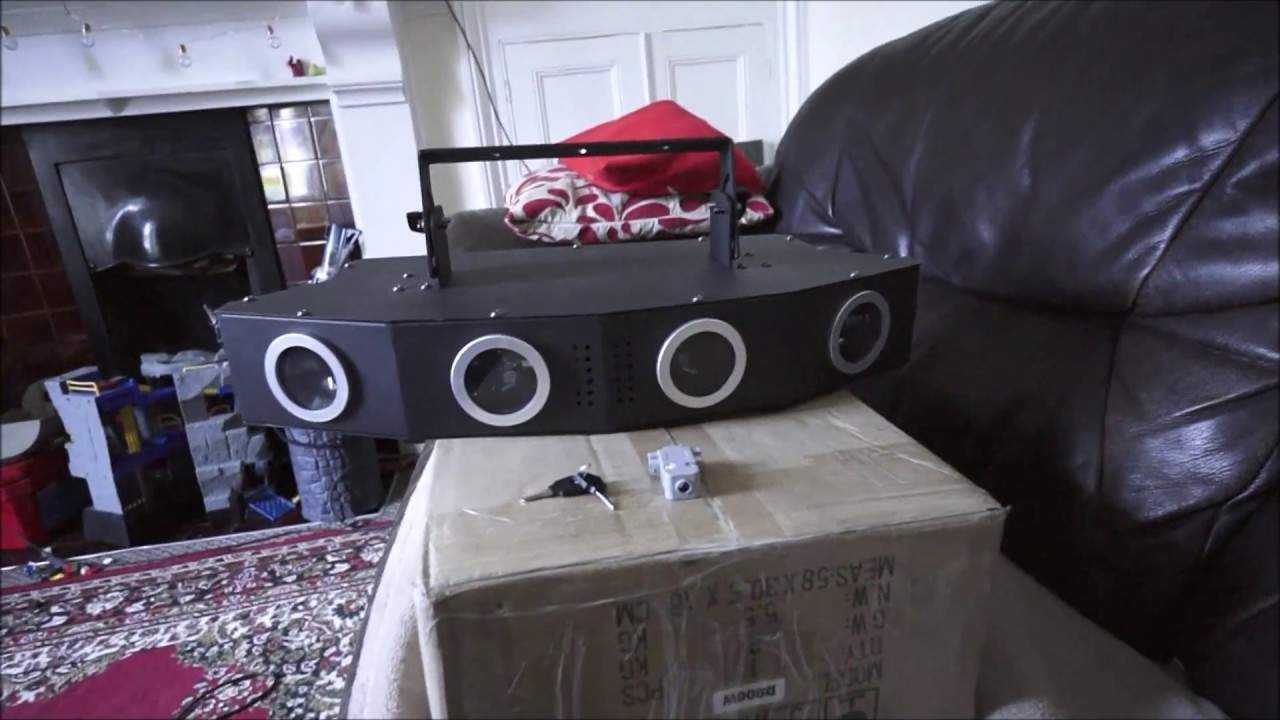
Right, you've got in front of you the Laser World EL900 RGB. First and foremost, if you'd have bought a laser, if you'd have actually been able to get one of this power back in the day, it would have cost you an absolute fortune. But of course with today's technology things are getting cheaper but they're actually getting better as well. Now, this is one of their new lasers. Bearing in mind, if you're watching this video After upload, it could have been superseded but we're looking at the latter part of 2018. So what have we got? Right, we have in front of you, you've got four apertures so there are four places for four lasers to shine out of. Now not only that, here's the deal. You haven't just got sort of one red, one green and one blue.
Guess what? You have red coming out of here, here and here. All four will shine out. Red, green and blue. So it's not just the one laser image hitting wherever it's going, it's four of them. Alright, so to give you an idea of power, the red is 400 milliwatts, the green is 150 and the blue is 350. So all together you will get a very nice mix of colours. Now in front of the EL900 we have the keys and this small item here which is the interlock. Very important, that needs to be plugged into the back. If that's not plugged in, even if the power is plugged in, you're not going to get any image coming from the laser itself. Alright so let's have a quick look at the back, very simply. There is the power in. Now, just about there where my finger is, there's an actual fuse. So if for some reason the laser isn't working, it could be first port of call, fuse has gone. Pull that out and you have two fuses in there, the one that is being used and a spare. If the one that is being used seems slightly dark and black, then there's a very good chance that's blown. Swap them around, turn it on again and hopefully you're good to go.
2:42 Would you find this laser in a big super club?
Of course, DMX in and out. And you have your laser on off, which is of course used by the key. And this area here is where you fit your interlock sensitivity. And we have dip switches here if you're going to use this via DMX. So very simple. Also very quickly a mic input there as well. Now would you find this laser in a big super club? It's highly unlikely, but it's not. Impossible, okay? You know, they could well have half a dozen of these or one in each corner. Because again, like any modern daylight, if you're just going to open the box, plug it in and let it do its thing, it's going to do a relatively good job. But if you want this to shine, and I mean literally shine, and give some great effects, then I highly recommend you go via the DMX route. Because then you are in control of what the laser does.
Not the laser just doing a random show or doing sound to light. Alright, so I'm just going to pause the camera now and plug the interlock in. We have the power in, we have the key in, also we have the interlock in. Now the interlock at the moment I've just put in but of course you would screw that in so it doesn't... All you have to do is plug it in and then the damn thing will fall out, which is highly likely if you're having a loud sound system. So small point, very good recommendation here. Make sure that is screwed in, couple of screws either side. Right, so all I'm going to do, I'm going to power it on. We can hear the fans working. I'm going to turn the key to the on position and give it a second and there you go.
4:44 Evening, dance, angle
Alright, now the noises you can hear, don't worry about that, that's actually the stepper motors working. Now I've got a bit of smoke in here so what I'm going to do is pause the camera again and put the laser on the couch and you'll get an idea of what to expect. Bearing in mind as well it's still daylight, there's a little bit of smoke in the room so there will be a bit of ambient light but if anything it's going to prove how powerful this is because if it was pitch black you would expect to see... If you've got one laser aperture, then depending on the angle, you know you're going to hit I don't know, say for example a room. You're going to hit probably all the walls but with this laser you're definitely going to hit all the walls because each of the apertures is at a slightly different angle. Now again like I said earlier this is in sort of pretty much daylight but you can see the lasers themselves. I've got a bit of smoke in the room
Now I've got to be careful about the angle that I have the camera because the last thing I want to do is have the lasers hit the sensor on the camera and knacker a few of the pixels, so I don't really want to do that. But it will give you a good idea. Now I'm just going to move away and let's have a look at the effect it's giving. And it's filling that wall. So if you imagine you're in a venue that say 20 meters, it's going to completely fill the room and I mean completely. Now that is quite a wacky effect. I can see this being used for dance events, for birthday parties. You could by all means use this at a wedding but I'd be more inclined if you were gonna use this at a wedding To have it later on in the evening. By all means, you could use this earlier on in the evening, but I'll be honest with you. I mean, I wouldn't want that on the first dance because people would look at you as though you're stupid. But definitely towards the end of the evening when you may be upping the tempo and you've got some classic dance tracks or some top 40 mumble rap rubbish. Sorry, I had to put that in. Alright, so there you go. What I will do, I'll put a link in the description.
To the LaserWheel website, once again, this is the EL900 RGB, of course, red, green and blue. Now bearing in mind that doesn't mean to say that you've just got red, green or blue. You get a colour mix, you know, so you will get your greens, your purples and your whites as can be seen there. And I can't stress this enough. Go via DMX and then you can choose the colours you wanted. Thank you very much, practice and enjoy.
This transcript was produced automatically from the audio of the video and may contain mistakes.





