 3:04
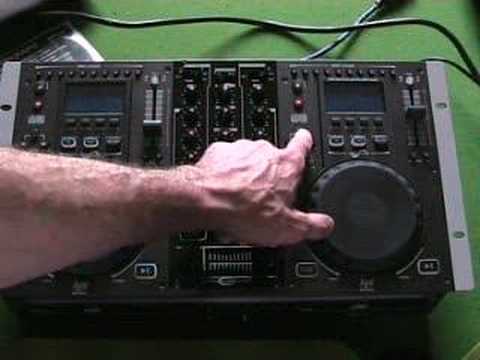
Gemini CDM-3600 all in one twin CD/mixer Video 1
Contents of the video
0:00 It's a twin CD player with an internal mixer
Alright folks, basic video for you. Video number one really on this guy here. It's a twin CD player with an internal mixer. It's from a company called Gemini and it's known as the CDM3600. In this video, a basic outline of this particular piece of kit. In future videos we'll be going slightly more in depth. Okay, two CD players, mixer in the middle. The mixer is two channels. This channel here on the right will work this right hand CD player. The channel on the left will work the left-hand CD player, but what you can also do, you can add an external source to each side. So for example, you can actually add an external CD player to this side by switching over here to line 2 and making sure the switch in the back is set to line 2, or alternatively you can actually add a vinyl turntable as well. Exactly the same applies with this side. You can add an external CD player
1:24 Again here, this button here, when it's shining, it's in search mode
Vinyl turntable, jog wheel. This will do two things. One, you can actually search through the track or alternatively, you can pitch bend. You can speed or slow the track down. This is your basic pitch control here. You can loop. Here, direct access. So in other words, if you want to go straight to say track six, you can press number six. Eject, stop. This will stop the whole CD. Here, track select. So you can go 1, 2, 3, 4, 5, 6, 7 or say 1, 2, 3. If you want to go straight to number 13, press plus 10, it will jump 10 tracks for you. Again here, this button here, when it's shining, it's in search mode. When it's not shining, it's in pitch bend mode. Cue. Play, pause. At the front of the unit, we've got a plug there for your headphones, also a plug for your microphone. In the back of the unit, again, you've actually got a headphone plug and you've got a microphone plug, but the microphone plug at the back is XLR. The microphone plug here is your basic jack plug. Alright, a very, very brief look on this guy here. In future videos, we'll be going slightly more in-depth with all the functions. Also, very quickly, crossfade here.
2:12 You've actually got fader start and also here these are your up-faders
You've actually got fader start and also here these are your up-faders. You've got low, mid and high, a master volume. When you increase or decrease the master volume it will increase or decrease the volume of the whole unit. Gain control here is for each individual channel. They're a bit like the actual volume controls. Again they're very similar. Quick video, practice and enjoy.
This transcript was produced automatically from the audio of the video and may contain mistakes.





