 6:36
Gemini CDT-05 MK2 Hybrid T Table , What can it do?
Contents of the video
0:00 It's a hybrid turntable from Gemini
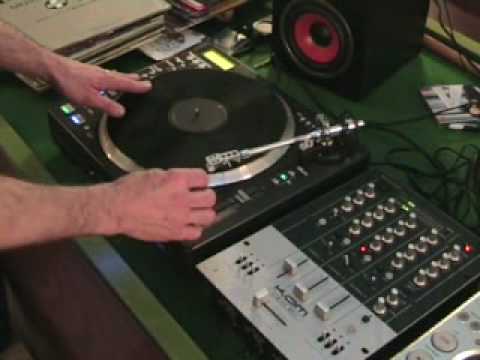
Alright folks, in this video we're going to look at this guy. It's a hybrid turntable from Gemini. It's the CDT-05 Mark II. It's a hybrid turntable, so what is a hybrid turntable? Well, as you can see we've got a normal piece of vinyl on there and basically you can play that exactly as you would a normal vinyl turntable. The difference is with this guy here, we've got a slot under here where you can put a CD. Now you can use this actually in three modes. First of all, you can use it as a normal vinyl turntable. You can get any piece of vinyl, bung it on there and you can play it as you would any other vinyl turntable. Alternatively, what you can do, you can use it as a CD player so you can get any CD, you can bung it in there and you can play CDs. But what I do like about it is you can actually play a CD
And a piece of vinyl at the same time. Now first of all, here's the vinyl and if you look on the mixer, what I've done is, if the camera won't move, at the moment now I've got this channel, channel 2, on this mixer set to the vinyl, like so. And I've also now got channel 1 set to CD. Now what I'm going to do, I'm going to pause the camera and I'm just going to show you the front area here because that's quite important, hold tight. Okay, what we've basically got here is we've got an eject button. So that does exactly what it says on the tin. If you press that, it will eject the CD from that area. But next to that, we've got a button here. If you press it once, you get 33 and you get 45. I doubt if there's many people who want 78s. But what we're looking at most importantly here is this. You can see CD, Mix and TT.
Now when you set that button across to TT, it means that you will be using the vinyl turntable. So what we'll do, we'll put that on there like that and we'll put the volume up on the mixer. Now we're actually using the vinyl turntable on here. Now then, if we then, I'll just stop that, I'll stop that and I'll move that over now to CD. Now what happens when we press play...
2:26 Even though the vinyl's actually moving, we're now using the CD
Even though the vinyl's actually moving, we're now using the CD. But watch, this is the beauty about it. What I can actually do, I can now manipulate this vinyl and it's almost, well it's not almost, it's exactly as though I was manipulating the CD inside there. Take a look. But I'm not using the sound from this piece of vinyl, I'm using the sound from the actual CD in the player itself. Alright, that's the second thing it can do. The third thing is this. If I switch that to mix, first of all, but before I do anything else, I just need to show you the actual back of the unit. Hold tight. Right, this area is quite important because you can see phono out and CD out. Now the phono out will go into your phono input on your mixer for the vinyl turntable. The CD out will go into the line input.
4:19 Normally at this point I'd be cueing t
Now what you can do, you can do one of two things. You could have CD out into channel 1 line, phono out into channel 1 phono. Alternatively, you could have CD out into channel 1 line, phono out into channel 2 phono. So you can actually play the CD And the vinyl at the same time. Now, that's why I wanted to show you these two outputs. We've also got digital out as well. So I'll pause the camera again and I'll show you how this can actually play a CD and a piece of vinyl at the same time. Hold tight. Okay, first thing, I need to set this button here to mix. Now what will basically happen is I'll be able to use the vinyl turntable on this channel here, which is channel 2. And then I'll be able to use at the same time, the CD on channel one. So I'll pause the camera again, get it set up and we'll have a bit of a mix, hold tight. Okay here we go, right what I'm going to do now, I'm going to press play, by pressing play now make sure of course that the actual button there is at the centre position, press play and the CD will start. Right that's the actual CD playing now, what I need to do now is start the motor
You can see the volume here on channel 2, which is now in control of the actual vinyl turntable except the zero. Now normally at this point I'd be cueing this up and using the pitch control on the headphones but because this is just a demonstration we'll put the volume up and we'll get the points and bars. Now we're mixing with one deck. Alright there's that CD player there but what we'll do, we'll turn that off. Alright not the best mix in the world but this is just a demonstration, it'll give you an idea. That it can actually play two entities at the same time. Cut it again. So folks, there's a little bit of a video for you on, it's the CDT-05 Mark II. It's a pro hybrid turntable, it's from Gemini. Thanks for watching and as usual, practice and enjoy. Thank you.
This transcript was produced automatically from the audio of the video and may contain mistakes.





