 8:43
Hercules Universal DJ Controller Video 1 BY Ellaskins the DJ Tutor
Contents of the video
0:00 Video one on the Hercules Universal DJ controller
Alright ladies and gentlemen, video one on the Hercules Universal DJ controller. Number one, it's a controller. Number two, you can use it in three separate ways or three modes. Now first of all as well very important if you're a well-known DJ and you're just about to move to Ibiza to do a fantastic set in Amnesia then I suggest you stop watching this video right now. On the other hand... Maybe you are a new DJ, maybe you're stuck in your bedroom, you've watched a whole bunch of videos and you want to delve into DJing without spending an absolute fortune. Just try it out first. Tip those pinkies into the water. Then maybe have a look. Now this you can use in three modes. It's Bluetooth enabled. So what are the three modes? Let's turn it over.
Of course you have your very basic laptop mode. Now for anyone who does not know what that means, you will plug your controller into your laptop or your laptop of course into your controller. Then from the Hercules controller you will go then into a set of speakers which will be your monitors. So you can use this for bedroom mixing, set of little speakers, your laptop, controller and away you go. Mode 2 is known as multi-screen. Very similar, you still have your laptop and your speakers but then you can connect that to the likes of your ISO or Android. Mode 3 is tablet mode. Now that's where you don't have to have the controller. All you need to do is plug your tablet in and away you go. So, but you will need by the looks of it external power. Okay so I'm going to open it up for the very first time.
2:54 All the dials, the knobs, the sliders feel good
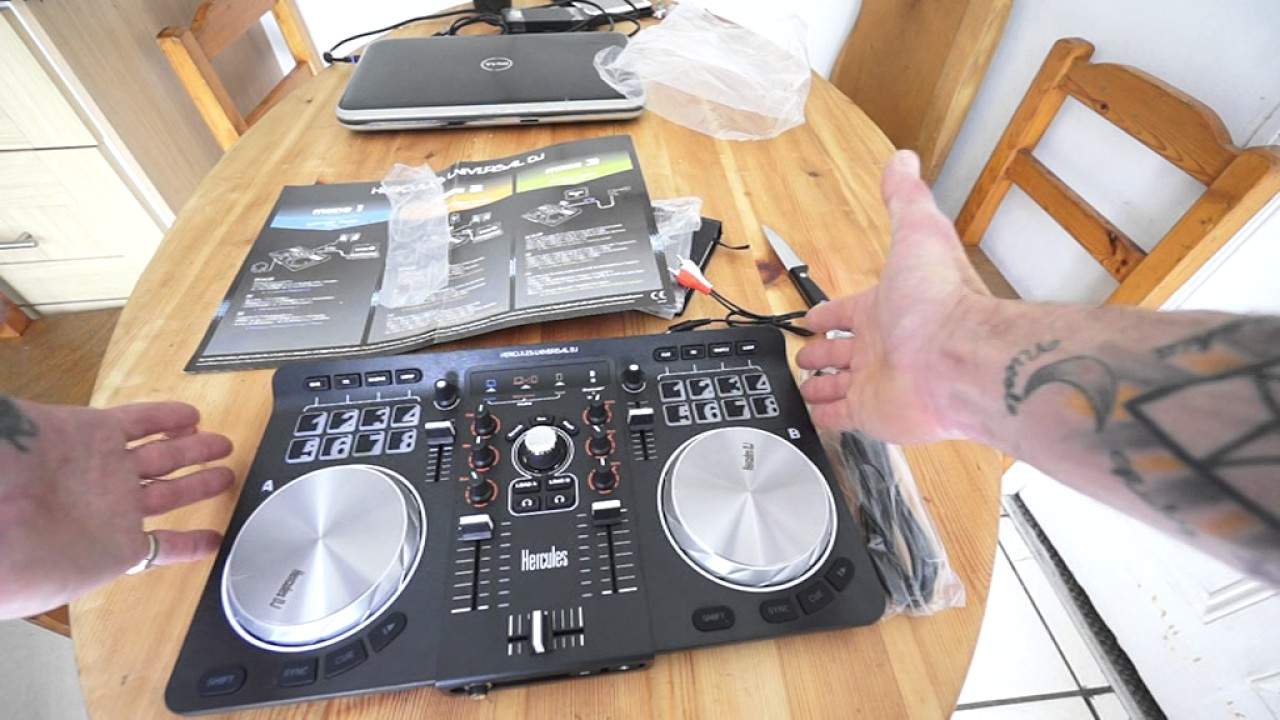
And let's have a look. So video one really is what's inside the box. Right, so here it is. Now first impressions is it doesn't really look like a toy but then when you have or if you have used high-end kit then you probably look at this and think well it's not The ProPro quality, or it isn't ProPro quality, but from aesthetic point of view and tactile touchy-feely point of view, I have to admit, I don't have to, I'm not saying I have to admit, I will happily admit that the overall feel and look is excellent. Now I'm being very honest here, it doesn't look as though it's going to fall apart, it actually does. Look very impressive. That's the cat down there who normally wants to be fed every second of the day. Right, so all the dials, the knobs, the sliders feel good. Sometimes with sort of the controllers that you get out there they just feel a little bit wobbly and as though all someone's done in a factory is just slap it together and think next and they want to go home but this it just it does
Feel good. You know, things feel as though they work, not as though you're going to press them once and they're going to fall apart. OK, so again, I haven't plugged this in yet. It's Bluetooth enabled, which is great. It means less cables flying all over the place. Now it comes, I believe, with the software deduced, which... will let you mix. Now I don't know yet whether you can use other software with it, possibly the best thing to do there is Google. You have your USB cable, excuse me, the software there, I believe that is the software and instruction manual and what I do like, I'm pretty sure this should be what I think it is, is a very quick informative Plug it in and get it going within five minutes. Now, one good feature about today's controllers, unlike if we go back sort of five, six, seven years, is that nowadays it's a question of just plugging it in and pretty much playing straight away. Many years ago you'd have to find drivers and you'd have to mess around for hours. It was an absolute bloody nightmare. Nowadays it's a lot easier. Okay, you even get...
A mini jack to RCA cable and that I need to check first to make sure I know exactly what that's for, but these cables are great if you are a mobile DJ already and you're on the road and someone thrusts an iPhone into your face saying can you play track 7. One of those is great because it means you can go into the back of your mixer or controller and play it, but I don't think so with this. Let's have a look. Mix out. Oh, auxiliary in. My God, you can. Now that, that's actually taken this controller to a new level for me because it's unheard of to have something like this where you can have auxiliary in. Now if you're not familiar with auxiliary in, let's have a look at the back. We can switch the modes. So blue, orange and green represents blue, orange and green laptop.
5:42 Blue, multi-screen, orange, tablet green
Blue, multi-screen, orange, tablet green. So very informative and easy to understand. Button there for pairing, USB. Now auxiliary in, what that means is you can plug an auxiliary input. So for example you could have maybe possibly even a CD player plugged in there or again your tablet. But I need to make sure first the auxiliary in might be just tablet mode. I'd better check. Now at the moment, like I said, it's just unboxing and opening. Right, so there it is. This is video number one. Now I'm going to finish off with... It's a nice small looking controller, okay? You have pitch so you can increase and decrease the speed. I'm not sure yet what these dials are for above the pitch. I'm sure I will find out shortly.
Cue, effect, sample and loop. We have scratch record and magic. Now that looks very interesting. Magic. What will it do? Change into a bunny rabbit? Who knows? As with pretty much every single controller out there now, we have the centrepiece that is very vital. That's the dial to choose your tracks and I can feel that we can press that down so of course you scroll through your files and when you find a file... Press down and then load A or load B, your headphones, your sliders, your volume and again bass, mid and treble. So they haven't thought let's cheapskate and just get a tone control or low and high. You have low, mid and high which again brings it above that really cheap, cheap kind of controller now. This isn't...
The bottom of the line. You know, this isn't the sort of thing you'd think if you buy one of these, you're just about going to be able to scrape to get into the realms of being a DJ. No, no. Something like this. When you've got bass, mid and treble, then you can start EQing your mix really well. Shift button. Of course, you should know what that's for. So, for example, if you've set some hot cues, press shift, press the pads again and that will... Get rid of the recorded hot cue. Sync, cue, play, pause, crossfade, up-faders feel very nice, very smooth and they don't feel, I don't know, cheap. They actually, they don't feel cheap. Fantastic. Headphone in, only a quarter inch jack headphone in and I believe these would be your volumes for your headphones. So there it is. Okay. I will put information in the description.
On the Hercules Universal DJ controller. This is video one, more to come, practice and enjoy. Thank you very much.
This transcript was produced automatically from the audio of the video and may contain mistakes.





