 12:09
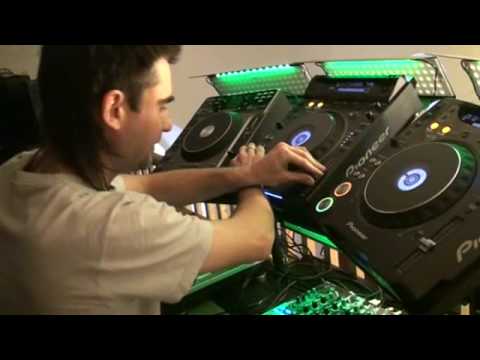
J-Me* Griffiths gives a demo of the Wide pitch scratch
Contents of the video
1:53 Introduce yourself, who are you?
Right, I was filming that. That was good. Introduce yourself, who are you? Hi, my name is Jamie Griffiths. Some of you may remember me from when I speak with Harry Bidd, one of the Ministry sound teachers and one of the DJ Academy tutors as well. Excellent, and you've come to this mad house, haven't you? Yep. Took you a while to get here, didn't it? How long did it take you to get here again? You must have phoned me about ten times. Yeah, I felt longer than that though. Like, we're here now. Yeah, what do we do? We're on the M1 Junction 5. Robby, what's the name again? I can't understand the sign. Lost! No signal! Help! That was cool. So what you... Right, explain to us, what were you doing? Okay, well basically when we're using this type of scratch, it's a combination of a scratch but really technically unless you're like moving the platter or something called a jog down on a CDJ back and forth, you're just sample stabbing really. I mean, let's take it back a bit
Let's just sort of go back to the sort of foundations of it really. Okay, so using the old traditional R scratch sound that probably everyone uses when they start scratching, even keyboard still uses it. It's a lovely sound to work with because it's sharp at the start of the sound, quite harsh chisely sound and it lasts for at least half a duration length of the playing time of the record of the CD. You've got more than enough there to play with, to sort of like capture different patterns with it. Now, I've been scratching for like, oh, since I was about 14. I'm not going to tell everyone my age, you can guess that one. But it's been many, many years. 97! And yeah, and like, you know, I've got to the point where...
I'm a club DJ. I started off sort of like traditionally as a hip-hop DJ many years ago and then got into club music. The reason I did quite well and the reason why I've been asked to join them was because I was one of the very few DJs that could keep up and scratch perfectly in time to breakbeat and house and that progressive and that sort of style of music. Since, you know, over the years, I've got to a point where I've mastered pretty much every scratch pattern, hence, you know, I teach it as well. And I just thought, I think, to be honest, this kind of is a little bit of an offspring from James Abelia. You know, he's, again, he's really into his tricks with the effects and the CDJs. But I'm not quite sure if it's exactly the same, but the Y-pitch scratch is just...
5:00 The DJ Tutor offers a wide range of sounds, including high-pitched CDJ
Basically, setting your pitch controller to the widest percentage range you possibly can. So we've got the tempo range here which normally I'd say a lot of club DJs would set it at plus 10 or if you want to sort of mix a little bit more comfortably without being so precise, I call it lazy mixing really on plus 6. Plus 16 obviously gives you a wider percentage but the widest pitch does actually sound on the unit itself. The DJ Tutor offers a wide range of sounds, including high-pitched CDJs. It's pretty far down to the bottom and the minus point. It goes quite slow and it does pretty much stop. One important fact I've got to make sure is to get this, you've got to have the master tempo off. Yes. To get the sound, the difference in pitch. Exactly. It just won't make any difference otherwise. A lot of DJs tend to mix with the master tempo on so that they can keep the same key. That's personal choice at the end of the day. Yeah. But I like to take it when... I was originally doing it with the cue button to just, you know, to chop and create patterns like this. Yeah?
But I found that as time went by, I was like, well, I want to add a new dimension to this. And obviously, you know, if you're using a mixer with send and return effects or especially something like the Pioneer DJM800, syncing up the effects couldn't be any simpler really. Let's just press play on a track we have here. And there's two ways you can either set it to auto-sync BPM. Sometimes I prefer to tap in the BPM myself because I find it's just a little bit more accurate. So I'm just keeping that tap going. As perfect as I can, eventually I'll get a reading that lasts for quite a long duration, which is 124 BPM. Yeah, I've got it there. So now what I'm going to do is set the effect that I want to use, which I'm going to use the echo effect, which acts as multiple delays. I'm going to switch the effect on and I want to make sure that the channel I'm using is assigned to the CDJ that I want to do the wide tempo scratch with, the wide pitch scratch I should say.
7:16 Button
So let's put it to channel 2, there we go, assign to channel 2, switch on the effect, let's hit the cue button this time and see what it sounds like. So we've got a perfect delayed R scratch sample ready to go, which does look and sound really good, I mean there's no denying that, and this is the type of scratch that I've not been seeing, I've not really seen hardly anyone do it, but I do know one thing for sure, most DJs I know The DJ tutorial by Ellaskins, The DJ Tutor. The DJ Tutor offers a wide range of sound effects, which can be used to demonstrate and execute scratches like this. Yeah, tapping the button basically. It's like tapping a drum pad or a sampler button or an NPC pad. Even if you're not that great, it's just a case of training yourself to get a bit more tighter with your rhythm and coordination. As I said earlier, I used to sit there when I was a kid listening to music over stereo and using the arm treads as pads just to tap into it as perfectly as I could. Exactly.
9:25 I mean, an idea, yeah, just do that to begin with and then do-do
I mean, an idea, yeah, just do that to begin with and then do-do. Gradually and build up your speed. It's always good to start off possibly even with like a trip-hop beat or slow beats. Yes. You know, and gradually work your speed, you know, as you get more experience. And then you can start to use maybe two hands or two fingers. And obviously that's without doing any pitch work at the moment. Yeah. And that can be used with any sample. Fresh, R, 1, 2, 3. Any piece of vocal, speech you want to put, or sound effect even. So let's demonstrate you now how it can be used with the effects using the pitch on a wide scale. Don't forget we can change the effect parameters as here so we can have like 3-4, half a beat, quarter beats, a bar etc. Demonstrate the different types of sounds that you get with the effects as well. Are you faster? Are you faster? But I like 3-4s and halfs. Yeah.
Providing your BPM synced up with the effects as well is always going to sound good. Yes, you know, as long as you're tapping reasonably in time and come up with a nice little pattern, something like this. Practice and enjoy. Nice one.
This transcript was produced automatically from the audio of the video and may contain mistakes.





