 6:49
KAM KCD3000 USB & CD Player
Contents of the video
0:05 In this video we're looking at the Cam KCD3000 USB
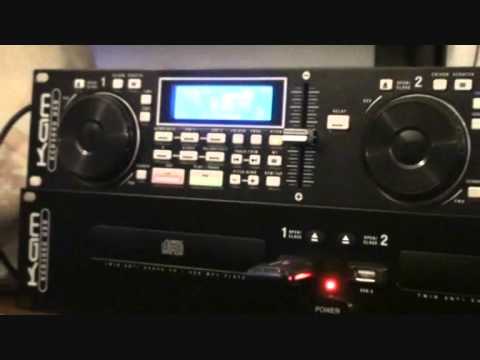
Alright guys, in this video we're looking at the Cam KCD3000 USB. It's a twin unit 19-inch rack mount. At the bottom you've got two CD trays and two USB ports. At the top you've got all your control panels, so two separate units. And as they are at the moment, you'd have them set like that in a small club, pub environment where everything's... For a mobile DJ, you'd be having problems because you'd have to have that head height or you'd have to keep on trying to crouch down to get to the control panel. So ideally for a mobile DJ, you can get the 19-inch rack mount units where the control panel can be at 45 degree angle and you can get your mixer above or below that. Now if we have a look on the left hand side, if I talk about the left hand side then the right hand side is almost identical. At the moment you can see just below the number 1 on the bottom tray I've got a USB in there. So how do we get from USB to CD? It's relatively simple. We press this guy here which has got CDUSB on. Once we press that then we'll have something on the screen that will say well what do you want to do?
CD or USB. If we click through track trim, we can go CD, USB 1 or USB 2. At the moment we're on USB 1, so once I get to USB 1, I'll then click CD or press should I say CD, USB again, and then the tracks will load up. Now also what this guy can do is even though I've only got it in USB 1, I can actually get it to play from side 2 as well. So you don't have to have one guy in here. For one side and one in the other for the other side. Now the track I'm going to be playing is by Enzyme Black. I will put a lickable clink in the description for the tune and also for this player. In fact what I'll do, I'll put a link directly to the cam website to this player where you can get more info on it. So we'll play the track. Now looking at this and then also the 450 USB there's not really that much difference.
2:34 Cue, play, pause, very straightforward
If I zoom in slowly it won't go blurred. Classic. Okay, cue, play, pause, very straightforward. We can loop here. We've got memory, cue 1 and cue 2, folder search as well. We can program this unit as well. So you know, maybe you can play what track 1, track 3, track 7. Track trim, search, pitch bend. Now a lot of people ask me about that because they say well I press the plus and it goes faster but then it goes slower again. Well, pitch bend, what that does, it will increase the speed only when you've got your finger on the plus. As soon as you take your finger off, guess what? It's going to slow back down to its original speed. The opposite happens when you press the minus. BPM tap, what you can do there, it's got nothing to do with water. What you can do though is as you press that in time with a beat, it will give you...
A rough idea of the BPM. Now again, a lot of people think, well, you know, one side says 127, the other side says 127. How come it's not mixing? Well, maybe one side is 127.3, the other side's 127.4. The tune, by the way, is Johan's By Enzyme Black or Danny J Lewis, Top Man. Alright, MT Master Tempo. What we can do there, if I press that, slow it down...
4:01 What it'll do, it'll keep the key of the track
What it'll do, it'll keep the key of the track. If I press that again, sounds a bit dodgy that. Okay, pitch, pitch off, we have plus or minus 8, 16 or 100. If you do like getting some decent smooth mixes, try and stick to about plus or minus 8. Always best to do that. We've got search function here as well, jog wheel so we can search through the track forwards or backwards. Also scratch function on this. Time, we can have continuous, we can have count down or count up. And for a mobile DJ quite often it's very good to have count down so you know how much time you've got left as opposed to oh my goodness you're on 3 minutes 28 seconds and you don't realise the track finishes at 3.30 and you're stuffed. You don't want to go there. Alright, there is the player. What I'm going to do now is pause the camera.
Make sure it doesn't go blurred and then I'll have a sweep across the front so you can get a relatively good idea of what the item looks like. Okay, very quick point here. We've got also this little button here in the middle called Relay. Now, just watch this. Alright, you know we can very quickly play from one to the other but what we've got with Relay, very simple. Let's say for example this track is finishing. With relay engaged, as soon as this guy finishes, the next track will start on the other side. So in other words, this one's playing, this one's paused up, this one finishes, this one starts playing. Alright, there you go. Like I said, I will put a link in the description. This guy here is the Cam KCD3000 USB player and as ever, practice and enjoy. I do.
This transcript was produced automatically from the audio of the video and may contain mistakes.





