 4:33
KAM KCD3000USB CD/USB Player
Contents of the video
0:10 Video number one on a unit from Cam
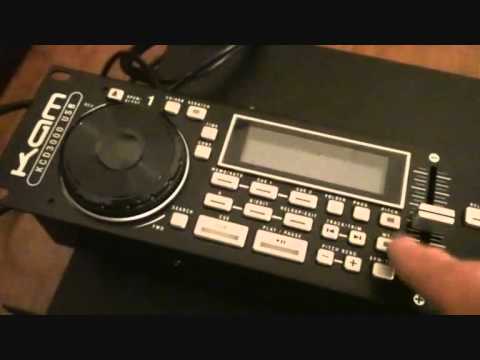
Alright guys, video number one on a unit from Cam. It's known as the KCD3000 and there it is. Now it's a twin CD player with a slight subtle difference because it's got USB ports or two should I say USB ports as well. It comes in two units and that is your control panel and on the underside we've got the 19 inch rack unit. Now it's virtually identical to This is your normal stereotypical twin CD player. The only difference is it's got USB as well. So to give you a rough idea of size, this here is the amplifier from CAM that I demoed a while ago. It's the KXD7200 and very incy wincy, tiny, squiggly little tiny amp that packs a rather large punch. And you've got that next to that. Right, voila! Alright, yeah, come and have a closer look.
1:10 You'll notice two USB ports
If I put that there, and put that there, like that, there it is. Right, that is where you will put your CDs. You'll notice two USB ports. Guess what? That's where you put your USBs. Right, open and close, USB ports power on and off, CD trays pull out, go back in. Simple, not rocket science. Right, what I'm going to do is just make the camera go up a little bit, just like that. And we can have a look at... The control unit. Relatively simple, very straightforward. I'm not going to go into too much detail in video one, but just give you a rough idea. Okay, we have scratch function on this. Now, I'm going to be honest straight to the point. If you are a turntablist... And you want perfect scratching, then this is not for you. Because there is a sort of a bit of a delay, but if you just want to do wiki-wiki a little bit and have a bit of a mess around, then that's fine. You have got a scratch function on it. We can have a time readout, we can have continuous, so if you want to, you can just play...
One track and it stops. Alternatively, you can let it play all the tracks on the CD, full stop. We've got a memo function here and we've got cue functions as well so we can cue certain parts, we can loop, we can re-loop, folder search, we can program it as well, pitch, usual thing, MT for master tempo. If, let's say, you want to keep that key of the track but still want to increase or decrease the pitch, make sure master tempo is working and then you can slow the track down, speed it up, but at the same time you will keep the same sound which is very important. Alright, cue, play, pause. Guess what they're for? No, they won't do your shopping but they'll cue the track and they'll play and pause it. Pitch bend and BPM tap. So in other words, if you want to say...
3:12 Say you've got some house track doing that
Do it yourself. You want to find out the BPM and what you need to do. Say you've got some house track doing that. All you do with your finger is this. Go in time with the beat and you will get a rough, please note that, a rough idea of the BPM. Loads of people are saying, oh I've got 120 there, 120 on the other side, it doesn't mix. Well this one could be 120.3, the other side could be 120.4. So again very important. Alright. So, something like this, applications. Now, at the end of the day, you're not going to probably find this in the hottest club in Ibiza, but if you are a mobile DJ or you've got a little bar somewhere, something like that, then you never know, this could be a piece of kit for you, alright?
It's from a company called Cam, and it's the KCD3000 USB. I'll put the usual lickable clink in the description, and the lickable clink this time will take you directly to the Cam website, to this item, where you'll get more info on it, alright? Video number one is just showing it to you. There you go. And... Love it. Hold tight for future videos very shortly when we'll be giving it a spin. Practice and enjoy. Thank you very much.
This transcript was produced automatically from the audio of the video and may contain mistakes.





