 7:52
KAM KCD400 & KHD410 Desktop USB controller
Contents of the video
0:00 Them, they look almost identical
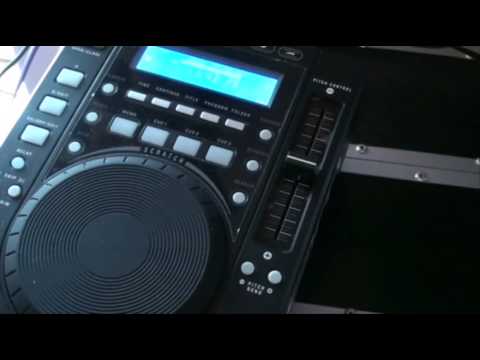
Alright folks, in this video we're looking at two players from the same company, the company's known as CAM. This guy here is the KCD400 MP3. This one over here is the KHD410. Now, when you first look at them, they look almost identical, but there is one major difference between the two of them. The 410 will only play music through this guy here, the USB input, and the 400 will only play music through the CD player.
Okay, all the tracks I'm using are from Enzyme Black and I will put a clickable link in the description. Okay, you just saw the 410. Now this one here is the KCD400 MP3. Exactly the same as the 410, the only difference is logically we haven't got a USB port up here. This particular unit plays CDs. So let's just... Put a tune on. Alright, some of the features. We can loop with this guy. Also we can set cue points. We've got time here so for example if I press time we go from countdown to count up. Continue, so in other words we have auto cue. If we press continue it'll just carry on through all of the tracks and of course logically if your tracks are titled we can get the title as well.
2:17 The reverse button is pretty responsive as well
We can program this unit and also we can do folder search as well. Now, we've got some nice effects here and the effects are pretty good actually. We've got flanger. If I hit the flanger button, what I can do now is using the jog wheel, I can manipulate that sound. Go to filter, a nice sort of background sound. It's almost like you're turning up to a rave in the distance. There it is about a mile away in the hills and you're coming closer to it. And then by this time it's blasting you. Alright, we go to echo.
At any time when you want to get out of that particular effect, press the button again and out. Okay, we can reverse. The reverse button is pretty responsive as well. Press the damn thing. And also we have scratch mode. Press that and we can track search as well. Okay, if we have a look here, pitch logically and pitch bend, what does that do? Well, if you press the minus, it'll slow down the track for you. When your finger is on the minus button, as soon as you take your finger off, the speed will go back to the original position wherever that pitch is. That's vitally important to remember. So if I put the pitch there, the track will slow down. But if I then press minus, the track will start to slow down even more. As soon as I take my finger back off, the speed will go back up to this area here, exactly where the pitch was. Opposite applies to the plus. Speed it up, take the finger off.
And it will go right back to the speed where the pitch is, like so. Okay, if we just bring the camera down slightly there, pitch on and off. So logically that speaks exactly for itself. What we can do now is we can hit this button here, range. What that will do, that will enable us to go from plus or minus 8% and you can see that in the readout, or 16 or 100. Now one of the main features on these guys is the master tempo. In other words what that will do, that will keep the same sound while you move the pitch. So for example if we press that, what I can do now is go on to say plus and minus 16% and I'm going to slow it down, put the pitch on for a start, beg your pardon, speed it up. Again another tip for you, if you want to do some serious beatmixing, it's always a very good idea to make sure...
5:32 Identical in virtually every single way is this guy here, the KH-D410
The pitch range is 8 to 10%. Anything above 10% and you haven't got much control. So for example, ideally 8%, and also when you're at 8%, then you're not going to hear much difference in the tone and the key of the track also. And again, if you've got master tempo on, it's going to be better again.
Okay, I'm just going to cue that one up. Alright, that was the KCD 400 MP3. Now, identical in virtually every single way is this guy here, the KH-D410. So, press play. Pitch on. Here we have 8% and 16%. We're going to go to 8%. Master tempo. And again, the scratch feature. Reverse. Now as I said in a previous video, there aren't any moving parts in this item. Admittedly yes, there is this guy here, the pitch and the jog wheel. But you haven't got a motor that could possibly eventually wear out. Echo, filter, that is a nice effect. And the flanger. Now bearing in mind as well, this guy will not only play MP3s but WAV formats as well. So a quick sneak preview into these two guys from Camp. That one there, the KHD 410.
And this one over here, the KCD400 MP3. Alright? Practice and enjoy. Thank you very much.
This transcript was produced automatically from the audio of the video and may contain mistakes.





