 9:54
KAM KCD450 USB Scratch cd/usb player iTunes ready!
Contents of the video
0:05 Short video on this guy from Cam
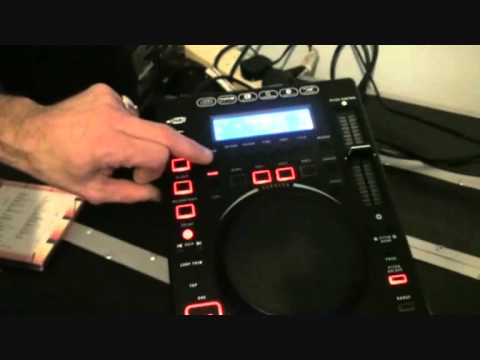
Alright guys, short video on this guy from Cam. It's known as the KCD450 USB player. Slot loading CD and USB top left hand corner. For this demonstration I'm just going to be using a CD. The track I'm going to be using is T-Ski Valley Catch the Beat. First things first, very good mechanism on the slot loader here. If I press open close... Pops out quite nicely, not like an old-age pensioner trying to hand you something. Excuse me, wobbling all over the place. And when you put the CD there, it takes it away with ease, just like your missus trying to grab your money off you. So, nice feature there. Right, I'm going to go to track number two, which is, like I said, it's Teeski Valley Catch the Bee. Now, first of all, alright, you're probably not going to like this, but guess what? Don't worry about it. Press play, or sorry, cue, duh, plays that one, uh.
Now, do you notice a bit of a delay there? Now, we don't want that, do we? But, guess what? At the moment I've got it in scratch feature. So, find that first part of the beat, hit cue, so you haven't got any worry whatsoever at all about thinking, you know what, it won't start on the count of one. If you want to get that cued up precisely on that first beat, it will do it with ease. Right, also another small feature that you do find on a lot of the more expensive players is... Press cue, and if you're happy with it being mixed in correctly etc. and you want to carry on playing this, you can press play pause at the same time and it'll carry on going. Small feature but it works. Right, what we're going to do as well, at the moment now you've got a bit of, the view's quite a distance. Once I've done this demonstration we'll have a bird's eye view and I'll just go over the knobbly bits for you. Alright so we're going to hit in and out and perform
2:55 Of the effects
Two loops, let's stick them in the memory banks. We've got three memory banks, one, two and three here. Here we go, so one, two, three, four, one, two, three, four. I'm going to hit memo, I've got a cue one. Now I'm going to go out of that loop and I'm going to get another loop. One, two, three, four, one, two, three, four. Hit memo, I've got a cue two. Okay, so now I've got two loops. Alright, at the end of the day... With demonstrations like this, you've got to use your imagination as well. You know, what can you do? Right, let's get a bit closer. We're going to look at some of the effects. Echo, filter and flanger. Press that small little icon lights up with echo. I'll take it off scratch, sorry. And at the moment, I've just got it plugged in from the player into a powered speaker so you can get a very good idea of the effects without going through a mixer or anything like that. Got a filter.
Flanger, so we've got some nice effects there. Right, you can search, very obvious, you can search through the track by using the jog wheel. Okay, if we get a scratch, I'm just going to pause it for a second. Now, this is the fun bit, okay, and a lot of players, what you do tend to find is when you start... Trying to scratch, note the word trying to scratch, you tend to be doing this, I'm just going to put the volume down a second, in fact I'm going to unplug it. You tend to be doing this, say you've got that uh, uh, uh, you're going uh, uh, uh, uh, and you're almost trying to follow the sound when really you shouldn't have to do that because if you use a vinyl turntable, you know, you're just moving that like so, the needle's not moving around unless of course you haven't got it set correctly, it's jumping all over the place like you're on a bloody boat or something. You want to be able to do that.
Right, what I'm going to do, I'm going to plug the plug-in thing back into the pluggy back bit on the pluggy thingy pluggy thing there. Right, so I'm going to press play and we'll go at a flanger, we're in scratch and there it is. Now you'll notice I'm not doing that. Back to that point, let's move around, back to the same point, back to exactly the same point, go around a couple of times.
5:24 Back to exactly the same point
Back to exactly the same point. So that, top marks. Damn good feature that. Like it. Okay, pitch control. At the moment we're on plus or minus 100. Hit pitch range, plus or minus 8. And if you are a mixing DJ, it's always advisable to go plus or minus 8. You've got more control then. At the moment we've got the master tempo on as well. What that will do, it'll keep the same key. The track, but at the same time you can increase or decrease the speed. Hit the pitch range from up to plus or minus 16. Now we've got pitch bend. Speed up. And don't forget as well with pitch bend, that will only increase or decrease the speed while you've got your finger... While you've got your finger... I'll turn it down a bit. While you've got your finger on the buttons, as soon as you take your finger off...
The speed will go directly back to where it was originally. Alright, let's just put the camera there. Okay, you've got your US port slot there. Folder search, time, continual, title, reverse. Nice feature. Here are the effects, echo, filter and flanger. USB just there. That's for your looping. One, two, three, four, memo.
7:45 Back of the unit
God, we like having a fiddle, don't we? Alright, what I'm going to do now, I'm going to pause the camera and we'll have a look at the back of the unit. Okay, back of the unit, very simple, straightforward, relay from one to the other, remote start, we have line out left and right, and as you can see there, I'm just going directly from there into the back of that power speaker, and then we've got digital out as well. Alright, so there you go guys, it's the Cam KCD450 USB, good features is the scratch functionality, The effects and also slot loading. Small tiny feature, but I'll tell you what, worth its weight in gold. Like I said, clickable clicks in the description, take it to the CAM website. And as usual, enjoy while you practice, practice and enjoy, and have a nice happy Christmas. Thank you very much. Right, it's me again, hot off the press. I've just spoken to a guy from CAM. And what he's informed me is this player now will...
Play iTunes files. So in other words, it won't, and this is from the USB stick or the USB port should I say. So in other words, it won't just play your MP3 files. You can get some tracks, a little playlist from your iTunes playlist. You can put it on your thumb drive and it will play the playlist for you. And I believe at the moment this is one of the only players apart from let's say a couple of the more expensive players that will do that. And I have been informed as well that I don't, you know a lot of people say how much are items. I don't like to say one main reason is because I could say for example this is say 200 quid but you never know two or three weeks from now or six months from now it might be a lot higher a lot lower so all I will say is that this is very affordable alright. Right practice and enjoy thank you.
This transcript was produced automatically from the audio of the video and may contain mistakes.





