 9:56
KAM KWM Quartet Wireless Mic Systems
Contents of the video
0:00 This is my video review of the Cam KWM Quartet
Alright ladies and gentlemen, this is my video review of the Cam KWM Quartet. It is a wireless microphone system suitable for bands, artists, maybe you do keep fit, maybe you do karaoke or maybe you just like to make a lot of noise at home whilst you're watching The X Factor. Right, radio microphones, also known as wireless microphones. They're very cheap. They're also very expensive. You can pay pretty much £5, £6, £10, £15 for a really, really cheap one. Alternatively, you can spend an absolute fortune. So my question is this. If you're spending a vast amount of money on a wireless microphone or microphones, would you put them in the hands of the drunk public? Probably not. If you do that, then it's highly likely you are drunk as well.
So, let's have a look and see what we have in the box. Now first of all, first impressions. Box, well made. Packaging, very good. You don't open it and everything falls out. So, Cam have considered, they've thought about making sure all the products inside are neatly packed away, which they are. And first impressions is very good. It proves that you're getting something of... Good quality. If it was just chucked in there, you'd be thinking, hmm, but they've spent a bit of time putting it together. Alright, you get your four microphones and each one has got a small coloured ring around it that is associated with the controller that's over there that I'll show you in a bit. So we have blue, we have pink, we have green and we have orange. Nothing to do with France. Also, you get two packs.
2:28 You have an Allen key
Each of the microphones takes two AAA batteries. You can use normal batteries. Alternatively, if you want to, you can use rechargeable. I'll explain about that in a little bit. We have these things here. Sometimes they're known as ears. Here they are. So you can put them like that. What they're for is to fit onto the receiver that will let you then put this into a 19 inch rack mount unit. So there they are. You have an Allen key. Thank you very much, Allen. Also, you have your USB lead that will let you charge two of the microphones at once. Very important, exceedingly important. If you're going to use normal run-of-the-mill AAA batteries, you cannot recharge them. You have to buy rechargeable batteries. You have to use rechargeable batteries to use the USB charger.
Also over here, I'll show you in a bit, you have the receiver, you have two antennae that are separate so you can unscrew them and you also have a jack lead that will go from your mixer through or the source that is sending the information to the receiver. So you have the lead, just a jack lead. If you want to you can... The setup is really simple. If you've never ever used a radio mic in your entire life, then you don't have to start thinking, is it going to be difficult? Am I going to have to set frequencies? Am I going to have to call, I don't know, the doctor and the emergency services just to make sure I'm not sort of tucking into their frequencies? Well, it's not going to happen. It's pretty much put your batteries in, plug it in over there and away you go. So I'll show you the...
4:45 You open them up and there's about one component inside
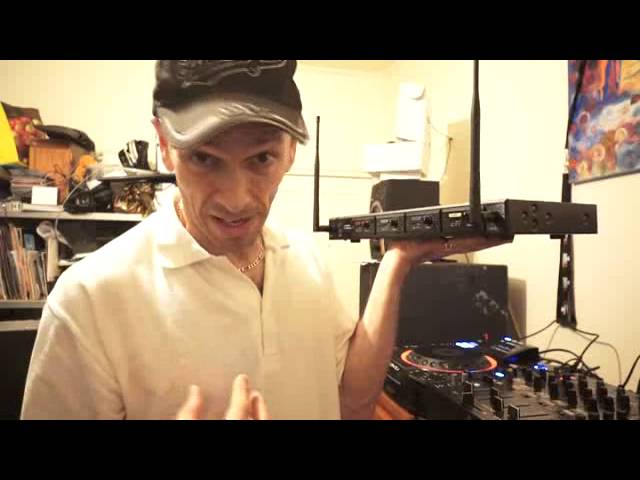
This is the receiver. I'm going to turn that off and I'm going to unplug the power and unplug the unbalanced jack. I know it's unbalanced because when I put it on my finger it fell off. Boom, boom. Okay so, oh god, sad isn't it really? Alright, this is the receiver. There's a bit of a weight to it as well. Again, sometimes... Where quality is concerned, if you get these like some of the controllers, they're as light as a feather. You open them up and there's about one component inside. This is a whole bunch and it's metal as well, it's not plastic. Okay, so very simple here. On-off, power, RF and AF. So we have channel, what is it? A, B, C and D. Okay, now during the course of this video as well I will be adding, probably adding annotations because I may forget certain parts so if I add an annotation I can just sort of, hold on, point to it. If I just do that now, there, hopefully if I'd have forgotten something I can add the annotation there. Okay, so these are pretty much your volume controls for each mic. Now this is the beauty about the receiver. You're going from one output.
Or should I say one input? Sorry, it's beg your pardon. One input from the back of here. If you use the jack, you can go into your own mixer, your DJ mixer, and then you can use the volume controls or the gain controls on here so you can separate the volumes on each of the microphones. So if, let's say for example, I'm trying to explain in greater detail. You turn the microphone volume up on your mixer to say 7 or 8. It doesn't mean to say that every single one of these will be at the volume 7 or 8. You can then turn the volumes up and down according to how loud you want the microphones. So for par exemplar, for example, you're doing karaoke. And there's three people using the microphones, and this one exceedingly loud drunk person. You can turn him down or her down and turn the others up. You've got really one quiet person who uses the microphone down here and is very timid. You can turn that up. Alternatively, you've got a few people that like eating microphones. You can turn them down. So, there you go. Also, if we have a look at the back, very simple. You have power in. You have your USB charger.
6:53 You have a mixed output
You have a mixed output. Now that is what I was using earlier. So if you have got, for example, jack in on your mixer, you go jack in to the mixer and then into here, and then that will let you use every single microphone on one input on your mixer. If you want to alternatively, you can use balanced output on either one of these. So again, if you do have Let's say two XLR inputs on your mixer, or for that matter if you've got a big band mixer you still can use this. If you have got a band mixer then of course you're able to mix the audio a lot better because band mixers are a lot more intricate. You've got bass, mid, mid-high, treble, gain, you've got effects whereas a normal DJ mixer most of the time if you're lucky you've got
There are two microphone inputs. If you're not very lucky, you've got one, but with this, you've got the choice of having four. All right, so I'll unscrew. This is one of the antennas and on the instructions it does say that it can pick up to 100 meters. Now earlier on, I gave the microphones to three children out there and they were running around the whole house like mad people as kids do. And I didn't even have the antennas plugged in and it still was able to pick the signal up. And that's bearing in mind as well that this house has got rather thick walls and there was no distortion and there was no sort of loss of sound. So, there you go. Now also as well, these are the ears or the adapters for the 19-inch rack mount.
You just literally unscrew the three there and then screw them back in to that and then the other side as well. And then that will enable you to attach this to your 19-inch rack mount. Now, I would class this as good, affordable quality. A lot of people are always saying how much are the items that I demo? Well, I could give you the price if I wanted to, but... If I gave you the price now in this video, in six months' time or in a year's time, it could be higher or lower. Higher or lower than it is? I'll want that one. So there's no point in giving the price. What I will do, I'll put a hyperlink in the description that will take you to the CAM website where you can get a lot more information on the Quartet, OK? So there you go. It's four microphones, wireless...
He comes in his own box and if you want to, you can even look at some pretty pictures there. Thank you very much to Cam. Practice and enjoy and have fun doing karaoke. And remember, if you use the likes of the quartet, you can turn them down.
This transcript was produced automatically from the audio of the video and may contain mistakes.





