 3:45
KS32 from Touch Innovations
Contents of the video
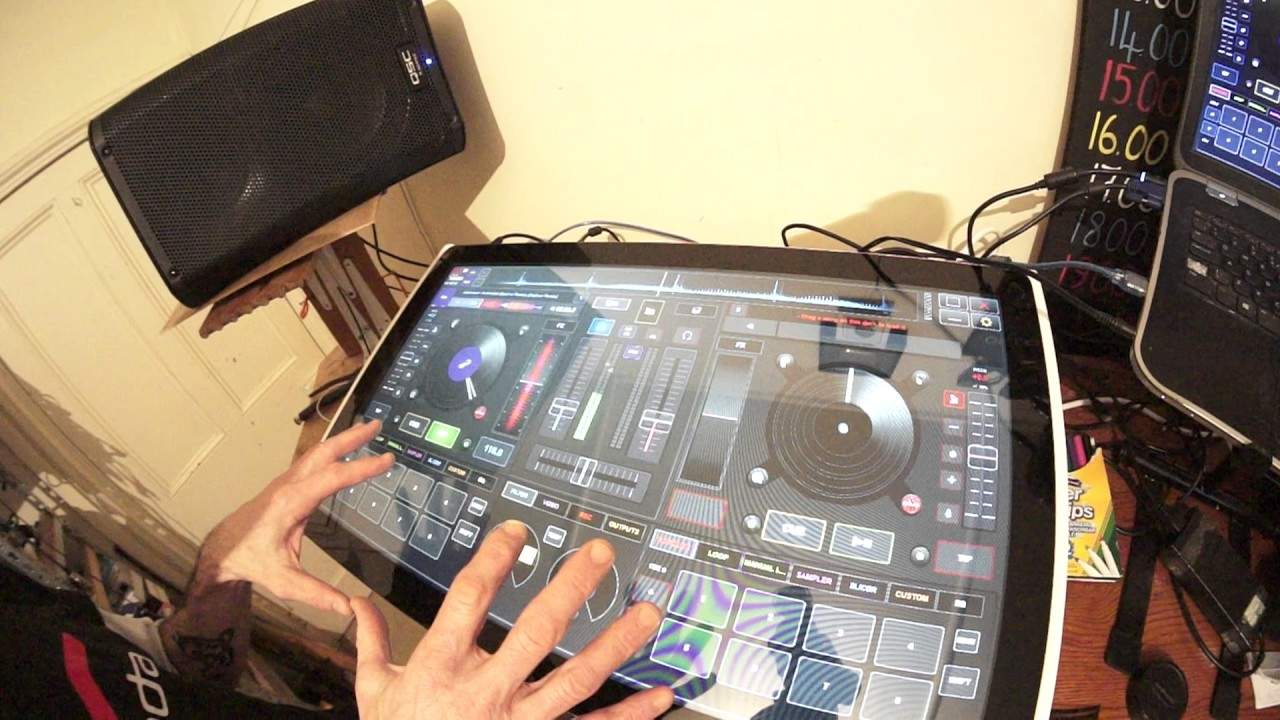
0:00 You've got in front of you the KS32 from Touch Innovations
Alright guys, you've got in front of you the KS32 from Touch Innovations. I'm also using a tune from the club series CDPool Styling March 2017. It's Jamara Kwai, a track entitled Automation. And I tell you what, this guy is a genius. Alright, full stop. If you don't know about Jamara Kwai, then go and check him out. I mean, because the guy's got a voice like no other and he's a very good artist. Okay. So first of all the KS32 touch sensitive screen and I'll be honest with you, it's not for every single DJ out there. I highly recommend, excuse me, you don't go out and buy it on a whim but if you're a mobile DJ who is a bit of a showman or a showwoman for that matter and instead of just standing there playing the tunes and hiding behind something, what you could do, you could turn this around so that people can see what you're doing. They can physically see you
1:29 You can have the other half if you want to, for your light show
Using and manipulating and messing around with the music. Or for that matter, if you want to, you can do video on this as well. So if I go to video, you can see there a small icon at the bottom centre where you would get your video image. At the moment now we just give it a bit of filter. So, alright, we're looking at VirtualDJ at the moment but let's imagine that you have a light show as well. You've got the screen in front of you, full of all the knobs and buttons and pressy-buttony things. But you think, well what about the light show? Well because the KS32 is a sort of piece of hardware you can make it your own, you could have half of the screen for your program, for your DJ program. Then you can have the other half if you want to, for your light show. So what I'm saying here is you can actually make it your own. Not only that...
But you can design it how you want to. So for example, if you look at your light show, let's say we take away the Virtual DJ screen. The whole screen here, this touch sensitive screen, can become your light show. So top right hand corner, you could say have an icon or your moving heads. Top left hand corner, you can have an icon say for your washes. And then down the bottom, you can have some pads, let's say if you want to press red, green, blue. So all of a sudden, you know, you're designing your own show. Not only that, you can layer it. So one layer could be Virtual DJ and then the other layer if you wanted to could be your light show. You can also use it as well, let's say for Ableton. So there are many ways of utilising the KS32.
2:44 Have a read about it first
Let's do a bit of a hot cue. Okay, so again you know this is just a bit of an insight and a demo really on the KS32 and again I would not recommend that you just go out and buy it and think right look what can I do with it? Have a read about it first. Make inquiries let's see if it is beneficial for you. For example, a great place to put this in would be a small fun bar or a small pub or a small club where the DJ is the centre of attention. So not only do you listen to the DJ's tunes, you can watch what the DJ is doing. Alright, so once again there will be info in the description on the KS32 along with a link to CDPool and this is one track from the club series that I downloaded, Jamara Choir.
Please check out Tamara Kwai. She's an absolute star. Practice and enjoy. Thank you very much.
This transcript was produced automatically from the audio of the video and may contain mistakes.





