 4:12
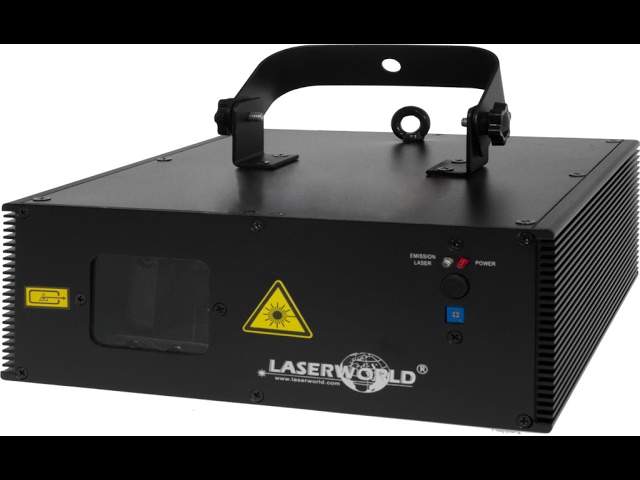
LASERWORLD ES-400RGB QS Showlaser Short demo video
Contents of the video
0:00 It is a 400 milliwatt laser
Alright guys, I have in front of you a laser, believe it or not, from a company called Laser World. It is the ES400RGBQS. It is a 400 milliwatt laser. Let's have a look at the front of it. There's the aperture, that's where the laser light will come out. Never look into any laser, whether it be a tiny little minute thing or a very big laser. Just don't do it because you could potentially hurt your eyes big time. On the right hand side we've got a red LED shining at the moment which is telling us that the laser head is powered on and ready to go. Which is, in a way, red is warning you, I'm ready, don't look at me. Below that is a microphone and below that is a small tiny little Phillips screw and you can turn that in one direction to increase the intensity or the sensitivity should I say of the microphone or decrease it. So why would you have that?
0:57 Of course, look at it this way
Laser is very suitable for the likes of a mobile DJ, a fun bar or even a small nightclub. So imagine if you've got a small nightclub or a fun bar and dance floor's one end of the room, the other end is where people can sit and drink and not have loud music. Well it's probably a good idea to have this that side of the room which means then that the laser projection And turn the sensitivity of the microphone up simply because the laser will be a distance away from the speaker system. So, of course, look at it this way. The closer it is to the speaker system, the more you turn the sensitivity down, the further it is away, the more you turn the sensitivity up. Right, let's have a look at the back. Now, very important. Let's imagine you plug your laser in, you turn it on, you've got your key and you turn your key on.
And you're pretty much good to go. Not at all. You need to make sure that you have the remote lock plugged in in place. That is very important. If that isn't in place, it's not going to work. You will not have any form of laser light leaving the laser. Now I'm going to place that there. At the moment I've got it set up on a very basic DMX controller which proves to you it will run DMX. I think it's six channels. So there it is, bearing in mind now we are in a room with the light on. There is a bit of sort of movement with the effects but you know this is not a high-end expensive laser. If you want a high-end laser then you're going to have to spend a lot more money. You know add a nought minimum onto something like this. Right so what have we got?
2:48 We've got RGB which is of course red, green and blue
We've got RGB which is of course red, green and blue. Now I'm going to turn the light off and there you go. Alright so pitch black now and you get a good idea of the effects. Now bearing in mind as well we're looking at this, the laser itself is probably only about 14 inches away from the wall. So if you're going to use this with a DMX controller then you can not only Choose what colours you want, but you can also choose the size of the effect. So again, earlier on, you're quite a distance from the wall you want to project onto. Using a suitable DMX controller, you can make sure that the image will fit on the wall. It isn't too small, it isn't too big and also it's not hitting the dance floor as well. Alright, so there you go. It's a very simple and quick video on the ES400 RGB.
QS from Laser World. There will be a hyperlink in the description that will take you to the Laser World website where you can get more information on this. So there you go. It's a rather nice piece of kit, not to be abused, definitely suitable for mobile DJ and also like I said your fun bars and your small nightclubs and I will leave it there and finish off with practice and enjoy. Thank you very much.
This transcript was produced automatically from the audio of the video and may contain mistakes.





