 18:35
Learn to DJ with Tribe XR Virtual Reality Mixing Music Experience Without the Expensive Kit
Contents of the video
0:03 Virtual reality, tribexr virtual, different angles
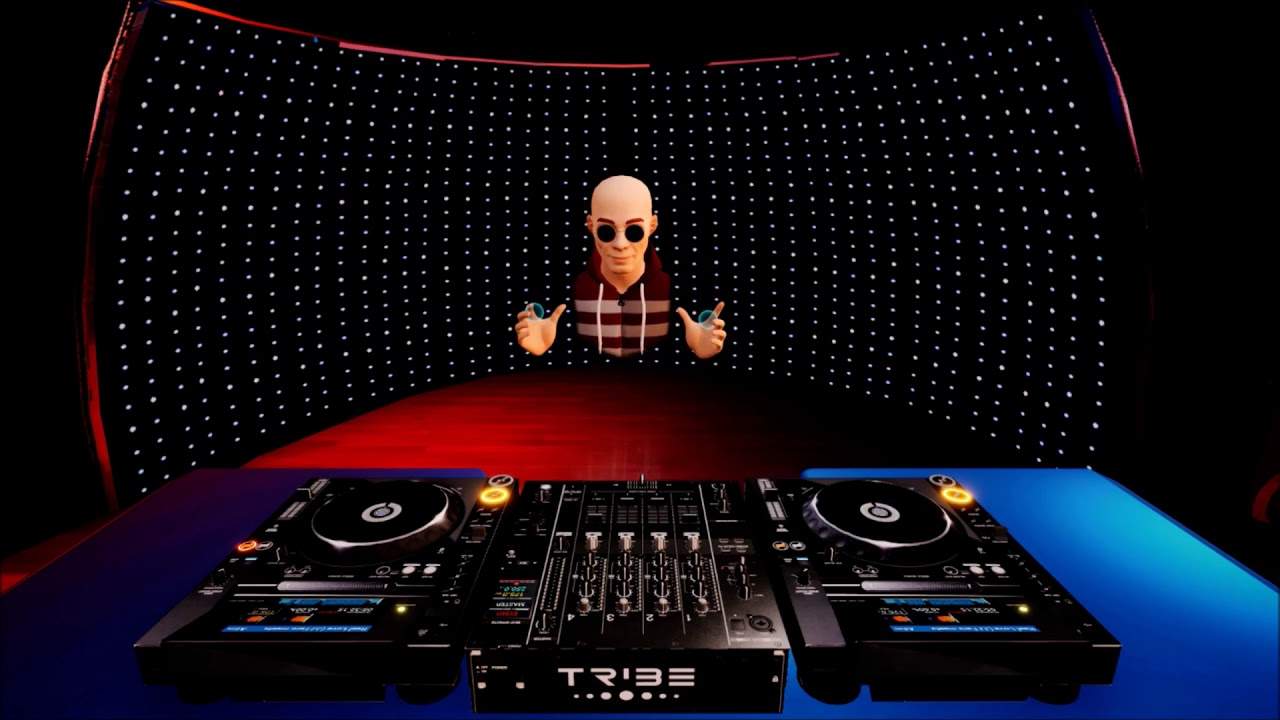
Alright ladies and gentlemen, welcome to TribeXR. I'm Jonathan Ellaskins, The DJ Tutor, and in front of you we have a mixer and two turntables. Now, I can do this. Look, I can actually put my hands through this kit because we're in virtual reality. Now, if you know anything about TribeXR and the virtual reality team from TribeXR, you'll know that I've done quite a bit of work with them over the past couple of years doing some live streams. But what I'd like to do now is, over the next however long, do a couple of sort of demonstrations and tutorials on how you can use this kit. Now, first of all, in the description of this video will be a link to the Discord channel and also TribeXR where you can get info on how you can get this stuff.
And when I say how you can get it, you don't actually really get anything because this is virtual reality. If you're not familiar with virtual reality... but you're a bit of a gaming freak, then it's like gaming on steroids because... when you do normal gaming, you've got a hand controller, you look at a television and it's just, it's like one two-dimensional. Whereas in a way TribeXR and virtual reality is almost three-dimensional. As I look around, I'm in a room, I can see things as I move around. I'm not looking at something as I move that says, it's at the same angle. As I move, the angles move here as well. So when I'm looking at this CD player from different angles, I'm seeing it in different angles or...
2:06 Today is about live streaming
Well, I hope you get what I mean anyway. Okay, so what we have is two virtual turntables. We have a four-channel mixer. Now, at the moment, I'm just using two decks and I'm using channel 4 for the right deck, channel 1 for the left deck. If I wanted to, I could upgrade and I can get four decks. So right, there's a lot to this. It's hell of a lot to this. But what I want to explain today is about live streaming a little bit. Also about how you can do back-to-back and just a little bit of a tutorial and something that will help you in beat matching skills and also timing and phrasing. So firstly, have you ever wanted to do some live streaming with your mates around the world? Now, that's a really good question because there's a few ways of doing that.
One is having a vast amount of money getting on an aeroplane and going and meeting them halfway around the world. The other one of course is to maybe do it online via Skype and have a webcam so you can see them and they can see you and so on which to be quite honest, there's going to be a lot of lag and it's probably not going to sound very good. The other way is this through TribeXR because I'm standing here and if I want to, I could go public in my profile through Oculus and I could have next to me a guy, a girl from around the world and we can do it back-to-back. Now, here's the difference with a back-to-back in Tribe. Let's say instead of say doing it back-to-back on real kit. Now when you're using real kit,
You're always exchanging headphones. You can't cross each other's path. If the other DJs on the left side, you're on the right, you've got excuse me and so on it's very awkward but in Tribe in virtual reality, you can actually move around the decks at the same time as the other person is moving around the deck. So while I'm on the left, give me a second. Yep, while I'm on the sorry on the right dyslexic while I'm on the right, I can go to the left even while that person is on the left and if they're on the left and I'm on the right, they can come to the right and so on. I hope you get what I mean also we can use the headphones at the same time. So there's none of this. Oh, I need to listen to Channel 2 and I need to listen to Channel 1.
You can both just mess around with the headphones as much as you want. It's it's great. It's it's quite bizarre. It's a little bit difficult to get used to to begin with because the whole concept of what's going on is alienation. You if you've never done it before but over time you get used to it and it becomes a natural flow. No, I've worked quite a bit with Ozan who is part of the tribe XR team also now a good friend of mine from Ireland a guy called Mad Paddy which I mean he is just a beautiful guy. Well actually they both are they're both amazing people but what I like about tribe XR and the virtual reality decks here is that you don't really need any space. You don't have to put kit anywhere. You don't have to plug it in.
5:16 I'll start again the the tracks that you can use
You don't have to mess around. All you need is what I've got the hand controllers. You have the item on your head the goggles so you can see what you're looking at. I've got some headphones on but if you get the correct goggles, they come with headphones anyway and then you're good to go now if you get tribe XR and you're a little bit concerned about world music. I mean, how do I? Put my music? How do I play my own music or maybe you haven't even got any music don't worry because tribe XR comes with its own tracks for you to use anyway, and I believe they're royalty-free or no hold on. I'll start again the the tracks that you can use. You're not going to get flagged for using those tracks. So if you want to use them in tribe XR
No one's going to slap your wrist and say you haven't bought them you can't use them because the DJ stroke producer who gave the track tracks to tribe XR said there you go. The tracks can be used by anyone who comes into tribe XR. Now that is very very that's just amazing. That's fantastic. So big kudos there. Okay, also maybe you've got your own tracks and you want to bring them into tribe XR. It's very simple. What you do is you put your your tracks your folder into the tribe XR. Folder into your computer and then they should come in to the app here. Now again, I will give more detail over time step-by-step on how you can get to just mixing whatever you want. But for now I have got on the right hand side. Let me check make sure I have got real love JJ Farrow meets
Maurice Dupree the club mix from karmic power records. So that's ready in deck on the right and it's ready in deck on the left now, I don't know if you notice but as I put my hand over the turntable the jog wheel here that is shining. So what this tells me is that I am now ready to move that if I want to so what does that mean? Well, basically your hand okay is holding the sort of controllers. So as you hover over certain parts, parts of the mixer or the CD player all of a sudden the part that you're hovering over will start to shine and that's the indication that you are able to move that part of for example, the CD player the mixer. So as I hover over the right hand up fader, I can now bring that down and up same with effects.
7:55 Engage the color effect the filter press it again and now that's disen
I can engage disengage same and these are the heat effects over here are the color effects. So engage the color effect the filter press it again and now that's disengaged. So let me give you a demonstration of let's say for example, the filter so press play. Okay, bring that up once again. Thank you very much for karmic power or two karmic power records for letting me use their tracks in my videos and a big shout out to of course The Don himself Mr. Lenny Fontana. So engage filter and move the filter dial and we can hear that next one in and the right one back in. Okay. So what I've done here bit of a sort of a tutorial for you as well because I like to do all kinds of stuff on the right hand side on the left hand side,
We have exactly the same track and they're ready on the count of one. Have a listen 1 2 3 4 now there. I just pressed the cue and I hovered over the queue while the track was playing as soon as I take my controller hand controller off that it will just jump back to the position where the queue was to begin with but if I press play pause the track will indeed play and carry on playing when I've moved my hand away from the plays play pause position. So have a listen 1 2 3 4 1 2 3 4 cue it up again and it's back to the beginning. So what I'm going to do, I'm just going to go from the right deck to the left deck to the right deck and the left deck very simple. I'll do it first and then I'll explain what was happening what was going on
10:44 We had this kind of phasing sound
And what I was doing so, okay. So firstly what I was doing is I was starting the right deck off letting it play and then I was starting the left deck at the same time as the right deck was playing and then I was queuing up the right deck and starting the right deck off the same time as the left deck was playing now we had a couple of sounds there. We had this kind of phasing sound. We're almost felt as though it was an aeroplane flying above you and then we had this sort of sound that it was almost like an echo. Now what was happening? Okay, firstly when we heard that sound of like that aeroplane sort of sound that was telling me that the two tracks the beats were exactly at the same BPM. They're exactly in the same position if you looked at the way format on
The other hand when we heard that sort of double tap sound, that was telling me that the two tracks were slightly off beat. So one beat of one track may have been slightly behind or in front of the other track now, what we can do is if we hear the second sound I mentioned we can change that and try and get it back to the aeroplane sound by moving the jog wheel. But what I need to do is I need to go to up. We're on CDJ mode anyway. Yeah, so I need to make sure I'm on CDJ mode because of what I want to be able to do is move the top of the jog wheel clockwise or anti-clockwise to just maybe nudge it forward a bit or nudge it back. If I have it in vinyl mode and I use the top of the jog wheel and try and nudge it forward or back,
I will actually stop the track because if you have the turntable in vinyl mode and you touch the top you will stop the track. So the term vinyl mode is meant to almost remind you of the good old days with vinyl turntables. If you put your top on the top of the vinyl while the turntable is moving and the needle is on the record, the track will stop because you're stopping the vinyl which in turn of course then will stop the music. So let's just try that now. Press play on the right. Now on the left. All right, we've got that aeroplane sound
Very slightly, so listen. Now listen, can you hear that slight echo? Let's make that echo worse and worse. Now it got worse because I was moving the jog wheel the wrong way round. What I'm going to do now is move it the other way around. Now the beat will come in on the right. Three, two, one. One. Now then, anti-clockwise listen. Here we go, we've got that aeroplane sound. Like a jet sound. Let's mess around with the filter. Cue that up and cue that up. Okay, so we had that phasing sound that it's called. We have that aeroplane sound and also we have that echo as well. What we did do though, we started the right deck off first and then we started the left deck off. Now this is slightly more difficult but it's good fun.
I'm now going to start the decks at the same time by putting both hands one over the right deck, one of the left deck and praying that I get them right. So but this time the two tracks or the track, the one track because it's the same track of course should theoretically start exactly the same time and we may hear the echo. We might not. We could hear a big echo, small echo. We could have that phasing, the aeroplane sound but this is what we need to try and mess around with. This is really good practice. Here we go. And two, three, four. Oh, right deck didn't start. Let's try that again. Two, three, four. There we go. Now can you hear that phasing sound? Let's change the frequency of that by moving one of the decks.
We can, there's four options. Right deck, forwards, backwards, clockwise, anticlockwise. Left deck, forwards, backwards, clockwise, anticlockwise. There we go. We get into an echo now.
Let's get a really bad or big echo.
15:36 I move this jog wheel clockwise
Now that doesn't sound so bad in a break but as soon as the beat comes in, that's going to sound pretty bad. Okay? Now I move this jog wheel clockwise. Now to go back to how it sounds, sounded, I need to move this the opposite way now. See it back in beat. Have a listen. There we go. We've got the aeroplane sound again. And now, here we go. Here we go. Now if I want to, I can use the crossfade. Go from right to left. Listen. Right side, left side, right side, left side and both together. Okay, let's do the same on the other side. Aeroplane sound. Let's get that echo. Let's get rid of that echo. Opposite way. Filter. Engage first. There you go. All right. Now this is so much fun. And in TribeXR, so much more that you can do.
Now if you are interested in getting this, then look in the description and you will see a link to TribeXR where of course there's so much more info on this virtual reality experience. Now just to reiterate as well. Okay, if you can't afford to buy the hardware because let's face it, you know, you can buy relatively cheap inexpensive hardware, but you're limited to what you can do. Whereas something like this, this all this kit is like the industry standard you would have in a nightclub for an absolute when I say fraction of the cost. I mean literally you can go out buy a few drinks a bag of potato chips for your mates and it's gone in a few hours. Whereas for the same price you've got something that should theoretically last you indefinitely.
Of course, you will need everything else to go with the virtual reality setup. But once you've got that the sky's the limit. All right now if you want any more information like I said on this check out in the description a big thank you to the TribeXR team and also to Mr. Lenny Fontana from Karmic Power Records to let me use his tunes practice and enjoy.
This transcript was produced automatically from the audio of the video and may contain mistakes.
Related videos
-
WHY Vinyl and WHY Is Now the Time to Go Old School
He admits at the start that this one might annoy people, and some of it should be argued with. The practical half is excellent. The claim…