 10:47
Make DJ Folders Based on Pictures in Your Mind Underground CD Pool May 2020
Contents of the video
0:00 Got a track here called Alka
Alright, got a track here called Alka. This is the intro version and it's from CDPool May 2020 from the Underground releases. This video I'm doing is all about making and designing your own personal folders. So what I'm going to do is I'm going to go through the Underground series May 2020 from CDPool and I'm going to put the tracks in imaginary folders. Now, a lot of people, what they tend to do at the moment is they will have, for example, their house tracks and they'll put them in folders relating to key. That's great because they're all in the same key, but that doesn't mean to say that they're the same vibe and energy and feel. You could have some that are euphoric and big and bold and brash in A1, but then at the
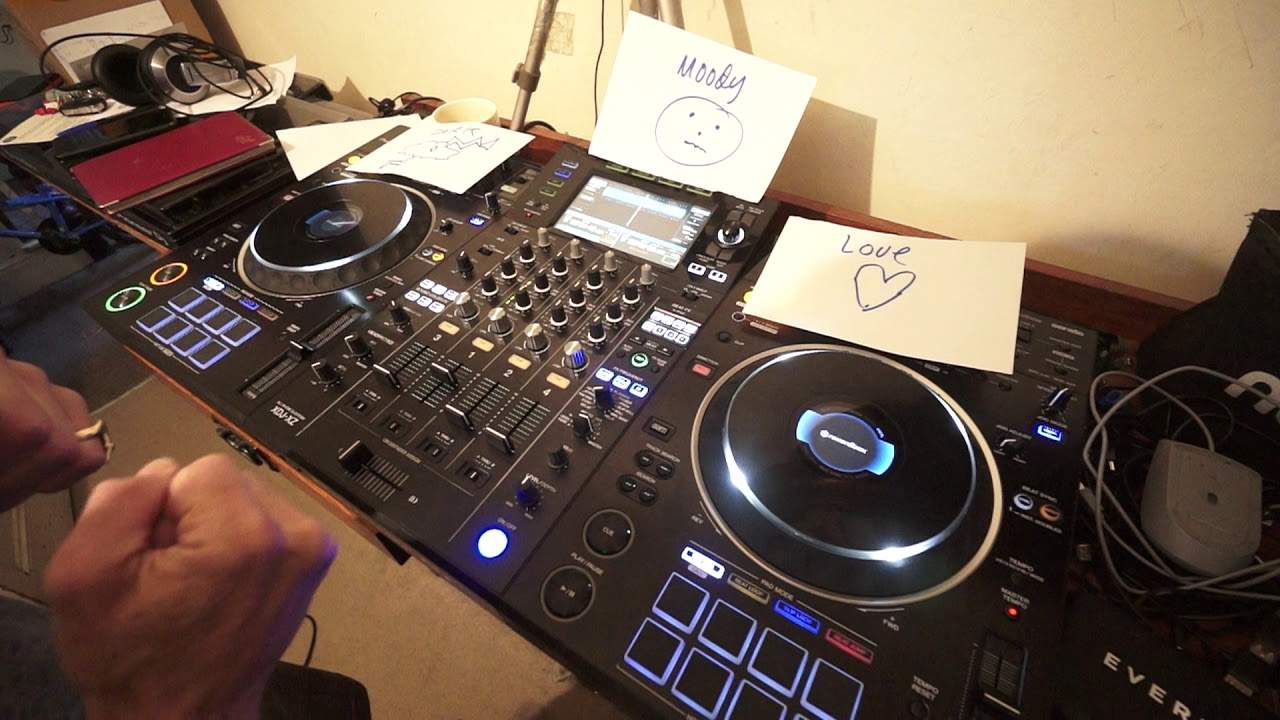
So, some tracks in that same folder that are very chilled out and laid back. So, if you wanted to compile a set in key, you'd be trawling through all these tracks of different feel and energy. On the other hand, let's imagine you designed your folders based on feeling. Now, let me give you an example. These are pieces of paper. Imagine that you've opened up There are three folders on your laptop. This one folder here, I'm going to call this one, let's say, Dark. So I'm going to call it Dark, D-A-R-K, and I'm going to put, I'm going to have a cloud there, and I'm going to put in this cloud a clap of thunder. Light, thunder, sorry, lightning, sorry. Alright, so there's my picture of lightning. My other folder is going to be called love and I'm going to have a picture of a heart. Now the pictures are really important and this one, moody, so moody and I'm going to put a picture here of a face that's just, you know, a bit moody.
2:27 Bear those three folders in mind
Alright, so bear those three folders in mind. Let me put them here so we can still see them and let's put them like that so I can still see them. Alright, now let's just think about this track. You heard it in the background and this tune, I would sort of class this as almost moody. It's got that underlying sort of, not dark feeling, but it just seems to be a little bit moody. So what I would do in my imaginary folder, so let's relate back to or let's now relate to our laptop, your home PC, you're listening to songs, you've opened up those three folders on your desktop and you listen to that track and you think yeah it's sort of moody. Let's put it into that folder. Alright, now bearing in mind you've only named the folders, you can't, as far as I know, put, unless you can put an emoji in there as well, the image. But the image is about the image you've got in your mind. So for example, tracks that have that warm hugging feeling, you could have a hug as this imaginary image in your mind or a heart as I've done there. The moody one is the picture of...
The face, whereas the dark, the deep, is that picture in your imagination of the lightning bolt through a dark cloud. So as you're listening to your tracks, what you're doing is you're trying to... Take the sound and put it into one of these pictures. When it does relate to one of these pictures, you will then put that track into the appropriate folder. Hope that makes sense. Alright, so the next one is automatic. So let's have a listen to this. Now again, this sort of style, the underground, is more your dark and your moody, alright? So this one to me now... It's like Moody. So I put that into my Moody folder. Put it forward a bit. Okay, one here. This is quite appropriate. It's Babyface. Now don't forget all of these tunes can be found May 2020 from the website. There will be a link in the description. Now I've got love in this one. It's almost like got that uplifting euphoric kind of feel. But again if you think about it now we're dealing with
5:54 I might have another group of folders for my more euphoric, uplifting
A sort of style of music with the Underground Series. You know, what CDPool do, alright, and they are very, very clever at what they do. They've taken, let's say, a group of music styles and put them into the Underground Series because that's the ilk, that's where they're from. They're not supposed to be big, handbag, euphoric, sort of get up and dance with loads of vocals. They're meant to be quite minimal and like experimental. So what you could have then, if you think about it on a broader scale, you could have a folder on your laptop with tunes. Inside that folder are subfolders for one would be the underground styles, another one could be the handbag euphoric styles, another one could be your hip-hop styles, another one could be let's say for example your 70s old school styles and then you would open up
Those folders then to find these subfolders again based on the moods that those tracks give you. Okay, so I might have another group of folders for my more euphoric, uplifting dance tracks. Alright, so I hope you're getting where I'm coming from here because what this will do, this will help you in designing a much... The DJ Tutor offers a wide range of features, including the ability to play in a variety of ways. This one here is Freaky in the Streets, the extended mix. Maybe dark? Yeah, dark. Definitely dark with this one. It's definitely got that deal. Yeah, definitely. You know, you're in a cave, you're walking in a cave, it's very dark, you can hear strange sounds in the background. Ooh, I like it. Alright, so how is something like this going to help you when making your mix? Well, if you think about it...
8:06 In fact, you've got many
If you need a moody mix, you can then go into your moody folder that hopefully over a certain time is going to have a lot of tunes in it. And then once you've got that folder full of your tracks, you've got a couple of options. In fact, you've got many. I'll give you two. One is just to work from that folder. and make your mix the other one then is if you want to put that folder into a program where you can get the keys of the tracks and then make sure you mix in key but also uh no i'll start again make sure you it once start again after starting again i don't like editing videos once you have got all of those tracks in key you can then make your set Based on it being in-key, but not only that, you can choose the tracks according to how you want the moody set to evolve, let's say. Now I hope this does make sense, but to me it seems far better doing it this way than just chucking 100 tunes you've downloaded into some form of software that will analyse the keys and then going, let's do a mix.
In F sharp or A1 and hope for the best. No, much better, alright? Now, if you're interested in CDPool, go and check it out. There's a link in the description. And I do believe they're still giving a good percentage off people who use them for the first time on a certain amount of downloads. Terms and conditions do apply, but in the description of this video there'll be a code. If you use that code, you will get your discounts. But if you do want any more info, of course, get in touch with CDPool and they can explain if you are eligible to download CDPool for a start. Alright, I hope this has been a help. This has been the underground releases. I'm going to play one more. Let's do one more. Sorry. Let's have a look. Okay, Keep On. Okay, so this one is entitled Keep On, the Steve Lee Club Mix. Will it be love? Will it be moody? Will it be dark?
Let's find out. Here we go. Oh, I'm looking at love here straight away. Oh, straight away. Do you see where I'm coming from here? The first few little notes, you're like, oh, it just makes you feel, yeah. Yeah, love. End of, end of. Anyone thinks this is moody, you're an idiot. Anyone thinks this is dark, turn off and take up Flower Engine. Practice and enjoy. Thank you.
This transcript was produced automatically from the audio of the video and may contain mistakes.