 14:53
Martin Audio Blacklinex Powered Speakers
Contents of the video
0:01 Yes, you DJs now have the power
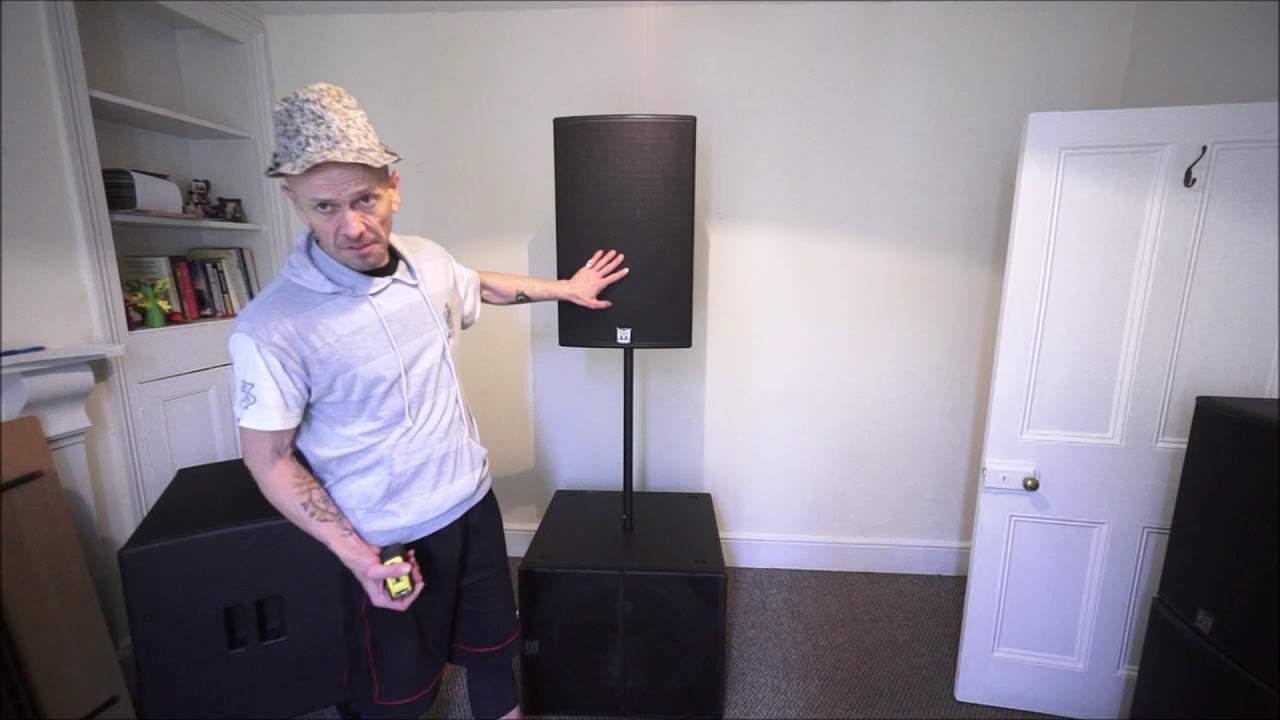
Alright ladies and gentlemen, welcome to the world of Jonathan and welcome to the Blackline X powered series from Martin Audio. Yes, you DJs now have the power. Actually it's in the Blackline X powered. So this video is sort of an overview of the new system. Now they have got a Blackline X passive. This is the powered, so for all the people out there who have no idea what powered is, it basically means that the amplifiers are inside the speakers. That's right, yes, there's no need for external amplifiers. So I'm going to show you three of their speakers. We have the 18 down there which has got a Class D amplifier that's got a peak capacity of 2000 watts. And the 18 has a 4-inch voice coil, so a lot of good heat dispersion there. Now I've got wheels on the back of that, and during the course of this video I'm going to sort of demonstrate ways of setting it up. One little way I thought how you can set it up as well, if you let's say get four 18s and four mid-top, there's a good way of setting it up without having to pole mount them or anything like that, but you're still going to use a pole.
2:18 Later on in this video
And I'm going to attach that to the top hat, that is known in the trade, in the 18 inch. Very soon during the course of this video as well we'll have a small look at the screen at the back of one of the speakers. They're all very similar and I'll run through some of the features. So that's the 18, I will be giving you an idea of size as well because I have a tape measure so I'm going to measure it now! 12, and I'll put that on top. Now the 12 is relatively heavy. Again, Class D amplifier. The 12 has got a 2.5 inch voice coil for the 12 and a 1 inch voice coil for the CD horn, that's short for compression driver. You've got 1000 watts peak on the 12 and 300 watt peak on the high frequency. I've had these for a while, the only reason I'm doing this video now is I wanted to give them a little bit of a go and they work. What I do like about the 12 is you're able to EQ the sound to the room so it's not just turn it up and turn it down on the settings at the back which I will show you later on in this video. You can maybe elaborate a little bit on the highs, maybe you want to take away some of the mid and maybe you want to have a flat bass, well you can do just that.
Also, there are settings with the sub. So let's say you do have 12, you can set it so the 18 knows you've got a 12 on the top. Alternatively, you can set it so the 18 knows you've got a 15 on the top which is right down there. Now I've got that pole mounted so what I'm going to do now is give you an idea Our height, because us DJ junkies we like to just know spec and we just want to know stuff. So if I have a tape measure there, the 18 is 21 inches high, roughly about sort of 21 inches high, and the width is just shy of 26 inches, and the depth Ellaskins is just shy of 25 inches, so that will give you a rough idea of size. They're not small, again 18 inches, they're going to be big and they're quite heavy as well. Now for everyone out there who seems to think that as tech moves on everything's going to get lighter and lighter, I'm a firm believer in if you're going to have a sub it's got to have some weight to it because the last thing you want is the thing dancing around the room.
That isn't going to. When that starts pushing out some serious sub-bass, it's going to stay exactly where you put it, which is what you want. Right, so the 12 height is just over 22 inches and here at the front of it we are looking at 14 inches and the depth is just a foot, something like that. Now these aren't trapezoid, but you can use them as wedge monitors. Now for anyone out there who's wondering what a wedge is, it's got nothing to do with sticking it next to the door so it doesn't open, even though you could probably do that and the door will stay open. It's for the purpose of, let's say if you're a band and you want to have your speaker facing you, let's say the guitarist or the keyboard, something like that.
5:08 We've got the 15 there now on the 18-inch
We've got the 15 there now on the 18-inch. Now, the 15 has a 3-inch voice coil for the 15-inch driver and a 1-inch voice coil for the CD horn. You can expect to have 1000 watts max output with a Class D amp on the 15 and 300 watt max on the CD horn. Now I'll give you an idea of size, a rough idea. We're getting on for 17 inches. The depth is 16 and the height is about 27 inches as well. Again, I'm going to give you my absolute honest opinion. 18 and the 15. Now, I would prefer to use the 18 with the 12 because the 12... is going to be more efficient you're going to get more of a punch sound uh you're probably going to get a brighter kind of sound because the 18 is going to be doing the hard work so the 18 is the driver that's going to be sitting there and chugging out that sub whereas the 12 then can just tick along nicely and give that mid and the vocals when you have an 18 in the 15 it's almost like well why have a 15 because these guys here
7:01 For one gig I did I took the 212, 218s and it was fine
A great for, say, a mobile DJ or a small band by itself. Because when you get to a 15-inch, you're then able to produce better low-frequency sounds. And you will be able to produce better low-frequency sounds than the 12-inch because it's a bigger driver. It's going to be able to move more air and just get a little bit lower in the hertz region. And that does hertz. Does it hurt? Okay, never mind. All right, whereas the 18, I mean that is made for one thing and one thing only to churn out some good solid bass. So if you think about it, that's doing the bass 12 inch mid and top, get a good crossover frequency and then you don't have to worry about the bass going into the mid and top or the mid and bass, sorry, the bid and high going into the bass speaker. So for one gig I did
I took the 212, 218s and it was fine. It was adequate. In fact, I don't think I ever turned it up. There was no need. A couple of times when I did sort of maybe tweak it slightly, people looked at me as if to say, will you turn it down? And I was thinking, well, it's probably only a 50% anyway. So there you go. Okay, so 15 and 18, I would say that's great for a band, something like that. Whereas a mobile DJ, maybe, you know, the 12 and horn is quite adequate. But you see, if you're a mobile DJ and maybe you're doing small bars and pubs and clubs for a maximum of 75 people, a set of the 15 would suffice. That's all you need. You don't need to go into subs or anything like that. If you've got one 18 or two of them,
Then your 12 and horn or your 15 and horn won't have to work as hard, meaning that you're going to get a better clarity and quality of sound. Right, I'm going to pause the camera and we'll have a look now at some of the settings. Alright, so we've got the back of the Blackline X powered from Martin Audio and I'm using the 15 and horn. For this part of the video, but what I'm about to explain will be exactly the same with the 12 and horn as well. So just out of camera view down there we have the power in and the on off. We have channel 1 and channel 2 and a mix out. So let's say for example you're a band, you're a DJ, you'd go from your band mixer to either into channel 1 or into channel 2 via quarter inch jack or XLR.
9:37 Let's have a look at the speaker control system here
Same as a DJ, you'd go say if you had two of these left out into one of these right out into the other speaker but you could go either into channel 1 or channel 2. Now your mix out is great because what that does is it will just send the exact signal from the mixer that's going into the first cab into the second speaker so once it leaves mix out it hasn't got Power from this amplifier going into the next. It's just the same signal that's going into the first one will leave the mix out into your next speaker. Okay, so let's have a look at the speaker control system here. Okay, so all we have to do is push for settings. Now this should be the first screen you see which is channel 1, channel 2, BT, Bluetooth
And the main out. So as soon as I start moving the dial, we can see that's a little bit brighter now. And the first one here on the right hand side is the overall output. So we can just have that off or we can start to move that. Now the minus is minus dB, minus decibels. I'm going to put that to zero. So once I've done that, press down, that's my out. And let's imagine we have an input on channel 1. So I'm highlighting on channel 1, press down and now I can do the same here. I'm just going to set that to 0 dB. Turn that a bit more and press down. And now I'm going to move this to the EQ on channel 1. Press down. OK, so now we've got this screen. Go a little bit closer. Okay, what I can do here now is I can change the sound and the tone of the high, the mid or the low. So let's imagine I want to have the high 0 dB. Hold on, go to high again, press down. So now the number in the high area is highlighted and I can increase or decrease the decibels there. So I'm going to put that at zero, press down.
11:59 Mid, I can do the same
And now we'll go to the mid, I can do the same with the mid, up or down. And then with the low, go down again, sorry, takes a bit of getting used to. And then turn that and then exactly the same then I can go to HPF which is short for high pass filter. Now this is great let's say if you don't have the Martinode Audio 18 subs, you have another manufacturer and you want to set Your mid and top. So you don't want any bass going into it, you want all the bass in the sub. So what you can do here is you can set it for a crossover. So I'm going to have the crossover frequency here let's say at 90 Hz. So set that at 90 and press down. So what that means now is this speaker will reproduce no frequencies below 90 Hz. Alright, it's as simple as that.
Let's go down across here back to the mixer and press down. And now we're at the first screen we saw. I'm now going to go to the mix here on the output. Press down. Let's go through some of the features here. All right, so we've got presets. Press down. We can have full range or we can have with sub or monitor. Okay, so go down to the arrow. Press down and now we have Bluetooth. So again, the great feature about the Blackline X Powered is let's say you're in an environment where you set your system up during the day and maybe the guests want to have some background music. Well, gone are the days of you having to supply a cable, an iPhone cable, Android cable, mini jacks, just all that sort of stuff. It's gone because all you need to do...
All you have to do is enable the Bluetooth, get them to go onto their phones, go to Bluetooth, should be able to connect it very simply and then that's it. They are then in control of their music. Okay so Bluetooth settings here, screensaver, we can lock the system as well. So once you've... Gone through the presets, you've set an optimum level, especially if you have to leave the speaker and walk away and you don't want people turning it up. You can set a lock number in there so only you are the one who can change any of the settings, okay? Alright, so a bit of an insight here into the Blackline X powered series from Martin Audio. There will be more videos to come and I will be using this as I have done.
In gigs in the future. Thank you very much, practice and enjoy!
This transcript was produced automatically from the audio of the video and may contain mistakes.





