 4:47
My first go on the Gemini CDT-05 MK2 hybrid turntable
Contents of the video
0:00 It's the Gemini CDT-05 Mark II
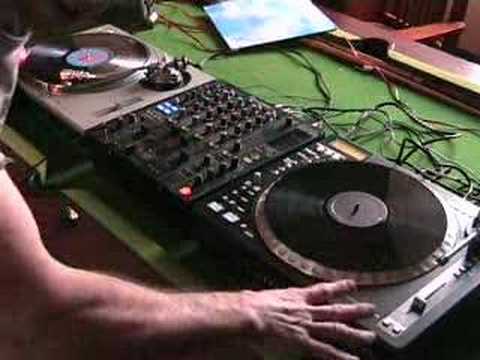
Alright folks, in this video I'm going to take my first look on this guy here. It's the Gemini CDT-05 Mark II. It's a pro hybrid turntable. Now what it actually does in total yet, I don't know. I'm going to be looking at it over quite a few months, slowly getting to know it. As I get to know it, I will explain what I know to you guys. But basically what we've got here, we have got... A real vinyl turntable with a real arm and at the moment there is not, we haven't got a cartridge in there but in essence I could put a cartridge in there, I could take my vinyl collection with me and I could play vinyl normally on that as you would with a normal turntable. Like any sort of vinyl turntable, that's what it will do, exactly the same. Alternatively what I could do, I could go to a function
1:26 There's a lot more to it that meets the eye
Without the cartridge and style I in, I could take my CD collection, put my CDs in here because it's hybrid. It will do vinyl and it will do CD. But here's the beauty about it. I put my CD in here and then all of a sudden I can manipulate this piece of vinyl as though I'm playing real vinyl but I'm actually playing the CDs that are put in here. Now at the moment I've got Michael Jackson, Billie Jean so if we just... There we go. Now you can see there's no stylite, no cartridge in there, but I'm using the vinyl. Now bearing in mind this is just video number one and this almost is explaining, not in depth, but actually explaining what this particular piece of kit can actually do. So there's a lot more to it that meets the eye. You know, we've got reverse, we've got loop, we've got effects etc.
On this, we've got a track on this side, it's The Fog, it's entitled Been A Long Time. This guy here, we've got Michael Jackson and Billie Jean. So what I'll do, I'm not going to use any headphones, we'll wang the crossfade to this side. So initially you'll just hear this particular side. The track here is being played on a normal turntable, it's an SL-1200. And then on the right hand side, we've got the Gemini turntable. So let's have a little listen to this guy. And then we'll mix this particular track in. So normally I'd be doing this on the headphones. I'd do that on the headphones, normally. First impression is now actually go to a function and I can take a real vinyl turntable but I don't have to take my vinyl. I can take a whole load of CDs and I can be a vinyl DJ, a turntablist, whatever. It doesn't really matter.
3:47 Vinyl turntables, serato scratch, scratch live
Again, alright, we do have the likes of Serato Scratch Live which is near enough exactly the same. With Serato Scratch Live you can take any vinyl turntables, you can put some virtual vinyl on your turntables, you have to take your PC, your laptop and bingo, you become a vinyl turntablist. But the difference with I suppose one of these is you don't have to take a PC. All you need is your music in here on CD. Like I said, video number one. Over a period of time I'm going to be doing a whole bunch more, but this really is just to give you a general idea of what this actual piece of kit can do. There's a lot more to it that meets the eye. I need to look in the instruction manual and I quite often call them destruction manuals because it basically destructs your brain. Anyway, my wacky way of looking at things. So there you go.
A little bit of an insight into this. I'll be giving you what I think is good, not what I think is bad about it, because so far the only thing I think is bad about it is that I've only got one of them. Alright, thank you very much. Practice and enjoy.
This transcript was produced automatically from the audio of the video and may contain mistakes.





