 19:27
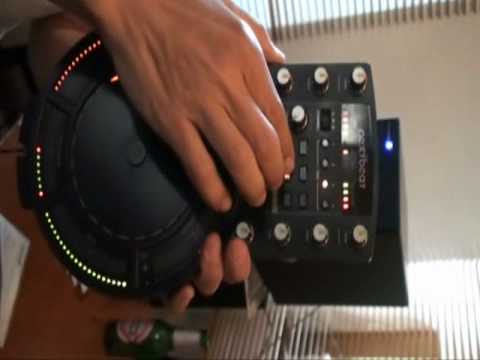
Nextbeat comes to Wales Live Demonstration on Blog TV
Contents of the video
0:09 The way of describing it, it's a portable DJ unit
So what is an X-Beat? Well, the way of describing it, it's a portable DJ unit. You've got quite wicked effects on there actually and also, you know, you can do usual scratching. You've got a sampler. That's your bass unit there. That's where you load up your tunes. You can form loops, samples. You can use that by itself. Alternatively, if you want to, you can plug it into an external mixer. Incorporate it with your normal DJ stuff and use it in a set. This guy for in, that's slightly off. What you can do is you can set the loop using either the in adjust or the out adjust. We'll do that for you now. The high filter pass, and this is on the main head unit, low filter pass, phasing, flanger, delay, up we go again. So you'll notice up here if I could show you,
4:05 We've got 1 over 1, 2 over 1, quarter and eighth
Out. We've got 1 over 1, 2 over 1, quarter and eighth. So what's happening here? We're now changing those loops into an eighth, quarter, half or 1 over 1. 1 over 1 was the original loop that was made. Half is half the loop. Quarter, logically, quarter and eighth is an eighth. So at any time you compress any of those, if you want to go back to the beginning of the loop, just hit loop A. There you go. Exactly. So notice that. Straight out back into the track. And then if you want to go back into that loop, just hit the loop out again. And if you want to go back to the beginning of that loop and edit as he's doing, just hit the loop in. Okay, have I accessed your friend request yet? Not yet, sorry, I will do, don't worry about it. Similar sort of effect yet to the DJM400 effect. Right, it hasn't got trans bubble or wire, anything like that, no. Yeah, we're going to go to the effects now. So what I'm going to do is just set the camera a little bit closer.
5:26 At the moment now it's set to channel E
Okay, you go closer, yeah. Okay, so what we're doing now, if you notice, top left-hand corner we have A and B. If I bring it over there. Now that is basically telling me and letting you know that when it's on A, you are going to set the effects to channel A, to channel B, you set the effects to channel B. At the moment now it's set to channel E. Hit play, specifically demoed on it. Also one thing there, yeah, you'll notice, you've new enough got full kill haven't you on the, yep. Total kill on bass, mid and treble. So if you just take a look there. All the EQ is off. Just got the mid. Mid away. Just move your hands out of the way. Pull the mid and the bass out there. Put everything off. Everything off? Yeah. Okay. Everything off. You notice no sound whatsoever. Can you increase the bass for us? Okay. Bass up. Treble coming in. Next to both channels at the same time. Okay. It's all good. It's all good.
12:35 Let me know where you are talking from around the world
Let me know where you are talking from around the world. Let's give you all a shout out. SSX, Hawaii, Manchester, Brazil, Rio de Janeiro. Oh, we're going to have some samba in the house, aren't we? Your name's Jonathan, please, you didn't know. You didn't know. You have to buy your... Well, you have to make your own tracks, haven't you? To the bass unit, and then you can do as much as you want with those two tracks, and then when you want a mix, have a tune-in, go back to the bass unit. No questions at all. No questions on it. In fact, you can give us a question, and we'll give you a shout-out, see where we are. Does it send MIDI? No, it doesn't. No. And I was going out to Gippo. Samba, samba. Well, exactly. RLP basically hit the nail on the head. This unit is not for a whole set. This particular unit is the sort of thing that you will take with you and you will incorporate it with your DJ gear to just enhance your DJ set. That's what it's all about. It's more about interacting with the crowd. Precisely, isn't it? Totally. How many tracks does it hold?
16:39 What's the range of wireless?
The unit itself holds two tracks. All you need to do is put it back onto the base unit. You can drag and drop another tune in there, but the base unit itself comes with a small 2GB card where you can download all your music onto. It comes with the 2GB card, but then you can't get anything up to a 32GB card to put on there. What's the range wireless roughly? What is it? 20 meters. Right, okay, 20 meters. I beg your pardon, 20 meters. Right, what's the range of wireless? Can you take it outside? Yes, you can take it outside. 20 meters, roughly 60 feet, that's right. And that one's okay, right. What he's doing now, he's going to go outside. You're going to go outside? If you can open the window. Hold on a second, right. What I'm going to do now, I'm going to pull the curtains up. Hold on, I'm the blind, sorry. I'm the blind man. Press down there and pull out the card. And there's the card.
Okay, you'll see that's an 8 gig. Press it in and that's it. And then it's literally a case of starting the unit up and we're good to go. Okay, right. That's a crossfade.
This transcript was produced automatically from the audio of the video and may contain mistakes.





