 8:03
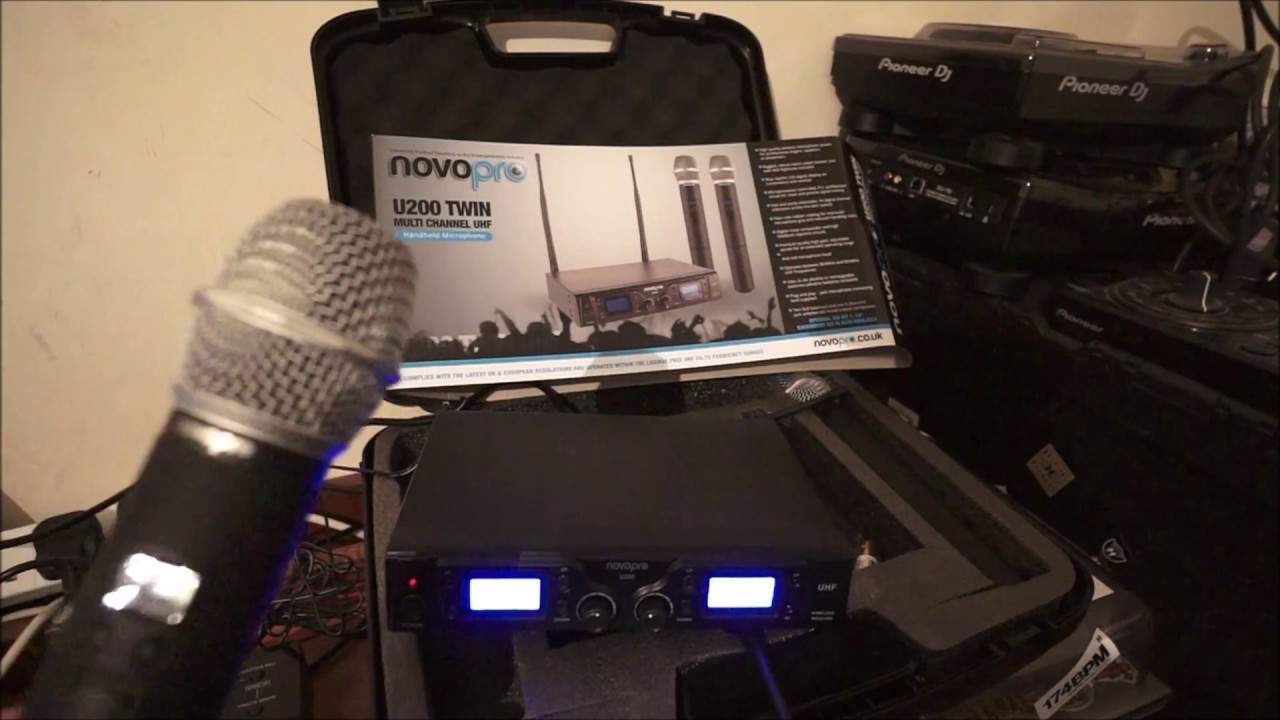
Novopro U200 Twin Multi Channel Uhf Handheld Microphone
Contents of the video
0:01 On top of the actual receiver, there's four feet and the screws
Alright, you've got in front of you the Nova Pro U200 Twin Multi-Channel UHF, which is short for Ultra High Frequency Handheld Microphone. First and foremost, this complies with the UK and European regulations, so you do not need a license to use this. Okay, so what do you get in the box? On top of the actual receiver, there's four feet and the screws. They will screw Underneath the receiver, now you can get an optional kit that can turn this into a 19-inch rack mountable unit. We have of course our two microphones, we have the receiver itself, you also get a power supply, you do get four batteries. The microphones will take double A batteries, two of them. You get the antennae and you also get
A jack to jack. Now very quickly if we have a look at the back of the receiver, we have balanced in two of them, one for each microphone. At the moment now I'm just using the supplied quarter inch jack to quarter inch jack and on either end of the back of the receiver There are small little sockets where of course you will plug your antennae in. At the moment I don't have those plugged in because the microphone is pretty much right next to the receiver. Okay, so being multi-channel a great feature of these microphones is that let's say for example you're a small band or even you're a DJ and you turn up and you're working with a band and you've got your radio mic, you plug it in And you turn it on and all of a sudden you realise that you're on the same frequency as the lead singer in the band, which probably isn't a good idea. Right, what you can do with these microphones is you can set the channel. OK, so how do we do that? Well first of all we need to turn the microphone on. We do that of course by first making sure the batteries are securely put inside the microphone.
2:59 Wait till that stops flashing
The DJ Tutor allows you to play your own music with the DJ Tutor app. The DJ Tutor allows you to play your own music Inside there, just for a few seconds, the actual channel itself starts to flash. Now I can press the arrow again, the down arrow to go down channels and the up arrow to go up. So we'll go down to 10, we'll go down to 8, 5, we're on 6 sorry, 4 and so on are going to go up, 6, up to 8, up to 10 and to 12. So there we go, we'll keep it at 12. Wait till that stops flashing. Now did you notice as soon as the receiver, which is on channel 12, has noted that the microphone is on channel 12, we get a green LED shining there. Now that's telling us that the microphone I'm holding is talking to...
The DJ Tutor offers a wide range of features and features that you can use to get the best out of your sound. Press one of the up or down buttons and that should start to flash. So if I press there, we can see the channel is flashing now. We go down to 10, 8, 6 and so on. Let's go back up to 12 and just leave it. There you go, it's stopped flashing. And that should pretty much be it. Except for, of course, you need to make sure it's plugged in to where you want the sound to come out of, whether that be a DJ mixer. At the moment, I've got it into the Pioneer XDJ-RX2. Or, for that matter, a band mixer. So I will now turn the RX-2 on there and go over to my mic. Let me just... There we go, we can hear it's on anyway. And move the camera back over so we can see the receiver. So I talk through that now and we can see AF. So what that's doing, that's actually now picking up...
5:16 With no on-off switch
Ellaskins, The DJ Tutor. With no on-off switch. Now again, you can either increase or decrease the volume control on your band mixer or your DJ mixer. Alternatively, there is a separate control for each channel. On the receiver of the U200. Now this is from Nova Pro, so I forgot to tell you as well, it does come in its own box, its own little flight case should I say. And it's not a tacky thing, I'll be honest with you, it's pretty sturdy. I'd be quite happy to put... All of the items in that small flight case, not literally chuck it in the back of the van, but I am quite convinced because it's well cushioned that that could be in the back of the van. I could put a heavy suitcase or something on the top and I'm convinced it's not going to crush anything. OK, so how do we turn it off? Now first of all I'm going to make sure that my mixer is off and just a by-the-by here, OK. If you are going to use any form of microphone whatsoever,
I highly recommend that you do this before you turn any part of the microphone off, and that is make sure that the levels are down on your DJ mixer or your band mixer. So levels down first, and then turn the microphone off. On the mixer, now what's happened now is you're guaranteed now to not get any cracks, pops or whistles through your PA system. That's what you don't want because if your microphone is on and let's say you forget to turn the mixer off then you could not always but sometimes get that nasty click and that's the sort of sound that could damage your PA system. Now I know that the actual mixer is now completely turned off from the microphone microphone point of view i can now turn off the receiver just by sorry i beg your pardon by pressing in and we can see now that's off and that is pretty much it very simple to use and all i'm going to do now is unplug the back the power take the power out and also now just take the quarter inch jack out and that is it and just to show you how simple it is
To attach the antennae, I'm just going to plug one in and twist it like so. And then that is it. OK, so what could be simpler? OK, once again, this is the Nova Pro U200 twin multi-channel ultra high frequency microphone. There will be a link in the description to the Nova Pro website. And I'll finish off with practice and enjoy. Thank you very much indeed.
This transcript was produced automatically from the audio of the video and may contain mistakes.





