 9:44
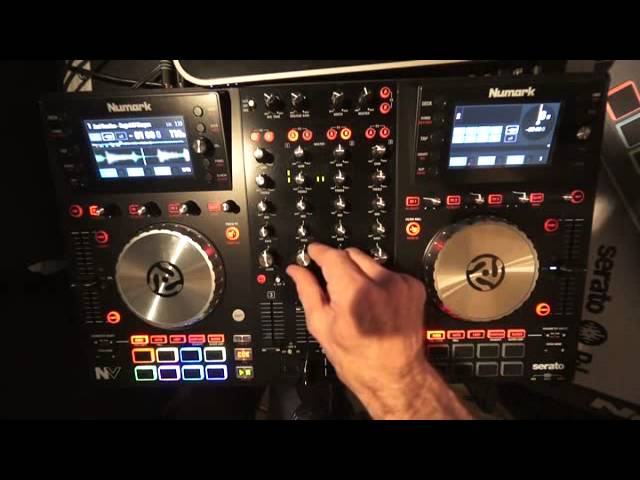
Numark NV Controller Demonstration with the Cues and Effects
Contents of the video
0:00 Why am I saying that?
Alright guys, I believe you have in front of you part of the future which is the new Mark NV. Why am I saying that? Well, I do on the odd occasion big up pieces of kit but I'm going to seriously big up this because they've done one thing that really, or they've eradicated should I say, one thing that really does piss me off big time and that is DJs continually gawping at the laptop when really... You should be looking at the crowd. There's actually no need to look at that laptop. If you know your music, you know your cue points, you know your phrases, your bars, your timing, your BPM, your keys, etc., then there's no need to look at one of those. Alright, admittedly I've got it open at the moment, but I've only just had the Numark NV, so I've got to get used to it. Right, so first and foremost, the NV.
What you can do is you can set it all up as you normally would with a laptop, close your laptop, make sure you haven't set your laptop to go to sleep and you have got all the information you need on these two screens. So, okay, you're looking at screens but you're not gawping at a huge big laptop as though you're on Facebook and if you are on Facebook then you shouldn't be a DJ because while you're DJing you should be DJing doing nothing else at all. Okay, right. That's that over. Secondly, if you do want to have a go with the Newmark MV then go and check out A84, also the Newmark stand at the BPM show, the NEC, this September which is in less than a couple of weeks. I'll put info on the BPM show in the description. Excuse me, I'll also put some info on Mr Jimmy Needles. This track here is called Sugar Hill Weapon. Thank you very much.
1:49 Envy, what's it all about?
To Mr. Jimmy Needles for letting me use this tune, he got hold of me on Facebook earlier on and said he was very pleased I used one of his old other tunes so it's all working, it's all good. Right, Envy, what's it all about? Well there's your screen, lots of buttons there to press around, to go through the screen to find your tracks etc. I will delve a lot more deeply into that very shortly. What I'd like to show you though is some of the effects and what I like doing is chopping up Tunes. Now, okay, straight away you see you can have a bit of fun there. So you're almost like cutting up the track. Now you'll notice I'm on cue play pause. That's because what I want to do is I want to hit the cue points here and since I took my finger off, I want them to stop. Now that is one feature that I absolutely love and it should be on absolutely everything.
It does annoy me when you hit a cue point and it carries on going. What I want to do is I want to hit it, press play, or hit the cue point, have my finger on it, and then at the time when I want it to stop, take my finger off, of course it goes right back to the cue point, but there. Imagine the possibilities. You could have so much fun. You could, new enough, redesign, remix, re-edit, remake a track on the fly all by your tod. Right. Also as well, you'll notice I've left one of these empty. I haven't recorded anything on there. I have now because I've just pressed it. Let's press shift and get rid of that. Right, so let's just press one of these. What I can do now, I can press there. I've already recorded there. I'll do it sort of... So again what you can do is while you've got one finger on...
4:33 Any of the pads and you've got one ready to record
Any of the pads and you've got one ready to record. While you've got your finger on the pad, you can record then another hot cue as well, but of course by pressing play pause. That's better. Pretty much carry on playing. Bit of a filter roll. I like that. Okay, so what is the filter roll? It's a filter and it's a roll. That's it. It's a filter roll, so excellent. That is great fun. Takes a little bit of getting used to, but once you have mastered it, I haven't yet. I can imagine that is excellent to bring into the mix. So let's just press play again. Press play again. Delay. Nice. Look at the platter. Again, bit of a demonstration, bit of a review, bit of a tutorial, and we're listening to A Killer Cut by Mr. Jimmy Needles. So, the platter is very responsive. And again...
Touching the top, you will have full control over the music. Moving the sides clockwise or anti-clockwise will either decrease or increase the speed of the track but of course as soon as you stop moving it, it stays at its original speed. That is really important. Some people think slow it down and yeah it's in beat now, take your fingers off. It's not in beat. Why? Because you've actually slowed it down to Decelerate to catch up with the other track, but then as soon as you stop moving it, it'll just speed up again. So of course you need to then move the pitch down or up depending on if you want to slow the track or speed the track up. I mean, again, the faders feel very light, but they don't feel as though they're gonna fall apart. Bass, mid and treble.
7:32 Of course the effects here for A or B
Of course the effects here for A or B. Mic tone, so we haven't got bass or treble, you've just got tone. But that's no real big deal to be quite honest. Mic auxiliary gain, booth and master output. Again, it shows we're getting into the pro era here because you have a booth output. So what that means is you can take this on the road with you and let's say use this in... A sort of a club environment, there's nothing worse than going somewhere and having a controller and only having master out and then realising you've got to go from the record out into your main PA and you've got to start messing around with the volume controls on the amplifiers to get a good sound for yourself. Here, no worries, the booth is for you, that's your volume control for inside the DJ booth and that's the master.
For the clubbers who are going to be raving to your tunes. Again, we've got 1, 2, 3, 4, 5, 6, 7, 8 cue points there. To get rid of them, put your finger on shift and just press down. So you can get rid of one, all or none of them. Try that again. You'll have so much fun with this. Alright, there you go. A bit of a random sort of video on this, but... This is going to be the future. This is how controllers will be, I'm quite sure, where you do have screens showing you all the information you need without having to look at the laptop, alright? Thank you very much to Mr Jimmy Needles, this is Sugarhill Weapon and also big up to Newmark and Envy which is going to kick it rather large. Practice and enjoy, thank you.
This transcript was produced automatically from the audio of the video and may contain mistakes.





