 6:49
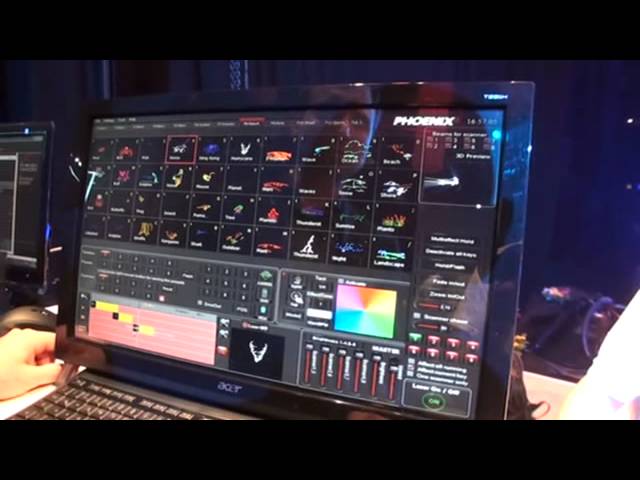
Phoenix4 The Professional showcontroller software for a laser show. Musikmesse 2012
Contents of the video
0:00 My name is actually Boris Bollinger
There. That's your name, isn't it? No, no, no. My name is actually Boris Bollinger. I am the manager from Phoenix Stroke Controller. Cool. And also the developer of the system. This is your baby. Yeah, that's my baby since more than 12 years now. Beautiful. All right. Software. Give us some explanations. All right. Actually, the Pfinix software is not only a laser software but also a DMX and laser. So you can use it for clubs and for outdoor shows, indoor shows, doesn't matter. We have up to 900 graphics and different kind of beams, so whatever you need normally for laser show. It is very simple to use actually. After you installed it, you have already more than 900 pre-programmed animations. You can choose them whatever you want.
And you also can do multi-effect holes, so that means that you can mix up together up to 12 different animations on this way. As you can see now the dancing goal is the same priority like the open, so now in this case you can go in the settings of it and you can give the priority of this dancing goal on a second layer. It's pretty much similar to the Photoshop system where you have more layers. From the point of view of having let's say the laser directed at the public, yeah you've got layers there but also what you can do I presume is you can increase or decrease the power of the laser, is that right? Of course, of course. Because of safety reasons we have to be able to use the brightness control as you can see on the laser directly, we can adjust the speed of course of the complete animations, we can even interactive
Take control over all the animations. We can do also, of course, completely new separate animations. For example, this is a timeline system so you can just drag and drop your animations in. You can look at it in the preview window. You can add some animations on it. You can do some rotations. It's a timeline system and it's a curve system so you can add Some points, do some movements like this. And now it's going bigger and smaller like the curb is. So the next step is also if you want to have run text. Everybody likes to have run text of course. So we just type in. You can write down in all kind of languages. You can choose your font. Press OK and you see already what's going on. You can directly have output on the laser.
2:54 For example, we have made some presets
Now, what you can do is also put some nice animations on it. So, for example, we have made some presets. What you can see now on the laser. Okay. Also, you can change the curve by yourself. So, you can do pretty cool effects on this way. Very nice. Again, you've got touchscreen, but you'd just be doing that with a mouse. Yeah, that doesn't matter actually for the software. You can use a mouse, touchscreen or even DMX in or MIDI in. It's completely remote controllable. Good. So what you see now is the square and the letters have the same priority. I put now the square in the front of the letters, or I can also mask it. So now the letters are always inside the square. So in this way we have up to 32 layers, which is how we can work. Okay, so you're able to program 32,000 animations in this program? Not many then. Oh, I think it should be enough.
4:24 There's a speaker signal
Besides that you have, as I said before already, many, many pre-programmed animations. You can use a timeline system here where you can just drag and drop it in. And also, in this timeline, can you drag and drop audio in there as well? Of course, you can do also audio for small shows. So you can do some opening shows for your club. You can drag and drop just different effects in. So let's do... Now in this case we have a 60 second show on this way and we just drag and drop some more effects in. And if you want to have also audio, we just take a tab which is free like this one here. Okay I need to go inside. Okay and now I drag and drop in speaker signal. There's a speaker signal. Now I can use any kind of mp3, wav files, whatever I have. Okay I don't want to have a loop. That's it.
I want to have a loop in this case. I say, okay, and I drag it, drop it in, in the timeline. So in this case, I have the music also. Yeah, sweet. We don't have loudspeakers, I'm sorry for that, but in this case you have loudspeakers. So you have five different timeline systems so you can put and drag together all kinds of animations which are already pre-programmed or made by yourself. Lovely. Does this work With an iPad? Yes, we do have an iPad and iPhone application for it. So you can remote control the complete software by the iPad or by the iPhone very easily and that's very neat in a club if you are in the bar, you drink a beer, you can control the complete laser and lighting and fog machines even with your iPhone. Fantastic. Also you have the BPM mode, that means that you do exactly tap to the music so you can
We pre-program several effects to the perfect beam, even if you have only in this case let's say this effect I want to have four times and one text. And the next effect, let's say this effect, I want to have each second text for four beats. So in this case I can mix a nice combination of different effects which pops up to the beat of the music all the time. Again, there's so much more to this, ladies and gentlemen. I will be having this software myself, using it with one of the lasers, and we're going to have some fun. I'm going to be doing my own sort of demos on this and tutorials, taking it to gigs, etc. Thank you very much, sir. Can you finish this video off with practice and enjoy? Yeah, practice and enjoy. Thank you.
This transcript was produced automatically from the audio of the video and may contain mistakes.





