 32:37
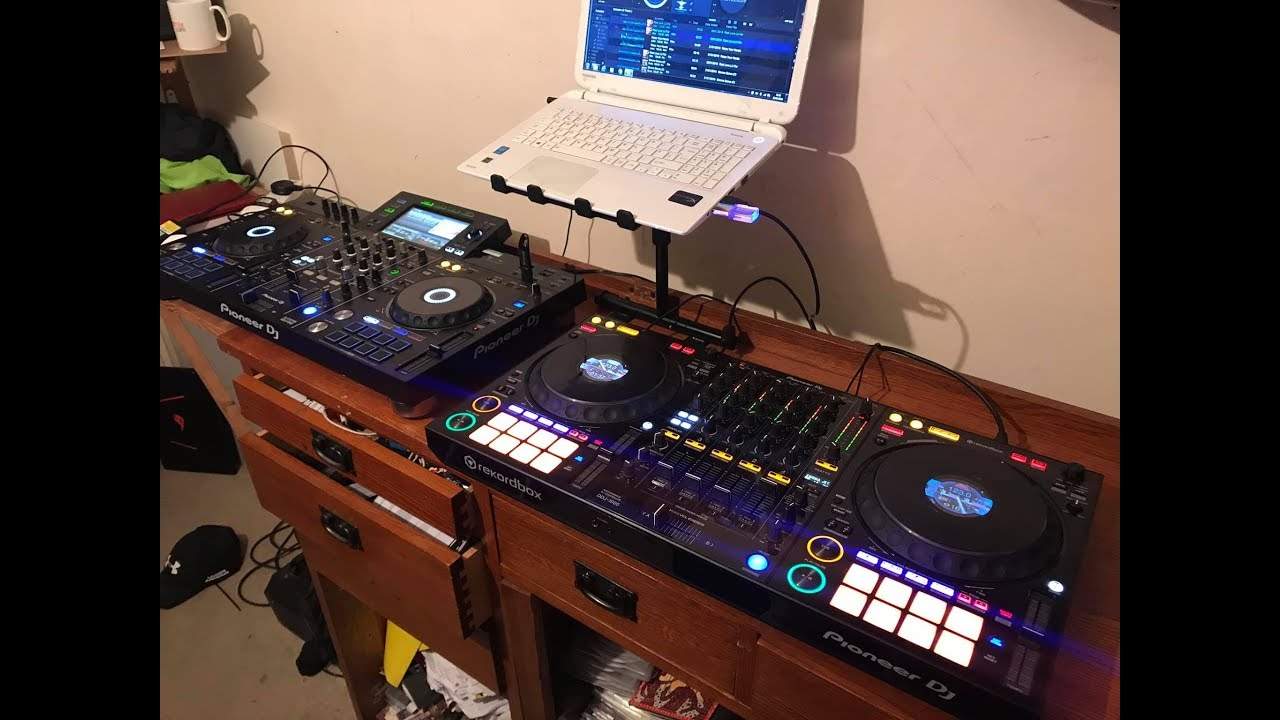
Pioneer DDJ-1000 and XDJ-RX2 Side BY Side What to Buy and WHY
Contents of the video
0:00 I will give you information about the track
Right, so today's the day when I do a bit of a comparison between the DDJ-1000 and the XDJ-RX Mark II over there. I'm using the same track. I will give you information about the track. Well, I'll do that now. It's a track entitled Real Love, JJ Farrow meets Maurice Dufresne. It's from Comic Power Records and I'm going to be using the same track. On both players. Okay, there will be a link in the description to Karmic Power Records. Okay, so we have the XDJ-RX number two and we have the DDJ-1000. Now before I go into giving a side by side demonstration or my look let's say at both of the players, I want to talk a little bit first about choosing the kit for you. Now more recently, and if you're watching this video...
A long time after it's being uploaded, this may not be relevant, but very recently there's been an item from Denon released and it looks great. It's got a screen in the middle, it's got four channels etc etc. Now let's just forget the name Pioneer, forget the name Denon, forget any name of any manufacturer. I want you to look at the kit you've got in front of you if you have and is it right for you? Does it work? Do you use all the features? Do you feel as though you don't use all the features? Do you feel as though maybe you could have a little bit more because you're missing out? Now there are of course players which are a couple of hundred pounds, euros and dollars and then there are players which are quite a few thousand.
So by having the ones that are quite a few thousand, is that going to make you a better DJ? Think about that because really as a DJ most people, most DJs just need two decks. You mix one into the other and so on. Do you need a third one? Do you need a fourth one? Maybe you really do because, you know, you're having a little bit of a transition and you're thinking I'd love to drop an acapella in there or I'd love to just add something else. Another channel to get some sort of effects or I've got effects units and I want to use those. I've got a cold chaos pad or I've got a keyboard. I want to plug that in, play along while I'm forming a transition. Then very possibly, you know, three or four channels.
2:38 Behind times
Can be for you, that's what you need. But you see, companies are very clever at all of a sudden bringing out this new product and saying to you, you know, you've got to buy this, if you don't buy this you're going to be behind the times. Well, if the truth be known, you're probably not because you're just thinking about other DJs. And being behind them, what you should be thinking about is really not about other DJs but your clients playing to the public. Because if you take a random selection of 100 people out of your gig and you're doing say a very basic wedding or a birthday party, probably very few know what you've got in front of you anyway. So you could have a controller from 10 years ago
Or you could have a controller that's hot off the press like last month and most of the people won't know. So it's about what you need to get out of the controller, not what they out there are telling you you should buy because if you don't buy it you're going to be behind the times. Right so first of all an outline of the DDJ One thousand and the XDJ-RX2, both from Pioneer and again this is my own personal opinion on both of them. I think they are both very good players. They've both got many attributes and I mean big time. Let's look at the RX first, the RX2. Maybe you've been following me and you should know that I had the RX, the original one, and I loved it. Well, I love this as well. There are a few quirky features on the RX2 that are slightly different from the RX1, which I will explain, but both of them are very good. And if you're in a position to get an RX1, the original, and that's all the money you've got, then don't think, oh God, that's all I can afford. Damn, I can't get the RX2. Don't worry about it because there's very little difference.
And to be quite honest, they both do pretty much the same. But the RX2, it's of course touchscreen, USBs on the right hand side instead of on the left. You have two USB inputs. You can record on one whilst you're even playing on that one as well. So the one that is furthest to the right, you can have a USB in there, say it's a 32 gig. It's half full of files. Well, you can play off that and at the same time you can record onto it as well. It's insane. You've got two USBs as well. So you can chop and chain from one to the other by pressing one of these buttons, USB 1 and 2. You can also plug in your laptop and you can plug in external CD players and vinyl. Now with the RX1 there was just one input for line or phono and you had to switch from one to the other.
5:35 What you will have to do though is use the switch above the trim
On the RX2 you've got two, you've got phono and you've got line so there's no need to have a switch at the back. What you will have to do though is use the switch above the trim. So you have deck 2, deck 1, line and phono. So when you are using USB If you're using the laptop, you will switch to deck. If you're using a CD input, you will switch to line. And if you're using a vinyl turntable, you will switch to phono. It's standalone as well. So what I love, and I've always said this about the RX2 and the RX1, is that you could pretty much download a bunch of files from... If you want to download your favourite download site, you could throw them onto a USB really quickly. You haven't got time to go through rekordbox and all this that and the other. You just want to download, load up onto your thumb drive, plug it in. You can do it. That's it. As soon as they're on there, you can start to play. Now maybe you won't, when I say get all the features...
You won't be able to get the RX2 to come to life. That will happen if, of course, you use Pioneer's rekordbox. If you do that and go through the rekordbox software on your laptop and then put those files onto a USB and then plug it in to the RX2, you're good to go. Now something here that... I don't know how many... I can't say a lot of people. But I still tend to find that there are DJs out there when I watch them and they're using the RX1 and 2, that they've got a laptop, they're using rekordbox and they've got the RX in front of them. Well, alright, if you feel comfortable doing that, that's fine. But try and get away from being a screenwatcher because that's the great feature about the RX1 and 2 is that you do not need a laptop. You can take your files
8:24 You can if you want to use a laptop or two laptops
Put them into the rekordbox software, let them get analysed and then download them or transfer them to a USB or two USBs. Plug them in to your RX or RX2. And away you go, and that's it. So there is no need for a laptop. So you haven't got to worry about an update or something going wrong or the battery running out of power or anything like that. So the RX2 has exactly the same with the RX, a standalone. That's it. You leave it, let it do its thing, and away to go. On the other hand, the DDJ-1000, you can't do that. You have to have a laptop. But do you? No. You don't have to have just a laptop because the DDJ-1000 is inside there, a mixer all by itself. So you can if you want to use a laptop or two laptops. You can also if you want to at the same time as using your laptop use a vinyl turntable.
And while your laptop is plugged in, and you're playing one file from your laptop, and you're playing one file from a vinyl turntable, you can also play something else from an external CD player. So the DDJ-1000, as it stands, is two turntables and a four channel mixer. But the four channel mixer can be used completely separately. So let's say all of a sudden... Someone came along and somehow managed to stop the virtual decks either side working. So let's just say, out of the blue, which is, I don't know, maybe if they're very clever, but let's just imagine the wizardry of some people, they're not going to work anymore and you're left just with a mixer. If you have brought along a CD player or two CD players, external vinyl turntables,
The mixer is a normal mixer, but again you do have to use an external laptop to play your files. Highly recommend through rekordbox. Let's say you're doing a back-to-back set with someone and they have their own laptop and you have yours. Well, you can plug in two laptops. There's two USB plugs in the back and on the four channels you actually have the option of A and B. So A, of course, is for USB A in which could be, for example, this laptop and if I had another laptop on the other side that would be B. So for example, I could go from channel 2 and 4, and again it's a little bit strange but this is how it is. The first channel is number 3, then 1, 2 and 4. So all I need to do is switch the top switches on channel 3 and 1 to A, and then channel 2 and 4 to B. So now the other chap or lady on the laptop on the right hand side can use channel 2 and 4.
11:03 You're at your gig and you're playing away on that, and all o
And I can use channel 3 and 1. But at the same time, if I want to just, for example, I am playing off my laptop something on channel 3 and I have plugged into the back of the mixer an external CD player, all I need to do is flick to line and now I can play something via the line. Now at the moment what I've done is, just for simplistic sake, I've gone from the master output of the RX into channel 4 of the DDJ-1000 and then from the output of the DDJ-1000 into the speaker system. That's something else you can do with the DDJ-1000. So you're at your gig and you're playing away on that, and all of a sudden someone else brings their controller. Now this will happen. It's going to happen. It has happened. They're used to their controller, they know where the buttons and knobbly bits are, and they only want to use their controller. So that's all they need to do. They can set their controller up, they can set their laptop, get everything ready, then go from the...
Output, whether it be the RCA or the XLR output. So long as then they've got an RCA in, they can go to one of the channels on the DDJ, sorry, yeah, DDJ-1000 that isn't being used by the other DJ. Set that one to line, very important, I'll show you in a bit, and then you're good to go. That I'm going from the RX into the DDJ-1000 and out of that into the speaker. Now on the back, and this is really important, on the back of the DDJ-1000 there are little switches with line and phono. It's very important to make sure that if you're using a vinyl turntable, that switch is set to phono. And if you're using, for example, an external source, something like this, that'd be classed as line, you need to switch it to line. This is what it will sound like if that channel is switched to phono. It's not good. Right, so I'm going to just switch it back. Just hold on, where is it? It's there.
13:34 Let's press play, or sorry, turn that up
Right, so let's press play, or sorry, turn that up. This is what it sounds like, have a listen. Okay, why is that? Now that sounds terrible, doesn't it? And if you can see there, the LEDs, it's all in the red, it's just terrible. Okay, so let me grab, where's that switch again? It's about there. Okay, let's switch that back to line. Okay, so why is that? Well, a vinyl turntable... has practically no amplification the only amplifier in there is the cartridge itself and it's not even really an amplifier it's it's and again I'm not technical here all it does it transfers the vibration from the diamond into a signal that can be read via your mixer but of course the mixer then has to have some form of internal amplifier for then for it to
Basically get some kind of sound so what happens here is if you are putting a line signal from a lot from exactly from exactly from a source that classes a line source into a mixer and you switch that to phono It's being enhanced again, so you've almost got the equivalent of having another amplifier amplifying the sound that's already been amplified. That's why it's distorted. So there's nothing wrong with your kit, just make sure that if you've got an external source which is line and you're going into another channel and the switch at the back is phono, switch it to line. On the other hand... You have got your vinyl turntable plugged in, and you've got it switched to line, and you can't understand why you can't hear it. That's because you need to switch it to phono. Bingo! Right, OK, so let's press play on here. And where are we now? Wrong channel. OK, so this is the DDJ-1000, and we're using the rekordbox software. On the left hand side here, on the RX2.
I am using exactly the same file, but I'm not using rekordbox. So something I'm going to test now, we're going to do a bit of a test. I'm going to set, make sure the pitch is dead centre on the DDJ-1000 and make sure the pitch is dead centre on the XDJ-RX number 2. So this is going to be quite a good experiment. What I'm going to do is press play on both of them at the same time. So have a listen here and here. Just make sure the same volume. Where are we? Let's put that up here a little bit there. There. OK. That's a bit louder, so bring that one down. That's about right. OK, so what I'm going to do, I'm going to start them both at the same time. They may be slightly off, but I'm going to make sure very quickly that they're exactly the same time. And we should be able to get that phasing sound. And let's hear if that phasing sound stays the same or changes.
17:15 Straight away we've got that phasing sound
If it stays the same that means that both players are able to hold that track at exactly the same time. If it changes very slightly then it's telling me that there is a very, very slight variation in the speed of one of them picking up the file and transferring it then through all the workings of each player or one of the players into the speaker. So here we go. Okay, straight away we've got that phasing sound. Now, the key of that sound is the same. See, bring one down. The sound seems to dip. Now it's high again. That's because they're phasing. Alright, my ears are telling me that they are exactly the same speed and there's no change. Okay, which is a good thing, alright? Which is a great thing.
18:57 Third channel, plug players, pretty exactly
Many reasons. One is because it shows that both players are able to read the files correctly. Also, number two, it shows that the one file that's going through the DDJ-1000 via rekordbox hasn't changed at all. It's exactly the same as the original file as it was downloaded and that's being played through the XDJ-RX2. So that's great. Again, hopefully this video will help you and make you maybe decide on which player you want to get. So if you are adamant that you want to become a DJ who wants to keep that laptop in front of them, then of course you're going to have to go with the DDJ-1000 because you do need to have a laptop with you and I'll be honest with you, okay? If you're thinking of getting the DDJ-1000 and using it with a set of CD players, you're defeating the object of everything. Because what's the point in buying something like this if you're not going to use a laptop and your intention is just to plug in your CD players? You might as well buy just a mixer and that's it, and then plug your CD players in. Alternatively...
With the XDJ-RX2, you can use a laptop, but you don't have to just use a laptop. While you're using your laptop, you can switch to, for example, the USB. And then if you're using the USB and you need to use a CD, you can switch to a CD. And then if you're using a CD at the same time, you can switch to a phono, to a record, a regular 12 inch or a 7 inch or an LP. Even in the gig, while you're playing, all of the functionality is there. Now what we've got on the RX2 is we do have a third channel as well and that is here, it's just auxiliary. We have off, 0 dB and 12 dB. Now we don't have any faders, it is just a very basic dial to turn it up and down. Now that's a great feature, for example, if you're at a gig and someone says, thrusts a phone in front of you and says, play that. Now sadly, in our industry, we do have that happen because luckily, not most, but some people are very ignorant and just, they expect you to do as you're told, play this. I'm always very polite and say, I will, madam, sir, when I have the time, thank you very much. Inside me, I'm going, okay, you idiot.
There you go. Alright, so you've got your third channel. Exactly the same pretty much with the DDJ-1000. If you've got one laptop, there you go. You're into two channels, maybe you've got a CD player in the other and maybe then you've got a cable, the RCA plugged in the back into a mini jack just ready, just in case someone turns up and wants you to play their track. Let's have a look now at the other features. Okay, so again, the footprint is pretty much exactly the same and that's what Pioneer have done. The footprint of the turntables, the pitch, the play pause is pretty much exactly the same from their lower end controllers up to the high-end CDJs. Pitch, you know, you can change the parameter plus or minus six, 10.
21:46 Sync, start sample, four decks
16 and wide. Now the wide is, when I say can only, should only be used as an effect. And that will increase or decrease the speed of the track by 100%. If it's at 100 BPM, it's going to go to 200 if you put it all the way as fast as it will go. If you put it as far as it will go to slow it down, it will stop because you're slowing it down by 100%. Very important. If you're finding it difficult to mix and you just seem to think that there's something wrong, check first to make sure that both decks are up the same percentage of speed. If you're a new DJ and you're learning how to beatmatch, I highly recommend, I mean I highly recommend, I don't think there's anyone that would disagree with me here, keep to 6%. That's important because it means then you've got all of that pitch
Change the speed. The higher the percentage, the less control you have on your pitch. I don't want to talk about that too much in this video. I'm just going to explain that now. So both of them, the pitches are pretty much exactly, in fact they look identical. I wouldn't be surprised if they're identical internal components as well. Okay, so we have two, four, six, eight pads on the DDJ-1000 and we have eight pads On the RX, hot cue, beat loop, slip loop and beat jump on the RX. Hot cue, pad effects 1, beat jump and sampler on the DDJ-1000. So, right, you can start to sample as well. You can grab a tiny bit of a track, bring it into some of the pads and you can start to sample. DDJ-1000, you can layer your decks. So where is it? You have a button here where you can layer. So you can if you want to use four decks on one laptop if you want to. Again, you're looking more into maybe production and so on. And if you're going to do that but you're not brilliant at beatmatching then ideally use the sync function.
24:37 Effects wise, let me just bring the camera here and put it down there
Now, I'm not a great believer in sync, but if I see a DJ working four decks and they're making music, they're experimenting, they're having some fun and it sounds good, but they're using sync, you know what? I don't mind that because they're actually working the decks. On the other hand, if I see a DJ using sync on... If you have two decks and they're just forming very basic transitions, then that to me is just a little bit cheating. Okay, so effects wise, let me just bring the camera here and put it down there. Okay, so your effects now on the XDJ-RX2. You have your sound colour effects which is dub echo, sweep, noise and filter. And on the DDJ-1000, you have a de-echo pitch, noise and filter. So the de-echo again is short for dub echo. So you've got exactly the same colour effects. The other effects, the beat effects we have on the XDJ-RX2, you have delay, echo, spiral, reverb, trans, flanger, pitch and roll.
And then on the DDJ-1000 we have quite a few more. We have low cut echo, we have echo, we have MT delay, I'm not sure what that is, I beg your pardon, spiral reverb trance, we have Enigma Jet, that sounds very interesting, we have flanger, we have phaser, pitch change and I'll tell you what the bloody lighting is. Crap, sorry. We have pitch, slip roll, roll and... What's that? I can't work that one out. But there's another two. Sorry, I beg your pardon. Sorry, the lighting here isn't very good. OK, so we've got a whole bunch more effects on the DDJ-1000. Now, price-wise, and again this... Can vary and change depending on when you're watching this video, but I believe the DDJ-1000 is sort of around about the £1,000 mark, whereas the XDJ-RX2 is slightly more. But what you have to think of here is that you're getting a lot for your money, OK? Because if you buy the likes of a Nexus CD Player Mark II...
27:00 You could buy yourself a set of monitors, a set of
That's going to cost you more just one of those than one of these put together. And the CD player, if you buy one of those, that's it. You can't do anything with it. You can turn it on, you can put a CD in, but you can't do anything else because you need something else to make it do stuff. But you can do things with this. In fact, the crazy thing is, is that probably If you're able to, say, buy a second-hand one of these, you could buy, and you've got to be careful with your money, you could buy a second-hand DDJ-1000 or even the original RX. You could buy yourself a set of monitors, a set of headphones, a laptop, a couple of flashy lights and do some gigs for the same price as an original, let's say, CD player, the Nexus Mark II.
Alright, now I'm not saying the Nexus Mark II isn't good, it's a great piece of kit, but that is club standard. Alright, so there you go. Now, they're both good players and I use both of them. And I'm not just saying this, but I do love the XDJ-RX2. And if I was to choose between the two, I would choose the RX2. This is what I like. I love this player. Simply... Because I can load files into a USB, I can take the RX in a case, walk to a gig, turn it on, put a USB in the top of the player and start to play some music. And that is it. I don't need to plug a laptop in to get the program running and so on and so on. It's pretty much Press play or turn the power on, put your USB in and so long as you've got your connection for your speakers, you're good to go. But again, you do only have the two channels. You've got four on the DDJ-1000. Now I hope this has been a help. Again, there is a lot more to this.
30:12 Oh no, sorry, they are slightly different
There's a lot more technical issues and we could go into it. The turntables on the 1000 have got little screens so you get some information there, so you don't really have to be a laptop gawper. And the mixer on the 1000 is very similar to the 900 Nexus, so we're getting to a club standard mixer. But on the other hand then, as I said with the XDJ-RX2, it's just plug your USB in and off you go. Alright, I hope that's been a help, practice and enjoy. And by the way, yeah, let's play a bit more of this tune because we didn't really have much of it, did we? Okay, got to play a bit more of this. Bit of a housey vibe here as well. Let's use the effects. That's the dub echo. Pitch. Oh no, sorry, they are slightly different. I beg your pardon, yeah. Right, it's a good job I did this actually. On the DDJ-1000 we have pitch. Now what pitch does, the sound colour effect, is it will change the sound of the track that's playing. It almost pitches it up and down. So instead of it being... Now then, now then. There, so, alright, it's a good job I did that.
The noise is white noise. Okay, and filter, one of the best effects of all time. There you go. Okay, so let's go over to here. Have I got it plugged in properly? Ah, there, of course. Other side. Okay, let's do the dub echo. Noise. And we can change again the parameter of the noise. So that's pretty much like its own kind of game control. And filter. Very quickly as well, you can both do vinyl mode or CDJ mode on both of them as well. What more can I say? Probably a lot more, but by all means don't forget to like and subscribe if you want to get some more videos from Jonathan Ellaskins, The DJ Tutor. A very nutty person. And post comments underneath. Have you got one of the players and you prefer to have the other? Have you been able to use both of them? Which one do you like? Let's get a bit of a conversation going in here because hopefully this video, if people watch it, they'll be able to think well after this video I'm not going to buy either of them or after this video who is that strange person over there? Practice and enjoy. Thank you.
This transcript was produced automatically from the audio of the video and may contain mistakes.





