 12:15
Pioneer DDJ-1000 First Look and MY Thoughts
Contents of the video
0:00 It's definitely not flimsy
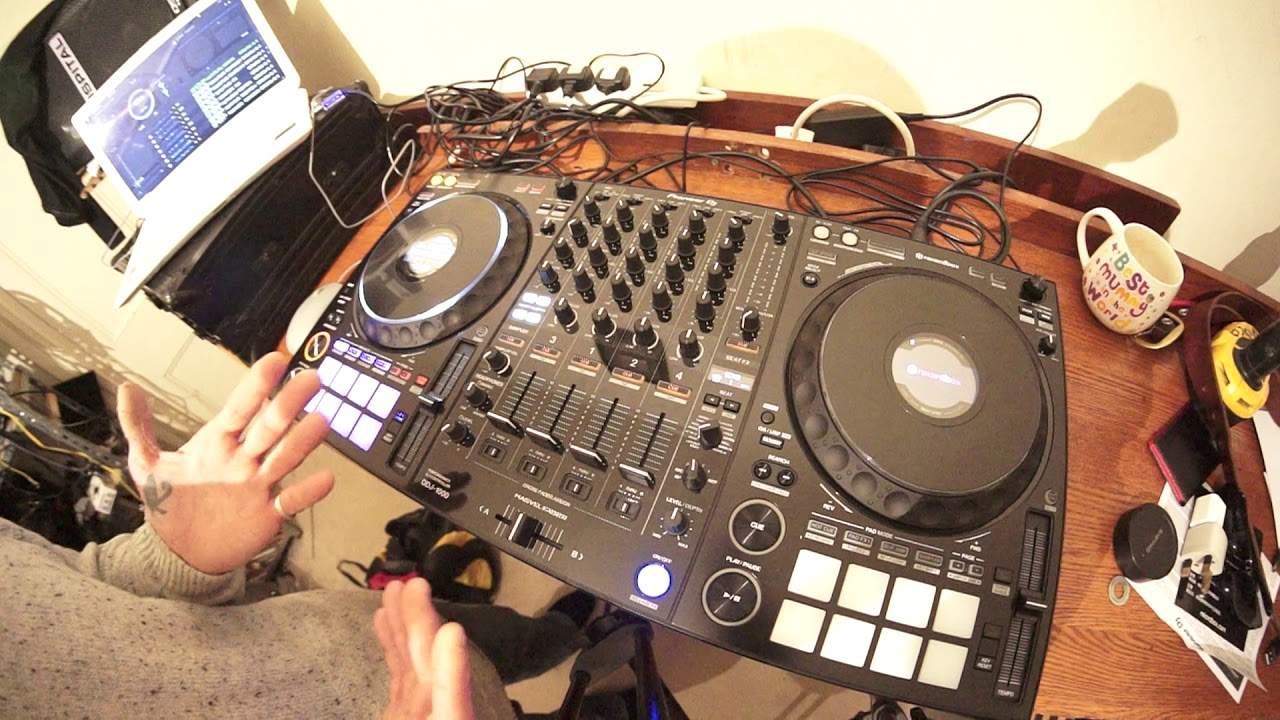
Alright ladies and gentlemen, I had the DDJ-1000 sent to me yesterday and my first impression is it's a sturdy looking piece of kit. It's definitely not flimsy. It's got all the footprints of Pioneer's premier CDJs and mixer. It's all in one, you plug in your laptop, you can use four decks, you can also plug in vinyl turntable, you can plug in external CDJ, you can also use two laptops. Now that is a great feature. So, two laptops, how does that work? Well, at the top of each of the channels, you have a choice, USB-A, line phono or USB-C. DJB. So, let's imagine you have two DJs. You know, they want to do a back-to-back. Well, this is the crazy feature. You can have two DJs working this at the same time. Correct pronunciation. I do apologise. So, how does that work? Well, first of all, let's imagine DJ A is on the left-hand side, DJ B is on the right-hand side.
DJB has their laptop plugged in, USB B on the back and DJ A on the left hand side has their laptop plugged into USB A. So without two DJs flicking over from side to side and one on the one CD player and the other on the other, this is what you can do. This is a great feature. I like it. Yeah, A on the left hand side can just use the left deck because it's double layered. We have deck select three and one. So what they've done with the DDJ-1000 is they set the channels not from left to right, one, two, three, four, but they've set them three, one, and then two and four. So DJ A on the left hand side DJB can put a track in on, say for example, Channel 3. There you go, so Channel 3 is playing and they can mix in then just after pressing the deck select another track in Channel 1. Now while that's happening, DJB on the other side can do the same but on the right hand deck. So that is in itself a great feature.
2:45 Crossfade seems very good
Crossfade seems very good. We have the key sync, which I will go over. We've got some great effects. We of course have the four pads so you can have hot cues, pad effects, beat jump and sampler. Beat jump is great because now again, I don't really want to play any music at the moment because A, I don't want any copyright issues at all and I want this video to be out there and not be blocked in some country for some reason because I've played a little bit of a track that no one's heard of. So, for example, the beat jump, great feature. What does that do? Well, let's imagine the track is playing and you... All right, let's imagine this. For example, Faithless Insomniac, you know, and you've got, bam, I can't get no sleep. Boom, the drop comes in.
Well, if you press the correct beat jump pad, you can go right back to that drop. You can go back one beat, two beat, four beats or you can go back, sorry, one bar or I think it's two bars or four bars. So, so long as you press one of the pads at the correct time, you're able to go back in time into the track. So if you do that correctly, the dancers aren't going to start wobbling about thinking, what are you doing? You've just done a really crap mix. So long as you press, and I will, once I get good tracks, I'll be able to do correct demonstrations using music as well. In fact, probably can anyway, but I don't want to right now. Hot cue, well we all know that. Shift, we all know what that is. Cue loop memory, we know what that is. And the slip reverse, well all that does, you press that and it will slip back. But then as soon as you take finger off it, it jumps back to the place where the track should be playing anyway. Now one of the great features of the DDJ-1000 is that the centre area, the mixer area...
4:53 Isn't really dissimilar to the 900
Isn't really dissimilar to the 900. You have a load of good effects, you have sound colour effects as well, you have the colour effects dial, low mid high trim, you know, alright, it may be lacking in the durability and the build of a 900 Nexus, but then if you haven't got the money to buy that, you know, I mean, look at it, alright. So for example... As I said with the Pioneer XDJ-RX2, you know, you could go out and you could buy a Nexus or CDJ-2000 Mark II Nexus and it would cost you shy of 2,000 pounds, euros, dollars or whatever. Yet the DDJ-1000 is around about half that price and you've got everything. You've got the mixer, you've got the capability of having four decks as well as inputting external devices. So for example, you're at a wedding gig and someone says play this on my phone. So long as you've got the correct adapter, RCA to mini jack, you can do that. So I do like it. So far so good.
Instead of having one dial to choose your files, normally you've got a dial in the middle, you twist around and of course your actions on that dial will be mimicked on the software. I've got rekordbox on there at the moment as well. That by the way is free from the Pioneer website. I will talk a little bit about firmware and what not very shortly. Other controllers, one dial, turn, press down and load up. Whereas here you have a dial for each deck, which again is a great feature if you've got two DJs playing back to back. So no longer have you got to wait to turn the dial and find the track. You can do it when you want to. Right, so what was I going to say now? I've lost my train of thought here. Think, think, think, think, think. Alright, the effects.
7:29 Filter, again is the best effect period of all time
We have de-echo, which I presume is dub echo, the pitch change, noise and filter. Now, pitch change, you've got to be careful about that with that because if you turn it too much, you know, the track itself is going to start to lose pitch. But again, it is a great effect. The noise is quite loud. I haven't used the sample volume yet, sampler volume, beg your pardon. Filter, again is the best effect period of all time. It is a great effect. Now I am using rekordbox as I said and right I remember what I was going to say now. When you do get the DJJ-1000 you always must make sure you've got the driver Download it onto your laptop because if you don't have the driver, it's not going to work. And a good analogy there, it's like sitting in a car as a passenger and waiting to get to your destination, looking to the right or left of you depending where you are around the world and realising there is no one driving the car. Well, it doesn't matter how good the car is, whether it be a Mini or a Ferrari, it's not going anywhere. You need the driver. The driver is the person...
The driver is the software that will enable the controller you have to talk to the laptop and vice versa. Also, what I recommend you do is to update the firmware. I did that. I went to the PioneerDJ.com website and I updated the firmware. Now please, this is a must. There will be places around the web where you can get the latest firmware, the latest drivers, I'm sure, for all your DJ kit. Do not go anywhere except the Pioneer DJ website because at least then you know you're not going to be downloading third-party crap and also downloading some rather strange software on your laptop that all of a sudden takes it over and is worse than Skype. Don't do that. Here we have a whole bunch of effects. Now these effects, I haven't used them yet but they look pretty good. Sound quality again is exceptional so far but a lot of that is down to the system that you have. For example...
9:53 This is a very simple video on the DDJ-1000
You know, you've just spent over a grand on the DDJ-1000. You plug it into your laptop or your Mac that's cost you another grand and then you plug it into a set of dodgy speakers that's cost you 60 quid off eBay. Well, you're an idiot, all right? Make sure if you're going to invest here, you invest all the way through to the end product which is of course your system, your power, you know, your speaker system. Because if that sounds crap, it doesn't matter what you've got here. It's just going to be crap. Alright, so this is a very simple video on the DDJ-1000. Again, two plugs here for headphones, quarter inch and mini jack, which should be industry standard now. I mean, come on, any company out there who just put a quarter inch jack input now is an idiot because most...
Headphones will have quarter or mini jack and like me I'm sure you have turned up and thought oh dear I forgot my quarter inch jack, you've got a mini jack and you're buggered. Nowadays you're not because there are both there. Alright well that's pretty much it except for the creme de la creme, the pinnacle of this player which is what we all need. And that is the screens on the platters, OK? Now, why do you have a screen there? Well, to be quite honest, I do not like people, DJs, who look at laptops. Now, you'll notice that my laptop is to the left of the player, or it could be to the right of the player. I try never ever to put my laptop directly in front of me, especially when I'm playing at a gig, because it's rude.
It's uncanny. It looks like you're sort of online and on Facebook, and it's just downright stupid because that direction are members of the public. They want to see you and what you're using. They do not want to see a huge big screen in front of you, and their thoughts will be, I wonder if they're messaging someone on Twitter? Right. So always have the laptop over there. But you see, once you've loaded your tracks, all the information is here. On the mini screens either side. So there's the information. So guess what? You can now look at your controller and look as though you're doing something. The general public may think you're doing something, but you're just checking on the time you have left on your tracks. They don't know that. You do. All right. So Pioneer, again, you've nailed it pretty much. DDJ 1000. This is video number one. More to come. Practice and enjoy. Thank you.
This transcript was produced automatically from the audio of the video and may contain mistakes.





