 14:51
Pioneer DDJ-T1 Video 1
Contents of the video
0:00 Pioneer DJ product specialist
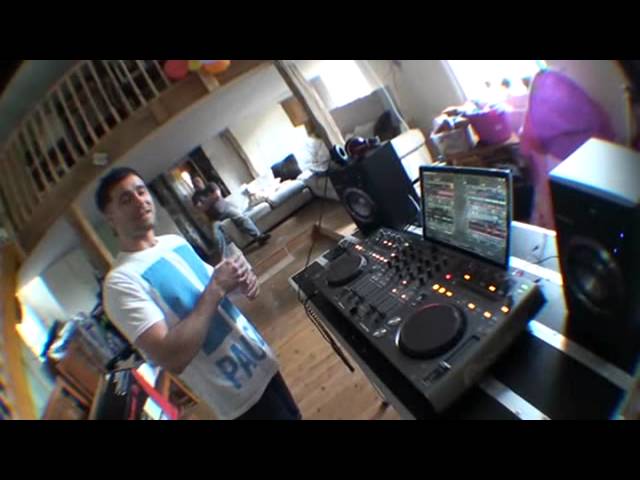
There we go. We're rolling. Right, ladies and gentlemen, I have this guy here with me, and your name is? What's happening? Rob Anderson. Pioneer DJ product specialist. Come down to talk you through some of the kit. Yeah, now, first of all, can you tell everyone what was it like to get here? The journey. What was it like to get here? Yeah, the trip. Interesting. 25 miles of narrow winding roads, but yeah, it's quite fun. I like it. I like little rally tracks. So did you get accosted by any sheep? No mate, they couldn't keep up. I was flat out. It's got a Lamborghini out there, it's red, it's beautiful. Alright now you have, well you haven't brought this, it's my guy here, it's the DDJ- DDJ T1. Yes, so yeah, DDJ T1, basically it's our first, Pioneer's first all in one MIDI controller interface. So it's an all in one unit.
It's been designed in conjunction with Native Instruments, specifically for use with Traktor Scratch Pro. So you see, basically every club in the world consists of the DJ booth, you'll have CDJs as standard, club standard product. It makes sense now with all the digital vinyl systems being used, access to computer music on your computer, DJing off your computer, to have... The controller to replicate the standard club DJ setup. So you see it consists of two CDJs, you know, twin CDJ setup and essentially a DJM800 in the middle, four channel mixer. Because this, you're like, the S1 is just two decks with Itch, this is four. Yeah, so the DDJ-S1, that's for Serato, which is Serato Itch, it's a two channel DVS software. So slightly simpler user friendly interface.
The software that is. This one, four channel, simply because Traktor is a four deck software. Alright, I'll tell you what, before we go into this, listen to this part, it could be a bit of, not so much news for you, but it could help inspire people. Right, you work for Pioneer, you've been with Pioneer how long now? I've been working for Pioneer two months. Okay, how did you get the job? What happened? Tell us, in your words, from let's say that first phone call, Two, shaking someone by the hand and signing your name and going, shit I work for Pioneer. Okay, well I've been focusing on music for the last ten years. The last six years I've been a music production tutor, so delivering logic and reason tuition, music production software training courses for the council and doing it off my own back as well.
2:48 Yeah man, there's something out there, there's something out there
What, so all the people digging the road, they know how to make a tune? Yeah man, there's something out there, there's something out there. Go on. And yeah, I guess I, you know, I saw the job advertised, or I heard about the job and applied and, you know, was lucky enough to be taken on. Okay, so you, the interview, what was that like? You turn up and did you have one person there, did you have three, five, what did you have to do? Bloody intense. Come on! It was good, yeah. I had two interviews, two and a half hours long each. But yeah, it was a very informal style interview, you know, Pioneer, you know, it wasn't scary at all. It was really cool staff team, you know, it was inviting. Did you have to show a few of your skills, that kind of thing? Oh yeah, of course. The interview was mainly performance based. Right, okay. CDJ 2000s, DJM 2000, how would you present this, what can you do on this? Fantastic.
And, okay, so you go to the interview and they say, you know, right, Rob, thank you very much. From them saying thank you very much and you walking out the door to them phoning you up or saying you've got the job, what sort of time scale? Five minutes. Gee, no way! No, no, no. I don't know, it was about a couple of weeks. Right. So were you a bit like, oh damn, am I going to get it? Yeah, obviously, you know, it's a dream job to be fair, so yeah, I was hoping. And then when you got the job, was it like, oh, okay, never mind. Yes! Yeah. That's all you can imagine. Yeah. Did you go out and have a few beers and stuff? Yeah, man. I went for a beer with my old man for the first time. Yeah? Yeah, in a long time. So yeah, it was obviously something to celebrate. Oh, nice. Yeah, man. And now you're here in the middle of nowhere. It's like he's gone from Pioneer to Wales.
5:09 Almost like from sort of stage one as it were
Alright, I'll tell you what I'll do. You can see me looking down there because I've got a monitor so I can see what's going on because the screen on the camera is buggered. So what I'll do is I'm going to take the camera off the stand. Can you go through initial setup? In other words, theoretically anyone who is familiar with any form of PC program will know how to put the DVD in and download it. So I'll take that off there. Can you go through how to set this guy up and make sure this works with the program? Yeah, of course. Almost like from sort of stage one as it were. No worries. I'll take this off here. I think the beauty of this product is the simplicity of his setup as well. That's one of the major key factors. When you're using digital vinyl systems in the past, there's been a lot of...
Upheaval when you're setting the programs up. A lot of wires to pull out of the back of mixers, a lot of almost risk of cutting the music dead when the club or when the party's going off, when the music's in full swing. With this unit, all you do, so let's say my laptop's there, no wires connected to it other than the charger. I'd roll up. Put my DDJ-T1 on top of it. It's a space saving unit so you can actually slide your laptop underneath. Connect one USB cable from the unit itself into my Mac computer and you're good to go. That's it? Yeah, well aside from the outputs, you know, connect to your speakers as well, we've got... Ellaskins, The DJ Tutor.
7:19 It's literally a two minute process
One connection to your computer, one connection to your speakers and you're good to go. It's literally a two minute process. Alright, well what we'll do, we'll see how the day progresses. We'll call this as video number one. Can you go over the controller now, the features? Give me a general idea of what they do. Because I know it's a bit layered, isn't it? Like you have a couple of dials that will do one thing but then you can hit an icon on the PC that will let them do something else, isn't that right? Yeah, yeah. So give us a general idea. Someone turns up, wants to mix two tracks, A and B. So what do we use? How do we use them enabling a DJ to mix two tracks? Okay, sure thing. Well, if we look at the software it's controlling, first of all...
So this is Traktor Scratch Pro 2. Now you can see we've got four decks, four virtual decks which are all looking very colourful at the moment because we've actually got music loaded into them. So you've basically got four channels, one for each virtual deck. So we've got A, B, C and D. Faders, you know anyone who's ever DJed before in their life will understand this is the volume for deck A, this is the volume for deck B and so on with C and D. Then we've also got crossfader at the bottom. Then, standard three-band EQ for each channel, for each track, so you can kill the bass, you can kill the highs and you can kill the mids. Let me get some music running and we can hear that. So it's a very nice EQ on this. Not a complete isolated kill, it still lets some sound bleed out but, you know, it works very well
Very nice sounding, natural sounding EQ. And you can change them on the software. You can tailor them to specific styles. So whether you want it to be in an Exxon style or a New York style. Can you show that? Sure thing. If I lift the unit up just to get access to my mouse. It's in your track, the settings. So if I go into the settings and go to mix up. Where is it? There we go. We've got EQ type. So we've got classic. P6D, Nuo and Exone. Four different types of EQ. That's quite important because there are some people who may want to just change the EQ very slightly. A lot of people always ask me, you know, how do I get to this, that and the other? Well, quite often if you do go to the likes of settings then you can go through even to the effects and etc., can't you? Yeah, and having the four different styles of EQ, that's one of the benefits of using a digital vinyl system, you know. You get some advanced options like that.
9:52 We've got four decks on there at the moment
Alright, so we've got four decks on there at the moment. Can you just show people how we go from the four deck setup to the two deck setup? Sure thing. Well this is set up as a four deck setup at the moment. So you can see on the software, as I'm adjusting my faders, you can see that the software faders are corresponding with that. It's internal mixing mode, so anything that's adjusted on the hardware interface will... Ellaskins, The DJ Tutor. If you've got a couple of different styles you like to use, so sometimes you want to play off two decks, sometimes you want to play off four decks and have the other two decks synced, so you might be beatmatching two and using Traktor's sync function to bring the additional two in time. You can preset them all and then have, if I jump back into the software, to this top section here, I've got different sort of templates for how my software is going to look.
12:18 It's nearly impossible, really, to beatmatch four decks
DJM-900 timecode and the whole software switches to facilitate my DJing style for that day. If you've got four decks available, you may as well have them there. I prefer to beatmatch so I use the six inch jog wheels on each CDJ to control the BPM of deck A and B. Adopting an old school method of DJing. You're doing it as you should do, properly mixing it up. As some people would say, the correct way, beatmatching with deck A and B, and then I'll use Traktor's sync function. So if I set, say, deck A to be master, or deck B to be master, it needs to be playing for it to do so. So if I set deck B to master, and then on deck C and D... Set them to sync. Anything I bring in on deck C and D will be synced in time with deck B. And this is done using Traktor's beatgrid analysing function. The one thing I must say, right, I'm like you, I like to beatmatch it myself, but when you've got four decks and you try and beatmatch four decks by yourself, anything can happen.
It's nearly impossible, really, to beatmatch four decks. It could be near enough a nightmare, literally a nightmare, but what I'm thinking as well, very importantly, right, one, two, three, four decks. With the sync mode on, it means you can be a little bit more creative in your mix because you haven't got to think about beatmatching it. So, I would say to people who start syncing four decks, if you're just going to sync four tracks all in, say, key of C... If you've got the ability to throw in four segments of four different tracks, and them all be beatmatched together, it does give you the creative possibilities of pretty much endless, especially with the amount of effects available on Traktor.
Thanks for watching, please subscribe and hit that like button. Rob's only here for today so theoretically when he's gone, he's gone. But I would have thought you could always go back to the videos and would you be able to then possibly answer some questions as well at any time? Yeah, 100%. Alright, it would just be nice if we get questions or comments now. It means we can answer those in the next video. Problem solved. Alright, practice and enjoy. Video number one. Nice one.
This transcript was produced automatically from the audio of the video and may contain mistakes.





