 19:39
Pioneer DJ OPUS-QUAD First Look BY Ellaskins DJ Tutor the All New Way to Play
Contents of the video
0:00 Here it is, the Pioneer DJ Ofus Quad
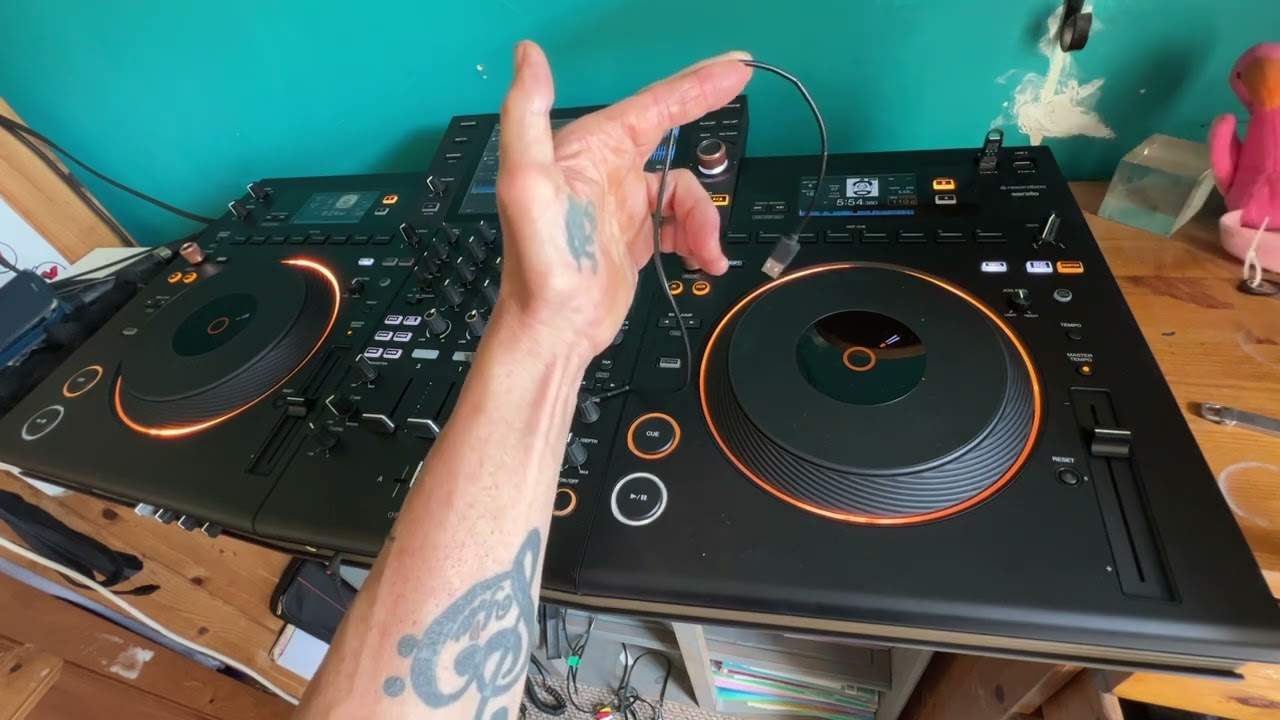
Ladies and gentlemen, here it is, the Pioneer DJ Ofus Quad. Right, so in this first video I'm just going to give you an idea what I think about it. Now, I have used, first of all, practically every single CD player. They've got the, you know, from the 1000, the 700, the 200, the 400, the 900. 800 Mark II, the Nexus, I had a little dabble on the 3000, the XDJ-RR, the XC, XZ2, XZ3, the RX1, RX2, RX3 and the XZ. Now we've got the Opus Quad. So, first thing that was very apparent to me is the sort of sleek ergonomic design. And I think what Pioneer DJ have tried to do with this player is just take it that one step higher with less features. More so, really the less features are just little tiny quirky things.
Dots or no lines. It just, for me, that just looks a little bit more professional. The analogy I'd give you, it's a little bit like, let's say, going into your top of the range Audi or BMW and seeing it full of bells and whistles because that's what... The company wants you to sort of step into this vehicle that, you know, it's almost like stepping into the cockpit of a 747 where you're inundated with dials and whatnot. But then the next level above that is your Ferrari or your Bugatti, where you still got that element of opulence, but at the same time, you've got functionality. You know, there are less bells and whistles, but there's more behind the making of the vehicle. And I'm pretty sure that's what they've done here because, you know, for example, on the up-faders, you just got dots, you haven't got lines. Now, the one thing I have noticed again is not so much there are less features.
2:33 All of the beat effects are, of course, on
But on the beat effects, we don't have any buttons. All of the beat effects are, of course, on... Where do I go? Press... Hold on. Where are we now? Yeah, that's it. Turn the beat effects dial and now we can see on the screen. So we can choose our effects. We can also choose on the screen the channel or channels where we want the effect to take place. On the area where we've got the crossfade and the up-faders, there's no switches. So you can choose how you want the crossfade to work in relation to the up-faders. That's all on the screen. Now for some people that may be a bad thing because you've got to go to the screen. But for me, once I get used to it, it's a good thing. Because the analogy here, it's like back in the day, the iPhone 1, 2 and 3, massive compartment where you plugged in your charger and then it got smaller and smaller.
Same with something like this. If you think pure logic, the less holes you've got into the player, the less chance you've got of dust and debris getting in too. And also with the switches, over time you could get clicky sounds and it's just more stuff to break really. I do like the feel and the look of the... turntables the platters the jog wheels whatever you want to call them very similar to the 3000 series which makes me think that you know this is in a line with the 3000 it's you know again we went from the very basic sort of 1000 mark one two three you had that variety of players then they stepped up To the 2000 Nexus and so on. And then they stepped up again to the RX, XZ and this, the Opus, it's another step forward again. Now what hits you straight away is that massive screen in front of you. Of course, you've got a screen either side as well. So I've said this time and time again with the RR,
5:16 Something that should be pure logic
The XZ and the RX, and now the Opus Quad. What Pioneer are doing is they're basically proving to the DJ industry that you do not need a laptop, okay? And I have even mentioned this prior to the industry saying you don't need a laptop or pointing you in that direction. Because what we have is on the front here, we have two USB connections, exactly the same as the RR and the RX series and the XZ. Differences with this one, we've got four. We've got another USB on the back and we've also got USB-C. And by all rights, I'm pretty sure you can plug in...
I have mentioned about this many times in videos, but I want to explain something that should be pure logic. You buy a player like this, you download on your PC the rekordbox software. You go into, I believe it's record mode, not performance because you have performance mode when of course it's plugged in to your player. All you have to do is analyse your tracks via the rekordbox software on your laptop, then you transfer those onto an external hard drive or a thumb drive also known as a stick drive, place that in and then all the information is on the screen in front of you. Now I can't explain this enough until hopefully it will with one person watching this video or everyone, it will sink in.
7:25 Vinyl turntable, four decks
Once you have the information put through the correct software and displayed on the screen in front of you, you do not need your laptop. You don't need it. Because again, if you think about it, if you're just using the laptop, you're relying on that USB cable into your player. On the off chance it does happen that something happens to your laptop and that's the only source of audio you've got, you're basically stuffed. And I honestly think now with today's technology, the likes of these players, if you just turn up to a gig with a laptop and nothing else, you're an absolute idiot. You need to make sure you have backup. And with the likes of the Opus Quad, you take in the back pocket a couple of thumb drives, stick drives, 32-64 gig with the tracks that are appropriate for the venue or the client you're playing for.
And anything does happen to your laptop, you're good to go. But again, with this, we've got our four decks, so you can use the four decks in its entirety off the one player. Alternatively, using the screen, you can go either to line input or phono input. So on the back of this, there are just two inputs. For channel three and channel four. And using the screen, you can go from say line, which is like your external CD player or phono, which is your vinyl turntable. So again, you can if you want to just use this for your vinyl turntable. So you could just use the mixer if you want it, if you really wanted to. But I in my professional opinion, I've been in this industry a very long time using something like this. Yes.
9:41 Software, I go through the process
Use your laptop, of course, which undoubtedly in videos, gig logs and so on for the next two or three years you'll see me use it. I will be using my laptop, but I will also be using the thumb drive inputs. Now, something else I'd like to explain. I don't have that cable with me at present. I don't think so. Excuse the noise and rummaging around, but as we speak, I am looking for... Where is it? Right, it's not that, but this will suffice. Okay, so I don't know if you can see, but that's a micro USB and that's just your basic USB. So what I recommend with a player like this, now if you imagine I've got a thumb drive stuck in there. And I go to the software, I go through the process of ejecting it. It says yes, good to eject, exactly like a laptop. I take it out. Now, of course, every time I put a new thumb drive in and out, excuse me, even if it's the same one, over time, it's not a case it might, it will wear away. It will, it's undoubted, it's undoubtedly going to wear away, whether it be a thousand times or 500 times.
That stick or thumb drive will wear away until you can't use it anymore because there's small metal prongs, quite often on the good ones they're gold plated but eventually that gold plate will wear away which means you can't use it anymore. It's going to happen with this player, you know if I use this for the next three years and every day I take the thumb drive in and out 20 times it's going to wear out so I'm going to have to change them. So what I recommend you do is get yourself an extension, something like this. Quite often you can get a cable which is, you know, sort of four inches long. You have your USB that you will plug in to the USB input. But on the other side, you've got the equivalent plug that you would plug the USB into.
12:04 Bass, mid and treble
So if you think about it, if you plug one of these into the player and then you plug your USB into the connection, then over time that connection is going to wear away. Okay? Your thumb drive, your USB stick is going to wear away. But to me, that's far better than the player's USB plug wearing away and you having to... Send it to the local store where you bought it from or post it back and get the whole player fixed. So that's just a side note. All right, so what they've done with this player straight away is they've got... Please don't go any further with getting rid of what I class as the tactile features, i.e. Bass, mid and treble. You know, because we like to use dials, we like to physically touch things, move up and down, side to side and wiki-wiki. What we don't really want to do is get into a situation where we're more relying on just touchscreen and moving wave formats. Because even though you're getting rid of more moving parts and the possibility of things breaking...
You're slowly but surely taking away the actual experience that a DJ likes of pressing buttons and being in control, having that click, having that feel with your finger moving, pressing something, turning something. That's what I like. You see, again, there are a lot of companies now who are bringing out, you know, band mixers where everything is practically on an iPad and it looks good. Great. You know, it's in one place. But you see, you go back to the 70s where you had these massive boards, 64 inches long with 5 million dials that you look at it and you think, which one do you press or turn? But the producer knew exactly which one to use. You know, you had, it was as though you were part of the process of making that track or part of the process of, you know, getting the sound spot on for the band instead of just moving a couple of cursors with your fingers and that's it. So let's leave it at this. Please don't take any more features away of the physical touchy feely part of the mixer.
Now, we've still got two mic inputs. There's one at the front, there's one at the back. Like I said, you've got four USBs now instead of two. Now, the dial here for a lot of the process of going through the features on the software on the screen has more functions because we can move it up and down to go through but again in the next few videos I will go through a lot more of the features. So, I mean, if I go back and back, let's just go to source. We can see I'm on USB 1 and that's USB 1 selected. So, if I want to eject that previously with the XE, RR and RX, of course, you've got a button. You press that and then, of course, you can remove the thumb drive here. It's just USB stop and away you go. So, you know, we've selected that.
14:38 Different folders here now, so I'll just go through some
Different folders here now, so I'll just go through some. Press down, I've got my tracks here. Again, I can use the dial, find one I want to play, put that onto deck number two and away we go. I'm not going to play too much because I don't want to get copyright issues. So again, this is a really quick kind of overview. The feel... The jog wheel is really great. Now, I think what they've tried to do with the jog wheel is go, you know, we need to make a jog wheel that's very functional. It does what it should, but at the same time, we don't want it to overpower the look of the player. And that's what they've done. It's just got this really nice feel to it. It reminds me like a volcano and they've chopped the top off.
It doesn't turn or anything like that, but it just looks good. I'm slowly getting used to all these features. Now, again, we don't have the control pads at the front of the deck. They're at the back, so we've still got our cue points. At the moment now, I'm in quantize, so... Now I'm off quantize. I mean, again, very quickly, a small feature here, which is the same with practically every other player. When you're in quantize mode, you know, basically what that does, it eliminates human error. So if I press quantize and I go to one of my cue points, you can hear how much I'm pressing that, but it's pressing it in beat. Whereas if I disengage quantize, so there now it can play. Whatever, whenever I hit that cue button it will play it. Now again with the other players, the XZ, the RR and the RX, when you hit a cue point, the track of course will start from that position. But I will show you in a future video the difference between those players and this one is that you can set it so you can actually get the player to just use the cue point and start from the cue point so long as you've got your finger on it. So it's a little bit like using...
17:13 Yeah, what else can I say for this video?
The cue, got my finger on the cue, it plays, take my finger off, jumps back. So you can do the same with the hot cues as well. Now again, we've got the screen above each of the jog wheels. So at a quick glance, you know, you can see what's happening on just that side. Instead, you've got this whopping great big television screen in front of you with everything on it. Deck 3, 1, 2, 4, you know, you can go through the process of QWERTY keyboard, finding the tracks and so on. Yeah, what else can I say for this video? Very quickly as well, what I do like... They've kept the great colour effects. So one of my favourite ones was the sweep effect because it's almost like sort of, it gives it that more techy effect there. It's sort of like snapping the sound in and out and that's a really good effect.
For sort of bringing a track in and taking one out. So it's almost like as you bring the track in, you know, you're starting the track off with the mid and a bit at the high. You're slowly bringing in the bass, more of the mid until you reach the 12 o'clock position where you've got the full spectrum of the sound. And as you're doing that, you're doing the opposite to the other track that's leading out. So using the sweep is similar. If not identical to, you know, taking the bass out, bringing the bass in, taking the bass out on another track. Anyway, what else can I tell you in this video? I mean, really, it's just a really nice, sleek kind of design. It's slightly bigger than the XZ, not by a great deal, but...
Let's see what happens. Anyway, expect a lot more on this. And of course, let me know if you got the Opus Quad in comments. Good points, bad points. I mean, don't slag it off. If you're going to be an idiot, then it's probably best. Don't forget to like the video, it always helps. Thank you for watching. Practice and enjoy.
This transcript was produced automatically from the audio of the video and may contain mistakes.





