 8:56
Pioneer DJM-REC App Short Review Record Your Set in Sterio and Live Stream at the Same Time
Contents of the video
0:00 This is a very basic look at the app
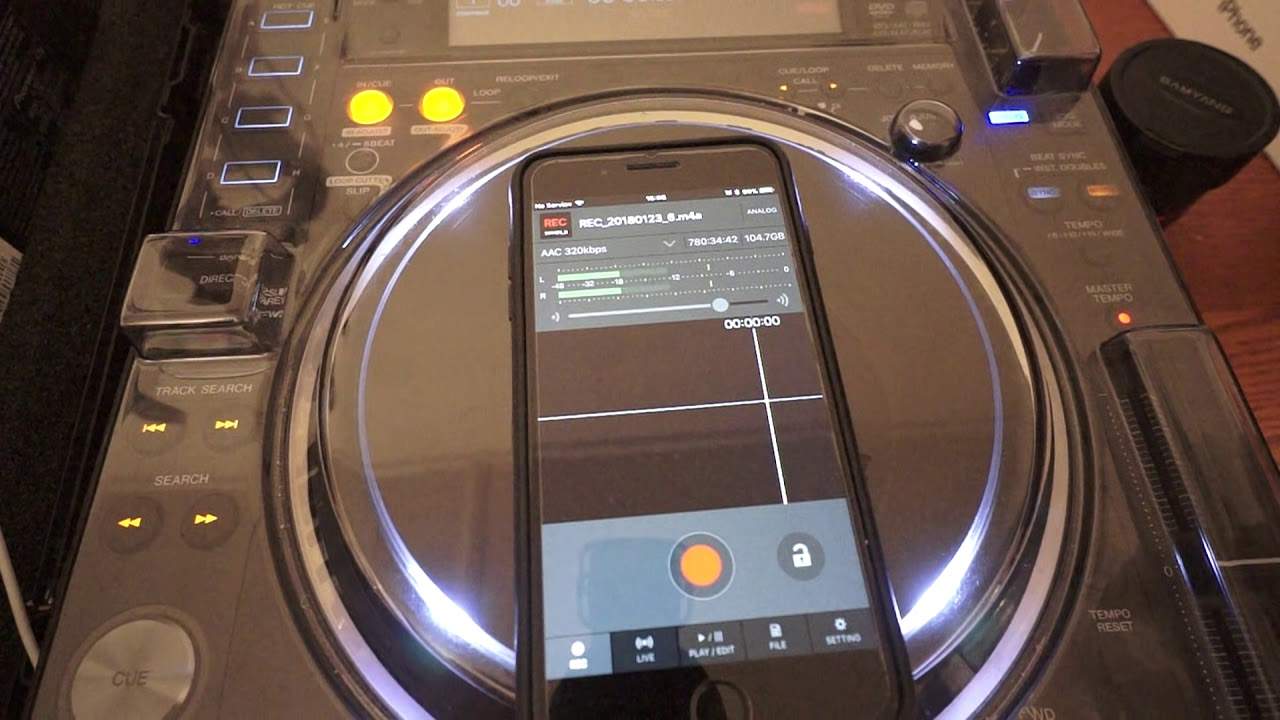
Alright guys, in this video we're looking at a small insight into the new app from Pioneer known as the DJM Record. It is great for your DJ mixer because it means you can, if you want to, record true stereo. So this is a very basic look at the app. You can buy it, I believe, it's £9.99 but if you go to the App Store you can get it for free. And have a bit of a mess around for about 28 days. After that, you either get rid of it or you can buy it. It's entirely up to you. So at the bottom of the app we have the icons. One which we're on at the moment which is REC, which is of course short for record. Next one is live. Next to that play and edit. Next one to that is file. And the one on the right hand side is settings. So at the moment I'm on the record part of the app.
Now, of course, we have there a big red button and by all accounts, press that and it starts to record. But before I do that, to the right of that, we've got an icon that looks like a lock. I'm just going to press that. Now I'm going to press the record button and it's going to do absolutely nothing. That will stop you from accidentally recording. Now at the moment you can see, and again for the partially sighted I will try and explain in great detail. We've got these sort of LED lights flashing. Now what's happening is they're picking up my voice. So for example, you don't have to have a DJ mixer, you can just record from your speakers if you want to. Also, what this tells me is that you can record people talking or anything for that matter. You can go to a nightclub, record the set, it's entirely up to you. But just remember what you're recording and the legality side of it. That is your responsibility. So, this is recording my voice at the moment, but again, because it's the DJM REC record, it means yes, you can record from your DJM mixer, but of course make sure...
2:59 Shut up, silly man
That you have a compatible mixer. Also very important, which is what I talked about in the last video I did on this app, you need to make sure that your mixer has the latest firmware. I plugged this in to the DJM Nexus Mark II, it didn't work until it was like, yep, needed to update the firmware, took me a few minutes, bang, it works perfectly now. OK, so let's press that lock icon again. And now I'm going to press the record icon. And as you can see, we've got a bit of a wave format going there, which is it's the app recording my voice. Press the record again and we will go straight to play and edit. So press play. There we go. I'll press play there. Shut up, silly man. OK, so let's go back to the record icon. All right, there's a bit more to this page than meets the eye. What we can do is we can move the volume up or down. Now that also, by moving the volume up or down, will increase or decrease the amount of signal coming into the app itself. Now again...
If you're not familiar with zero dB, that's pretty much the level that you need to get to to get good audio. Anything above that, you could get distortion. Anything below that and it's maybe a bit too quiet. A good analogy for you is let's say you're playing a track on your DJM and you're tapping in the green and you know you're just about hitting the amber. That's where you want to be. You do not want to be in the red. Red is dead. Okay, so right about sort of top left-hand corner, we've got AAC 320 KBPS. That's kilobytes per second. 320 is a good amount of, let's say, quality. But if we press that, we can go 320, we can go 256, 192, 128, 64, 48 and 44.1 kilohertz, which is wav if we want to. So there are many...
4:25 Different types of, let's say, quality we can record on too
Different types of, let's say, quality we can record on too. Press that again. Now next to that we have the amount of space we've got left on the device and also it shows me the amount of hours I can record. Now at the moment I can record 780 hours, 34 minutes and 42 seconds if I want to so I could pretty much plug this in. Plug it into the mains, walk away and go on holiday somewhere and record practically everything, which I don't want to do. Right, so the next icon, this is the amazing part because what this will let us do is live stream good audio to any of the sites that you're a party to. If you've got a YouTube account, you can live stream to YouTube. Periscope, Instagram and Snapchat. I presume there could be a few more coming in the near future. But again, this is really important to you. Very important. This app at the moment is for free. After 28 days, you buy it. You can happily press on YouTube, Facebook Live, Periscope, Instagram, Snapchat. But it is up to you whether you want to record and live stream your set.
Simply because some of these sites may have their own settings to what music you can or cannot use. So it is, again, I can't stress this enough, it's up to you, the user, to be careful about what music you are live streaming. Because if you live stream the wrong tracks and you've got a great YouTube account, you could get a strike. The same with Facebook Live, which has happened to me. I've done quite a few live streams and all of a sudden I've been blocked from uploading videos because I've played someone's music. So be very wary about live streaming on channels, it's entirely up to you. Alright, the next icon, play and edit. Very simply if I want to, I can play any of the files that I've already recorded, alternatively I can edit them as well.
6:45 Recordings that I have done
The next one, of course, is file. So I can go to the recordings that I have done and just pick and choose whichever one I want to. The next icon is settings. So again, this video is a general kind of look at the DJM record, auto-record if we want to. Now that's quite clever because what that means is that if we go to auto-record, An amount of signal I want the app to recognise before it starts to record and the same to recognise an amount of signal before it stops recording. So let's say your set is starting with a floaty kind of melody, then so long as you know the audio level of that... Okay, so that's that. Let's have a look at something else. We can of course reset. Display of timestamp info, we've got recommended DJM to friends if I want to, review on the app store, support and purchase. Now if I click purchase, it's £9.99 so I don't think that's a great deal to be quite honest.
Alright, so I hope this has been a help. It's a little bit of an insight into the new app from Pioneer known as DJM Record. I believe it was out today and I will be using this in the near future and I'm going to go and buy this because I like it. So I hope that's been a help. There will be... No, actually, shall I put a link? I'll put some form of link on it where you can get more info from it but if I don't then I forget. God damn it, just Google it. Alright, thank you very much. Practice and enjoy.
This transcript was produced automatically from the audio of the video and may contain mistakes.





