 5:18
Pioneer DJs with the DJM-400 mixer and CDJ-400's
Contents of the video
0:00 Here is PCDJ but also using
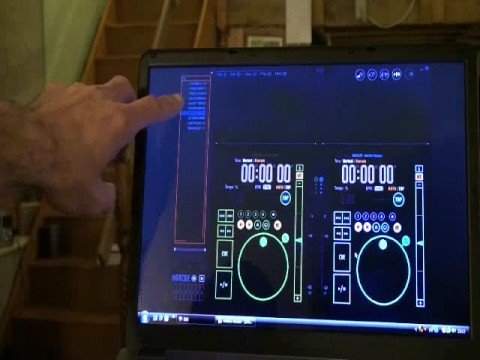
Alright folks, Jonathan here. Now as promised, some more videos on PCDJ, but what we're going to look at here is PCDJ but also using hardware as well. Now that program up there is from Pioneer, it's known as DJS. And what I've done, I'm utilising the PC program along with the hardware here. Two CDJ-400s and the DJM mixer. What I'm going to do is pause the camera and show you exactly what I did.
Okay, first off I'm going to show you how I got to this basic screen. Right, at the top here we've got file. So what I'm going to do now, I'm just going to give you a basic rundown how I got to here. I'm going to click on file, go to preferences, click on preferences. Now prior to getting to here, I had to tell the program that I was going to use an external mixer, which is the CDJ-400. But here, what we've got is player A, we're going to be using... In conjunction with Player A, the Pioneer CDJ-400. Exactly the same with Player B, the Pioneer CDJ-400. And I'm using an external mixer. So what I'm going to do, I'm just going to click here, OK. That's what's happened now. That guy there is in control of this CD player and exactly the same the other way around. This guy is in control of that. I'll explain that very shortly.
2:01 I can go over and I can just click on a track
Exactly the same this side. That is working in conjunction with this CD player. Now first of all, what I'm going to do, I've got a CD in here, a basic CD, audio CD. I'm going to eject that and if we have a look, I'm going to give you a quick demo of this track here. It's the Bass Hunters' Angel in the Night. So we'll put that back in there and if I move the camera out slightly. Right, what I'm going to do is I'm going to press play. If we have a look on the crossfade, we're using the music from here. If we move the camera over, I'm just going to press Q. What I'm going to do is move the crossfade over and I'm now going to press USB. That straight away has said PC mode. Now if we have a look up here to this area, I can do one of two things now.
I can go over and I can just click on a track. Click up, anyone, doesn't matter. But what I can do as well, if I go down to the CD player, I can, using this guy here, if you can listen to that, and if we have a look up here, you can see I'm now scrolling through the tracks. So when I get to a track I want to play, press down, now that's loaded up. Now this is why the two are working together. Because watch what happens, bring it out, and when I use the touchpad on this laptop, which is the equivalent of basically using a mouse. If I put now the mouse over the jog wheel, virtual jog wheel, have a listen. Let's press play. But also, watch this, let's go to the CD player now. This is the hardware.
3:55 Basically now, let's say we're in a live setup
So basically what's happening is I can, if I want to, I can manipulate the music here or I can manipulate the music here. So alright, what does this mean? Well basically now, let's say we're in a live setup. I can use CD in there, the mixer, CD in there. But at the drop of a hat, if I want to use the music from the PC, all I've got to do at any time, press... USB, we go into PC mode. I will then have the option of using this for the PC. I can press down to agree and then I will be using the music from the PC. So in other words if you go to a function let's say with seven or eight CDs but you've got 10 or 20 gigabytes of music on your laptop you can use the music off your laptop Just at the same time you can use the music from your CDs. Now again, I am as well just about getting into PC DJing but I can see it's going to be a lot of fun. Alright so there you go, second video on these guys here and especially in conjunction we're working with the Pioneer DJS software. Practice and enjoy.
This transcript was produced automatically from the audio of the video and may contain mistakes.





