 24:42
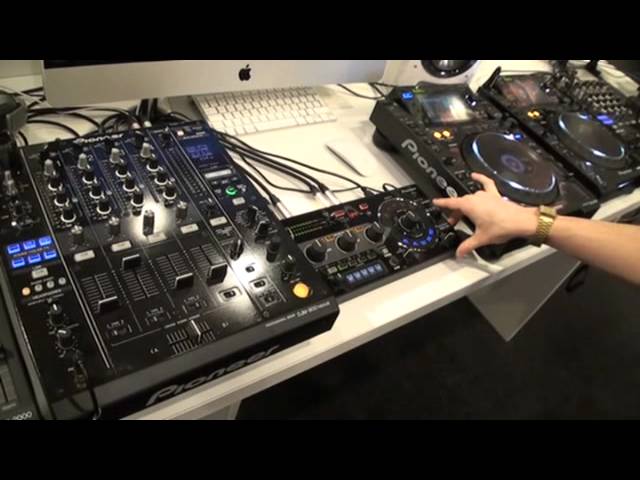
Pioneer RMX-1000 Remix station Frankfurt Messe 2012
Contents of the video
0:00 We're here at Frankfurt Music Messe 2012
Right ladies and gentlemen, we're here at Frankfurt Music Messe 2012. My very good friend Rick Parkinson, Pioneer. Exciting times I believe. Absolutely yeah. What have we got? Today Jonathan or at Music Messe we're presenting the RMX-1000. So this is Pioneer's remix station and this next generation of product 4 is in our effect series. So no longer is this just an EFX, this is what we've run in a remix station. And it comes in three parts. We have the hardware, which works on a send and return principle as does our EFX 500, 1000, take the signal from the mixer, in and out and away you go, all your affecting and your hardware manipulation. It also comes as a VST, which means you can recreate all your DJ effects in a software environment. So what we found during development is people are making mixes in Ableton, people are producing but people are struggling to
Recreate their DJ performance in a software environment. So now hopefully, all these tips and tricks and traits that are familiar to your sound will now be recreated in a software side as well. And then the third part of the puzzle is a piece of software called Remixbox. So if you just forget this, and you look at this over on the screen, this is a piece of software that gives you the ability to customise the hardware. So every setting, every parameter, Every frequency curve, every roll trigger, every sample sound, everything can be customised within this software because it's connected via USB. So you do this all at home. You do all the preparation and then you save the settings onto an SD card. Just like you're doing with rekordbox. Absolutely. Anywhere, get it done and then when you're there in the club... Sure. We understand that preparation and customisation is very important but people don't want the hassle of
2:25 I've just got a track playing over here on channel 2
Definitely not one of these in the DJ booth, but definitely not one of these in the DJ booth. It has its advantages but also has its downsides as well. So you customise everything, you click sync and it saves all the settings onto the unit so if you were touring with this unit it would be customised to you or if you're touring just with an SD card you turn up to any gig, any ghost and you customise. So what I'm going to do is go over a few of the effects on the hardware and then show you a bit of customisation and a few of the bits inside the VST. So let me just get rid of this and disconnect this. Okay, so I've just got a track playing over here on channel 2. Send and return and straight into the effects unit. The RMX unit, sorry. And the hardware itself is split up into four sections. We have scene effects which are here, which give you the ability to build up and break down a track.
You know the theory behind it is no matter where you are within your music, you can still create some kind of energy either peaking or going down. We have release effects, isolator effects which are more effects based on frequency movement rather than tone generating effects such as white noise and then we have our X-Pad which works around the principles of sampling. Ok so I'll show you a few of the effects and what they sound like. This is our big wet to dry pot here. And the thing that's great about this is instant gratification. The EFX 500 and 1000 were great, but sometimes very hard to produce nice clear sounding effects. Many different variables, lots of settings, lots of different options, but now with one big pot you can get an instant sounding result so it's really easy to use, but sure at the same time you can still go very deep into it as well. Because when you turn this pot it doesn't just do one effect, it does multiple effects so it sounds a lot richer, it sounds a lot warmer.
So to give you a bit of a demo of what they sound like, so I'm just going to hit fan pass echo which is kind of like a frequency echo. Set my time parameter, we've got two sub-parameters per effect which work in different manners for each effect but for the echo instances this is time and filter. So, echo on, scene effects build up, instant. Nice. Change the time parameter. Very good. Like you said, it's literally plug and play, isn't it? Sure. That's sweet. So, bandpass echo, for example, as you would expect. Filter. Nice. Some really, really, really nice sounding effects. And something if you notice here, Jonathan, we have this new feature here that's got quantize and nudge. And this is the new BPM engine that we have inside here. Right. So we have a BPM engine inside our DJM-900, our 850 and our other products.
5:02 It's a new algorithm inside the unit, which means
But this is a new BPM engine we have in here. And it's basically rekordbox one time, but without the need for the LAN port. So it's a new algorithm inside the unit, which means... It'll do it for you. Basically, yeah. It's the tightest BPM engine we have. So hopefully all of the effects you engage will always be pretty snap on the beat. Excellent. That's always a problem with a lot of the external effects units. You know, you think they're in time... But, you know, after say, I don't know, 16 bars, they start to go off very slightly. And the LAN port that we put in the back of our DJM900 for example is great because that will always block the time depending on your pitch on your CDJ. If we put that in here, that was going to shoot the price up. So we've developed something new and this also means that whatever signal comes into it will have that nice sharp time on there. Sweet. So a few of the other things, we have like a noise generator but now so many more sub-parameters on it.
Now, very quickly Rick, I've noticed you've got this guy on the send and return. Now, I'm sure I'm right in saying by having it send and return you're not going to use the effects here, no? No, so when you activate send and return on the mixer here, you disengage the effects unit here and you'll send all the signal out onto this here. You know, if you just go back onto delay and hit delay, you're going to use the 900 effects. As soon as you go send and return, you're using this here. So, if we went from here... From the output or record output, then into that, from out of that, then into the DA. Presumably then we could use the effects from here and then add an effect on that over the effects here. Absolutely yeah. I wouldn't advise that because you're probably going to blow somebody's sound system up. But theoretically it could be done. It could be done. The best way to use it is send and return. And it's an easy way to use on select your channel and away you go.
7:04 There are some of the build-up effects that we have
So there are some of the build-up effects that we have. We've also got our breakdown effects here on the scene effects, these blue buttons here. So if I just engage like a crush echo for example. Nice. Low pass echo. Yep. And then the really cool part we've got here is what we call our release effects. So during the development of this product, we found that a lot of DJs sometimes got into trouble with effects. They'd applied too much feedback, they didn't know what had happened, the sound was going crazy and there was no way to get out of it other than to completely disengage the effects and you lose all this energy in your music. So now we introduce the scene effects. If I engage an effect that I know is uncontrollable, like a spiral, it can go pretty wild if you don't know what you're doing with it. But with the release effects, it disengages the signal and then lets the track run underneath it. So I'll demo that.
And it works in three ways, the release effect. It's either a vinyl break, an echo or a backspin, so... Fair enough, Rick, you know your stuff. I must admit, listening to that, I do agree because the old school style of that sort of effect on the mixer, you could see it going from green amber, full-on red and of course... It's just out of control, isn't it? So you've got three ways to exit the effect like that. It's the vinyl break, the echo or the backspin. So just do a normal echo and then you've got the echo which sounds like this. But a really cool thing about the trigger here is it's got three different sections so you can get three different variations on the release effect. So if I do a vinyl break
9:46 Isolator effects, which are more frequency-based
But push it really fast, I get a really, like a 12-10 break. If I touch it gently... That's very clever. And then if I go in between the two, I'll get this kind of medium... Yeah, and because we've got a bit of a slip mode going on, like the 900 where the beat is on the background, yeah, love it. And then of course you've got a backspin. Nice. And if you touch that gently... Probably the worst song ever to get interrupted by. I know, never mind. So those are the release effects and the scene effects. And then we go on to the isolator effects, which are more frequency-based track manipulations. The isolators, classic, DJ 1000, these big pots, DJs love using them. Yeah, beautiful, beautiful. And then we've just based a really, really simple... You see, I've noticed as well, what we've got, ladies and gentlemen, here is a track that has been playing now for about 10 minutes. It's going to get better as well. So even while you're talking...
You know, we're still getting a new concept. Everything's happening over this track. It's completely different, you're experimenting with it, but it's one track so you haven't mixed anything in. Potentially then the crowd could listen to the same track for ten minutes and you could be just there jamming away couldn't you? Of course, I'll always say that more is less on an effect tuner. So if you go off the isolated section onto the X-pad section here, this is where the fun starts. This now turns into a roll... So there's more fun? There's more fun, that's where the fun starts. So I'm going to start, I'm just going to get the track going again. Yep. So the DJM900X pad was a really popular feature so we kind of incorporated that onto here but now this is our roll pad as well so... But now what we've got is some really nice cool sounds going.
11:38 You can hear and feel it more instead of a half or quarter
And because I'm so confident about the new pitch engine, if I now disengage this, it should be smack in time. Everybody that did a roll on the DJM900 and then tried to do the wet-to-dry thing, it might have slipped a little bit. That's on. I always like the three-quarter time as well because there's slightly more emphasis over the beat. You can hear and feel it more instead of a half or quarter. So now, that's the roll pad. Now we've got this drum machine inside here as well. In two ways, we have these standard synthesized sounds of a hi-hat, clap, kick and snare. But you can also load in your own samples. You can have four banks of four sounds totaling 16 seconds per bank. And then what is even cooler is you can start to put on your own beats. And if you're slightly off will it do the timing for you? It quantizes it. So a good way to demo that, if I just stop that...
I'm just going to put overdone mode on, which means it'll loop. But I'm going to turn Quantize off and I'm just going to go... So it's looping, but it sounds awful. If I turn Quantize on and do the same, just randomly hit a load of buttons, it'll snap it to its retrospective beat and it'll be a perfect loop, he says. He says. Sweet. Very good. So when you start to do that over the top of a track, you get some nice little sounds. So if I mute all these out and then just put a snare in...
15:37 I'm going to engage an echo
So now I can unmute it, drum pattern going, track out, get the song ready on here and mix that in over the beat called remix. No problem about time while you're doing it on the fly. You've done it. So that's kind of the hardware side of things. And then let's look at the Remixbox software. So I'm just going to stick a loop in over here. If I now start to sync the units, these two are now talking to each other. So if I just engage... Excuse me, I had a few beers last night. Didn't we all? So I'm going to engage an echo. You can hear I've got like this quarter beat echo going. If I now hit echo, engage it to a 60. Three. So this portion of the subparameter will only ever be that timing. It'll then be three quarters when I go here, half down here. Yeah. And all these are saving instantly into the unit. So on the noise for example, if I hit noise...
16:25 How much were you involved with the actual manufacture, the design of
If you've done your settings inside remixbox, if you don't have an SD card in, it will save the settings directly onto the I hope you're getting this, ladies and gentlemen. It's a bit of a tutorial as well. How much were you involved with the actual manufacture, the design of this? I've worked on this product for about a year and a half now. It must be for you. It must be so exciting to be at the forefront The music technology, you know, to be part of the best DJ company out there and to have this in front of you and think I did some of this. It's very rewarding when you see, obviously we work as a team and we can't do everything, we have guidelines and budgets and all these other political things that we have to adhere to when we design products but it's very rewarding when you see a concept you've worked on and developed into a final product.
We're not finished, come on. So yeah, some more ways you can do stuff is for example the release effects. I'll tell you something that's quite cool. On the EFX1000 we had a trick called the feedback loop where you could completely sample. So basically you can still do that inside here, it just works in a different way. So if I go into my echo effects, we've got all these different sends here. So that'll never degrade. But if we go into like DJM style, it'll degrade. Yeah. So when you kind of use that with the echo, you can get... I was sure it was really cool inside the EPEX 1000. And now it just works in a bit of a different way. Very good. And there we go, we've got the music stopped over there now and everything's happening through this little baby. But I did a stylish exit to my feedback loop then.
20:01 On the software and then down onto the hardware
Yeah, alright, okay. Maybe I missed that. I'll have to try and... Alright guys, rewind that and go and check it out. I'm copying. But yeah, you can load your own samples in and you would do this by going over... Another cool thing is on the roll pad, for example. So personally, I've set my roll pad up like this. So whenever I press... Oh, sorry, wrong. Whenever I press three quarters, I'll get this kind of a... Sorry, that's my fault. I get a three quarter delay. Yes. You know, if I wanted that to be a 32 delay. Got you. On the software and then down onto the hardware. So for me personally, I put like one big number 1 here, so if I slip over it, it'll always be the same. And then you've got these little fills either end. Then literally just drag it in. And then also this is where you load your samples. Could you show us again where, go back to where you load the samples? So hit the X pad, and then you bring up the X pad. So that's where I just edited my roll pad.
Here's how you edit the oscillated sounds. So if I want that hi-hat to be louder, or a different type of sound, you've got to synthesize down so you can really start playing around with it. And then if you go over onto the sampler and hit one of these slots, you basically just browse for a sample and note your samples in there. Perfect. And also... We have a new version of rekordbox coming that will enable you to splice samples out of there and load them directly into the software. Nice. And as well ladies and gentlemen, rekordbox is a free software program and best place to get that Rick? It's pioneerdj.com. Fine, excellent. So yeah, kind of, oh now we need to go, so that's the hardware and the remix box software all comes inside the box and then the final part of the puzzle is the BST.
21:38 It's going to load at Ableton
It's going to load at Ableton. I'm going to stop the CDJ for this, but start up a track. Here's one I prepared earlier. So this is just a track running inside Ableton. I'm just using the 900 sound card to get the audio. Yeah. So for anybody that doesn't know what a VST is or an AU, a VST stands for Virtual Studio Technology and an AU stands for Audio Unit. Basically where VST came from, Steinberg introduced Cubase and in the old school days people had hardware studios And no matter what analog kit you were putting into the studio, it was possible. You just plugged it in. Then software was introduced and it was hard for, for example, Korg to put their keyboard inside Cubase. So Steinberg opened up their software so people could create their VSTs. That's why you get Native Instruments, Sugarbytes, all these different VSTs hosted inside software. So now, all of our effects can now
Recreate in a software environment. Sweet. And the really cool thing is about it, sure this will work as a controller like this, so you can do this with your mouse, but this is where the fun comes in. This is a hardware device controller. Sweet. So what you can do now is obviously record all of this automation in. So if I just hit record, basically now no matter what I do, so if I now pull up and away we go. All of our automation.
And then you can start to edit this, you know if I didn't like how that sounded. So what we're trying to do here is bring DJ's effects put into a studio environment. Sure you can either use this to make a mix with like people do in Ableton or obviously you can just use it to produce with so we're pitching a bit of a different market. You're a bit of a brain aren't you? I can imagine Rick when you die what they're going to do is they're going to open up your head and quickly pickle your brain so they can keep all the knowledge. I've got a very good team working with me. That was a very political answer wasn't it? Excellent. So yeah, in a Jonathan Lewis style nutshell, it's the RMX 1000, our new remix station, the VST and AU support that comes inside the box, and the Remix Box software. It's going to retail at £600 and it should be available in May. In May, and that is May 2012, ladies and gentlemen. Yeah. Alright, Rick, thank you very much. Pleasure. I'm sure we will talk in the near future. In fact, we're probably talking about three or four seconds time after a few more clips, but...
What's the best saying in the world? Practice and enjoy. Hey, easy, nice one.
This transcript was produced automatically from the audio of the video and may contain mistakes.





