 6:33
Pioneer SVM-1000 a look at the VISUAL FX.
Contents of the video
0:00 Visual effects on the SVM-1000
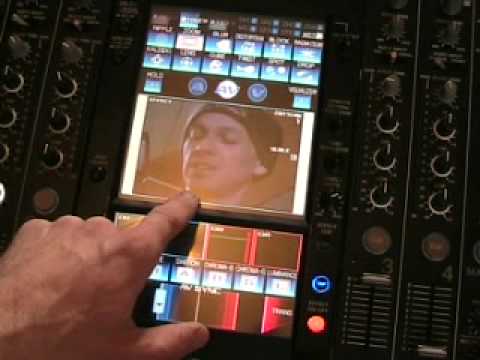
Alright folks, in this video we're going to look at the visual effects on the SVM-1000. Now first of all, very quickly, I could, yes, put a music DVD in there and I could show you the effects on the music DVD. But because there's so much going on in music DVDs it's sort of a little bit difficult to explain actually what's happening. With the effect on that specific DVD. So, sadly you're going to be looking at my ugly mug and I'm going to be doing rather distortion-y things with my face that probably could make me look a lot better. Anyway, right, what I'm going to do now is pause the camera and I'll show you how I've got it all set up. Right, what we've basically done, I've gone out of here and then I've gone into that camera over there. So that now is looking at me and that's actually on channel one.
And there's channel one on the small screen, so we can see what's actually happening. That's almost like a little cue monitor for you, so you've got four for the four channels. And then that is on the main screen over there, and I'm going to be recording all of this with this particular video player. So what I'll do now, if I just put that like that, bearing in mind this is punk TV, no one's paying me for this, this is my style. So, just have to put up with it really I suppose. OK, now first of all you can see the button flashing there. Now then... What I'm going to do, I'm just going to press that. At the moment now, if I put it on the ripple effect, right at the top, if you watch this now, we've got ripple. Panasonic, oh god, it does have to stop doesn't it? Hold on a second. Right, that's better. OK. We've got the ripple effect there. Now, if you actually look at the TV screen, and I'm now touching that and we can't see anything on the TV at all. But, if I now press effect on, ripple, now look.
2:19 You can create your own set of effects
We get the ripple effect. So basically what you can do here is you can almost just check out, see what it's like first before getting it on the telly, like so. But, okay we've got ripple effect. Now you may think, oh brilliant, there's the ripple effect. But what we've got here, we've got depth and we've got pattern, my goodness, we've got pattern. So what we can do, we can actually go through a depth, we can have it, have the actual effect. The DJ Tutor is a software that allows you to create your own set of effects. You can create your own set of effects. This one here, hold on, no that's right, sorry we've just got the four, beg your pardon. Now zoom, now zoom is quite cool. We zoom in, oh my god, there you go. Now that is excellent. Now what I do like about that is, alright, I've got a camera on me. Imagine you had a camera on the dance floor or in the nightclub and you've got the camera say pointing at someone who is by the bar. Well there you go, you can actually zoom into them.
So that is excellent. Pattern, let's have a look. My goodness. And then we'll go to number three and number four. Hold on, there we go. So there you go. I mean this will give you sort of a general idea, no scale again. See? So you can do one hell of a lot with this. Okay, so now we're going to go to something called blur. So you can see exactly what's going on. And again, it's now on the telly as well. Okay? And then distortion. Now this one I do like, and that is the block effect. Okay, now check this out. Now if I point to the TV and the telephone's going again, I'm going to shoot that phone, seriously. Now this is well cool. If I just put the camera back down there again, and we go like so, and what I'm doing now, I'm actually moving, I'm turning the time parameter clockwise. Now check this out.
4:43 Audio effect
Now that is pretty wicked. And again, patterns, if you watch, like so, pattern 3, pattern 4, different colours. And at the same time, you can have an actual audio effect with this as well, and into radiation. Now bearing in mind as well, exactly like an audio effect, you can change the level depth. So if you look, we can slowly change that. So again, I mean what I do like about this, you could have, for example, you've got your camera here, you've got let's say, you know, one DVJ on here, one DVJ on this side. So you could be mixing quite happily, mixing away at the audio tracks and all of a sudden you could have your camera panned in at someone, you know, boogying on the dance floor and you could actually incorporate them into the video which is quite bizarre.
Because you can mix the two videos again. Now it's not a case of, right, crossfade and you know, you go from one video to the other. You can do that. What you can do as well is you can actually mix the two videos so they're almost overlying each other. So you have the one, it's almost like a ghost image which is quite cool. And of course I'm going to be looking slightly more into that in the near future. Alright, without boring you to tears, another little bit of an insight here into this geezer and In this video we're having a basic look at some of the effects, the actual visual effects. So practice and enjoy. And who is that chap there?
This transcript was produced automatically from the audio of the video and may contain mistakes.





