 6:28
Pioneer WEGO3 Short Demonstration BY Ellaskins Djtutor
Contents of the video
0:00 Short review on the Pioneer Wego 3
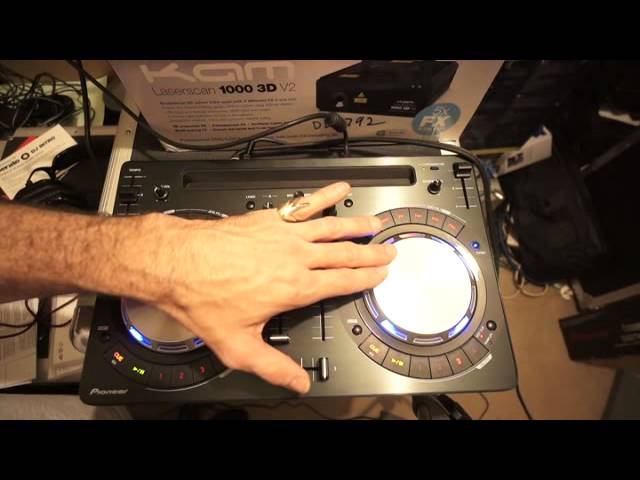
Alright ladies and gentlemen, short review on the Pioneer Wego 3. This is the third generation of Wegos, of course Wego 3, and first of all it looks a lot more professional. It doesn't look as much as a toy, I'm not saying the others did, but this just feels a little bit more as though it's more pro. Okay, the track you're listening to by the way is Sophia D'Soul, a track entitled Creeper. It's the Kenny Hectic Remix. If you want any more info on Mr. Kenny Hectic or any of the tunes, check out the link in the description. Okay, so you've got an area there where you can put your iPhone or your iPad and plug it in with the cable that comes with the WeGo 3 and use the likes of DJ app. Okay, at the moment I'm using VirtualDJ 8 and it comes with one of these
So if you want to, you can go online and go to VirtualDJ and all you have to do is pretty much put the number of the WeGo3 in the program, you download it. So it's pretty simple, just go to the website and you can get yourself VirtualDJ. Also if you want to, you can use Serato DJ Intro as well. So apart from the WeGo3, it comes with your normal run-of-the-mill. Instructions. Also, this unit is externally powered, it's not bus powered. If you're not familiar with bus power, what that is, is you've got your USB plug that goes into your laptop and the controller will take the power from the laptop which has its advantages because it means that you don't have to have an external power supply so you can take it on the road and have a bit of a mix in the middle of the street.
1:49 Alternatively though, it does drain the battery off your laptop
Alternatively though, it does drain the battery off your laptop. So having an external power supply is good, of course it doesn't drain the battery off your laptop, but of course what that does mean, you've got to plug it in at the wall somewhere. Okay, the WeGo 3 does seem a lot more robust. The controls seem a lot better, ergonomically it just feels a lot better. Okay, right, on the back you have, if I just tip it very slightly, If you're familiar with controllers, then you should be able to look at this and go, yep, I know exactly what things are for. Press down, load A or B, high, mid, low, your volumes, master volume here, select for headphones, A or B, select for your headphones. Crossfade, you've got effects here, you can assign different effects, you can also loop, I'll show you that in a bit, your master volume, your standby on off, your pitch control, jog wheel here which is touch sensitive and very good, no latency there at all.
But again, a lot to do with the latency. That depends on your PC, the processor and what else you're using in the background. For goodness sake, if you're going to use a controller on the road with any software, do not start going on Skype or Facebook. Just turn it off from the web so the laptop then should be used just for one purpose and one purpose only, and that is the software that you're using with the controller. So, there you go. Alright, let's do some hot cues. So if I press down, there, we'll do another couple, there, just get rid of that one and do another one. Again the buttons feel a lot better as well. They don't feel as though they're going to fall apart in any second. Very sturdy. Okay so I've four random hot cues, press shift, press down on the hot cues while I've got my finger on shift, there now, they've disappeared. So we can just do some more if I want to. There you go.
4:21 Again, you can sync the tracks as well
Okay, we can use this for the sampler as well. Top here, loop, press loop, we can halve the loop or we can double it. Out of the loop if you want to. Effects, as soon as you've engaged an effect then you use the jog wheel for the effect. Okay again, you can sync the tracks as well. It's up to you if you want to use sync mode but I don't like to. Alright so microphone volume here, it's very simple but If you're not familiar with controllers and you want to maybe get into DJing, you don't want the hassle of, let's say for example, spending hours and hours working out what everything does. The WeGo3 pretty much covers the basic bases, yes. So if you want to mix, if you want to scratch, if you want to...
Cut out the low, mid and high, use the crossfade, maybe do a bit of cutting and scratching. You can. Alright, jog wheels are very tiny. There's my hand. If I get a CD, you can see the jog wheels are very small. But, you know, you're not paying an absolute fortune. You're paying a small amount for something that does a very good job. Let's press play again. OK, the WeGo 3 from Pioneer. I will be doing more on this in the near future. Also using it for a couple of mixes and whatnot. Thank you very much to Mr. Kenny Hectic, and I'd say within sort of six months or so, I'll be giving this away, so let's see what happens there, alright? Again, any info on Mr. Kenny Hectic, check out the link in the description, and also any info you want on the WeGo3, I'll put a direct link to the PioneerDJ.com website where you can get more info on the WeGo3. Thank you very much, practice and enjoy. Nice one, Kenny!
This transcript was produced automatically from the audio of the video and may contain mistakes.





