 28:01
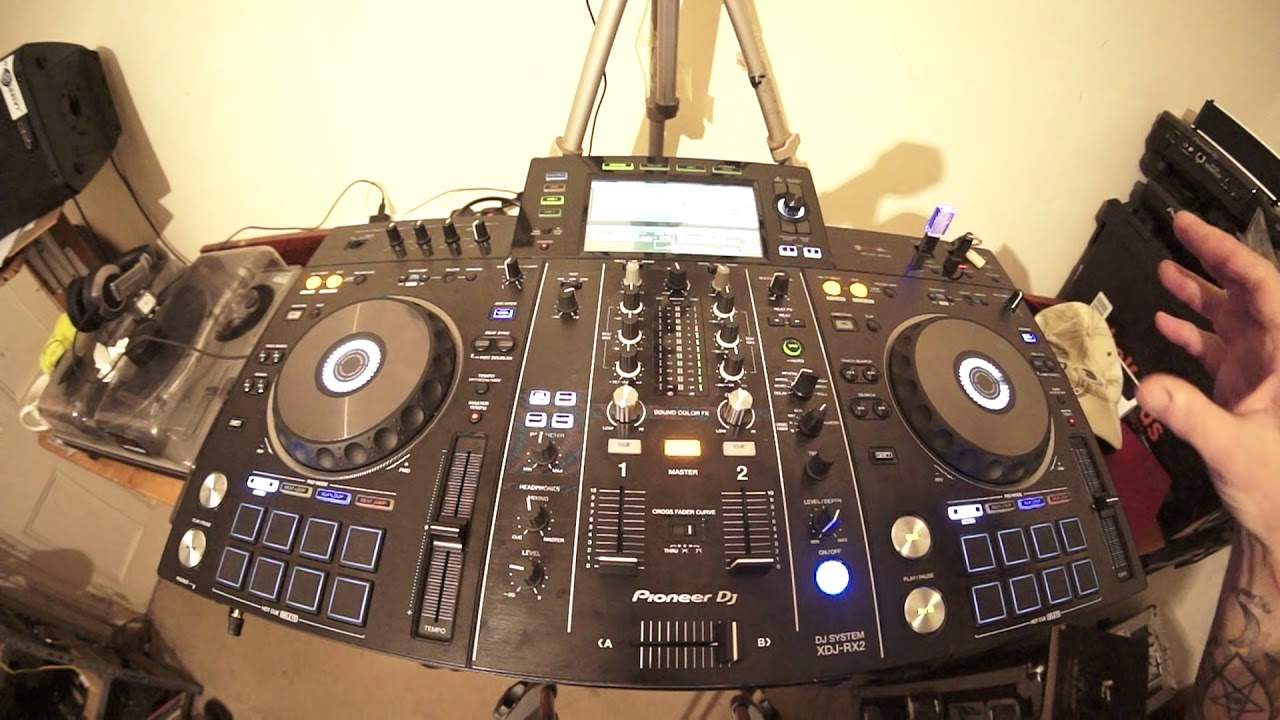
Pioneer XDJ-RX2 Good for the New DJ
Contents of the video
0:00 XDJ-RX2 and my thoughts on
Alright, in this video we're going to have a look at the XDJ-RX2 and my thoughts on it. Well, probably a lot of people already know my thoughts on it but I think with this video if you're in a position where you've got a wad of cash and you're thinking about buying some kit then I would like you to consider the RX or the RX2 which is in front of you. Underneath this, okay, this is the crazy thing. And what I'm about to say can be backed up because if you've watched gig logs or, you know, you see quite a few of my videos, I'm using the RX, but underneath here is the DJM-900 Nexus 2 there and a couple of CDJ Nexus 2s, the 2000s. You know, each one of those items is worth more than what's on top of them. Okay, don't panic, there are deck savers on the kit so nothing's going to get scratched. But I still like to use the RX. If I go out to a gig, I will take the RX with me even though the kit underneath is... I'm not saying it's far superior but maybe there are more features.
I like the RX2 because it's all in one. You haven't got to mess around with different flight cases, but having said that, OK, if let's say I was going to a club night or I was arranging my own sort of club event, for example, you know, I've done a few festivals, I would take the RX definitely as a backup, but of course I would use the Nexus series. I'd be an idiot to take the RX2 to, let's say... A big dance event and expect top DJs to play on it in front of thousands of people. Even though they could, it still can be done on most riders now if the DJs haven't got separate CDJs and a separate mixer and they turned up with a venue that can house a thousand people and saw the RX in front of them, they'd probably walk out because...
2:43 It's just two channel, but guess what?
It's not the industry standard for, let's say, huge nightclubs. On the other hand, it's great, let's say, if they're in the hotel room with a bottle of Dom Perignon next to them and they want to have a bit of a tinker prior to their set. Of course, they'd be quite happy to use the RX. So why do I like it so much? It's got everything you need. It's got the footprints of pretty much the high-end Pioneer kit. Okay, it's just two channel, but guess what? You've got a third one over here. So for example, let's say you've just got, I don't know, someone like shoves an iPod in front of your face during a gig and says, can you play this tune? It's my favourite. Well, instead of telling them to bugger off, of course you can if you want to. All you've got to do is go to the auxiliary in and...
There's your volume control, you've got a trim there. Okay, you've got no bass, mid or treble there, but at least you do have a third input. And also, let's take it to the next dimension. You've actually got four channels here because you can use... Well, in fact, actually thinking about it, you've got five. I do beg your pardon. There's actually five ways of playing audio through this because you can also use the microphone input. So all you need to do is make sure you've got the correct connections. With the microphone, that would be an XLR or jack. Slightly more intricate because if you're not completely familiar with how to set up this correctly, I wouldn't go there. But of course, the people in the know will understand that you've got deck one here, deck two there, you've got deck three on your auxiliary input, deck four on one of the microphones and deck five on the other one. So guess what?
5 channels, if you really think about it. Now that's insane! That's absolutely insane for something like this that costs less than a CD player. And if you bought the CD player that would cost you more, you've just got a CD player and that's it, nothing else. So what else have we got with the RX2 that's interesting? Right, OK, so again, it's touchscreen. You've got a shortcut button here that can take you to a QWERTY keyboard or alternatively you can set parameters for example your settings, hot cue. If you want to use quantize you can set the beat value of quantize as well. So let's say for example I don't know you want to form a loop and you're not sure about if your finger is going to be snap on in time. Well of course if you set quantize let's imagine you start the loop
5:35 You know, this particular person has been stuck inside for years
Accidentally, a fraction of a second before that beat and a fraction of a second after the beat. So you want to do one bar loop using quantize, that will snap it into time for you. And again, I highly recommend you use the rekordbox software even though this track hasn't, do apologize. Because once you use rekordbox with the RX2, everything comes to life. It's almost like... Someone is stuck inside and they need to be outside to get the full life of them. You know, this particular person has been stuck inside for years. They're a moany old bastard. And guess what? As soon as you bring them outside, they become a happy, lovely person full of life with a big smile on their face. That's exactly what will happen.
With this player, stick rekordbox in it and it will smile at you and give you a big kiss. Right, so get a menu, we've got the QWERTY keyboard, I'm just going to go back, we're on search here, so let's go to folder, which we are anyway, or we were. Get a karmic, karmic power, Lord hear our prayer, bang, put it on, press play and away you go. Alright, now again, this video as well is maybe targeted... DJs who do not know much about the RX2 and are thinking about getting a player. So at the moment now, I'm on USB number 1. Now you always know which USB you're playing from simply because that USB will be flashing. So I can, if I want to, I can press the button below USB 2. Now the LED that was highlighted in right
7:35 It's a great feature
Sorry, right in red has gone. That gives me the opportunity now of unplugging my USB. Small point here but very valid. It's exactly the same as say using a computer. Once you put your USB, also known as the thumb drive, in your computer, you finish doing whatever you need to do and you pull it out. That's not a good idea because the computer may over time stop recognising the USB. You always need to... Eject, so it's exactly the same with this. Do not pull it out, just press the button so the RX2 understands that yes, that is now being ejected and then of course you can pull it out. Now also, what is great with the USB 2, if you have a thumb drive not in 1 but in USB 2, you can not only play from that but you can actually record to the USB 2 as well. Alright, so it's a great feature. Now something else that is an effect but not an effect and it's one of my favourites is the slip mode.
Again, this video is targeting people who have no idea what slip mode is. Let's imagine you want to do a spin back. So I'm going to go forward a bit. Let's go disengage slip mode. Okay, this by the way, Eddie Amador, Lord Hear Our Prayer from Karmic Power Records. There'll be a link in the description to this track. So let me do a spin back. Okay, so what's happened? I've spun back. So the track has literally spun back and then wherever the spin back stops, that's where the track will start again. So if you're let's say doing a mix and you want to do a little spin back, if you did that, you'd have to be very clever to make sure you snap it in beat and in phrase and in time. On the other hand, if you engage slip mode, you can spin back forward as much as you want and the underlying track will carry on playing at the same time signature it was prior to you spinning back. So, same as a hot cue, got my finger on the hot cue, keep your finger on the hot cue, it'll go from that point, take my finger off, it will snap back to where the track should be playing anyway.
Now this is something here that is very, very important, especially for the new DJ who hasn't got the fog ears, is your tempo select. You've got plus or minus 6, 16, sorry 10, 16 or wide. Now if you're new to DJing and let's say you're finding it difficult to beatmatch, I highly recommend to stick to plus or minus 6%. It means you've got more control. Over that pitch, so for example, an easy way of explaining it. If your track you're playing is a bit of hip-hop, 100 BPM, plus or minus 6, bring the pitch all the way towards you, you have now increased it to 106%. On the other hand, if I move the pitch all the way from me, I've now decreased it by 6%, which means that track will now be 94 BPM. So if you just use that logic, then...
10:24 Guess what it is at 10, 16 and 100
Guess what it is at 10, 16 and 100. Now 100 is slightly different because 100 will mean that you will increase the speed 100% or stop it. So have a listen. Bang, stopped. Now the wide is not a good idea, especially if you're trying to mix one track into the other. It can be done. It is possible, but it is very difficult. Now the wide feature is great for effects so you know maybe you want to get some kind of really dreary or interesting sort of beginning of a mix that can be achieved by making sure master tempo is selected and I am going to put the pitch down to like minus a lot press play here we go ah guess what let's put it on wide to begin with Right, so there we go. Now with master tempo disengaged it's going to sound completely different. Check it out. Master tempo just keeps the key, the pitch of the track the same no matter where you move the pitch control. Okay now without confusing people we have hot cues, we have beat loop, we have slip mode and we have beat jump. Now again what I want to do with this video
12:50 We've got dub, echo, sweep, noise and filter
Let's take this on board. Let's say you're a brand new DJ and you're not familiar with loads of effects and the ins and outs of wacky transitions. All you want to do, you want to get something that you can open the box, you can look at, you have a certain amount of an idea of sort of, well I know what DJing is, I know the bass, mid and treble and all the up-faders, I know what they do and the crossfade. So you want to be able to open the box, plug it in to the mains, plug it into your speakers and pretty much start to mix. Well this video is going to show you that. Alright so again two channels, you've got your headphone here, you have got these two dials here, SoundColor FX for small effects.
We've got dub, echo, sweep, noise and filter. Now the sweep is a great effect because what it does, it like really chops up the tune. So we're going to sweep. You know, we've almost got now from a house tune, we've got like a techie track. Now that, to me, that's amazing. You know, it's not doing much. It's almost like, you know, you imagine you sat there or stood up and all of a sudden... Subtitles by the Amara.org community Line and phono. So at the back, I did say in a previous video, I was incorrect that there's only one input. There's actually two inputs. So you do have an input for your line as well as your phono. So phono of course, vinyl turntable, line is auxiliary in, for example, separate CD player, whatever you want, so long as it does have auxiliary, also known as AUX or line input.
Next one is deck, so we're on deck as well and over to deck two, same exactly on the left-hand channel. Something here that one person I teach in my online lessons mentioned about which is the vinyl mode. Now they were concerned that when they played a track it was always jumping, it was shuddering when they were in pause mode and that was because They were in what's known as CDJ mode. And it's entirely up to you if you want to do this, but if you hear that... Now this is CDJ mode. Now this to me would be the most annoying sound in the world. This would be like going to the dentist and having the dentist just drill one-two constantly with no stopping. I hate... Personally, this to me is a nightmare. Go to vinyl mode, it stops. How about that?
15:38 Just make sure you've got vinyl mode engaged
So just make sure you've got vinyl mode engaged. Now that turntable will act exactly, well, not exactly exactly, but pretty much like a vinyl turntable. That's what you want. So just make sure to begin with, you're in vinyl mode, everything's fantastic. Now again, if you can't mix perfectly, so let's imagine a brand new person, you wanna be a DJ, you know what to do, but you can't beatmatch, guess what? You do have the option of syncing the two tracks up again so long as you use the rekordbox software. You can either have the right hand side master, the left hand side sync, alternatively the left hand side master, the right hand side sync. All you have to do is press the master on the right or the master on the left.
And that's pretty much it. The one side will beatmatch with the other one. Again, that's not going to happen at the moment because this track has not gone through rekordbox. Some people always ask me what's the tap button for? Well, if you're playing a track, tap along to it and then that will manually then get the timing of your tapping into these effects here. So, very quickly as well, this area from top to bottom, we've got booth monitor. Now again, this is what makes this player a little bit more special from the other let's say cheap and cheerful controllers is because that dial there will let you add on An external set of monitor speakers. So if you do, let's say, take this to a medium-sized gig, you know, you can have your own little PA system there. You can change the volume of the PA system that you've got and you won't interfere with the master volume, which is, of course, dead center just below the screen on the RX2. Now, if we go below the booth output, we've got beat effects.
17:49 We've got an arrow facing the left and one facing the right
We've got an arrow facing the left and one facing the right. And that will just increase or decrease the amount of effect based on the right button will increase, the left one will decrease. Below that we've got delay, echo, spiral, reverb, trans, flanger, filter, pan and roll. And then below that we can select What we want the effect to be on? Now, not many people do this. All right. But give it a go. Try it. Why don't you put the effect to mic microphone and just say something in the mic and get an effect over your voice? It's fun. Believe me, it's fun. Right. What else can I tell you about this? Yeah, we know we've got two channels here so we can have two microphones and You've got EQ on the mics as well, just bass or low and high but you've still got EQ which is great. We can add loops so for example like that's slightly off okay it is slightly off but never mind all right so I'm just going to press the out I'm going to move the jog wheel anti-clockwise not not brilliant but you know I mean you could actually use this as some kind of keyboard now all I did
The pitch was on the wide feature and I disengaged master tempo and now I can make some wacky sounds. The deck is cued up, all I'm doing is tapping the cue button. Okay so let's take this to the next level. See we've got that on pitch. See I've made that sound even higher.
20:27 Use the grey matter and think, well, how could we like mix everything
Filter. You see, this is what a lot of DJs don't do. Trust me on this. What they will do is they will look at, let's say, the sound colour effects and use one of those or maybe they will use one of the effects over this side or maybe they'll form a loop or something like that. What most DJs do not do is... Use the grey matter and think, well, how could we like mix everything together? You know, add this effect with that effect and do some kind of effect on the deck. That's exactly what I've done there. That's what you need to do. Doing something like this correctly, of course, unlike me, it'll just put you at another level. All right, so what else can I tell you about the RX2? Again, this is happening with a lot of players today. It's something very small but it's still great. On the front left-hand side you have two inputs for your headphones. Now if we look at old school mixers, even going back a couple of years, you would only have a quarter inch jack input. Now of course people have thought these crazy people from Pioneer and a couple of other companies have gone, well you know what?
Why don't we just add another headphone input, but of course the mini jack. So it means if you do forget your quarter inch jack, dim problems as we say in Wales, no worries because you can just plug it in. But also think about it, that's two inputs. Guess what? That means two DJs. It's great for me because when I teach people here, I can have some headphones plugged in and listen to the DJ I'm teaching and of course they can... All in all, this player is pretty much all you need. Now again, very quickly as well, something just to make sure you know what you're doing before you think there's something wrong with my headphones. We've got the headphone level there. This is the same with most controllers.
22:54 Dial
That you understand what the headphone mixing dial is for. Really important because let's say, for example, that dial is anywhere from the cue up to, well it shouldn't really be at master, let's say it's in between the cue and it's sort of, I don't know, facing nine o'clock and you can't understand why you've only got the cue button highlighted on the right hand side but you seem to be able to hear What's being played on the left hand side? Now that's because this dial will mix in the other sound from the other side. So if you only want to hear the one side that is cued up, just make sure that the headphone dial is set to the cue position which is the off position which is at seven o'clock and that is exactly the same across the board with pretty much
There are so many more features to this. There's too many to explain in this video because I have not got the next six months. Pioneer recently now have brought out an extra part to rekordbox where you can use the rekordbox software to do your light show. Stunning. Also what you can do with rekordbox now, again I do believe it's a paid add-on, but you can now get text while a track is playing. Now I do believe there's a third party involved. Don't quote me on that, but you know, that's pretty good. So for example, you know, you're playing a track, you do have a television screen or you've got a projector, you can have imagery on there and you can have the wording from the track. So guess what? People can sing along to it. Imagine that. Mobile DJ, hey Macarena, say no more. All right. Now, if you want any more information on the RX2, what I suggest you do is after this video, just...
25:17 I truly believe that the days of your controllers
Have a look on YouTube and look at some more videos. There's hundreds out there, more in depth on what it can do, what it can't do. But finally, let's finish on this. Now, I truly believe that the days of your controllers... I'm pretty sure on this, pretty sure. The days of having a controller and having a cable into a laptop are numbered because... I always hear about people saying, oh the laptop's crashed or this or there's been a problem. You know, you've got a weak link and that weak link is the USB cable. Now what I'm pretty sure will happen maybe in the next five years or slightly less, we will get to the stage where we'll have controllers like this that will do everything. And if any companies are listening to this now, this is the way you should go, seriously.
Give me a thumbs up and in a comment just say I like what you're saying at the end of this video and add your bit to it because companies may watch the video and they also look at the comments and get your ideas as well. But this is what we need, we need a controller like this, of course touchscreen, a bigger screen so of course all the information can be on the screen on the controller, no need for a laptop. Also, you have USBs so you can plug your USBs in. More importantly, what you've got is you've got some form of internal SSD, a solid state drive or any form of large capacity storage. So for example, you know, you could have two inputs that you can put your own storage in A minimum of one terabyte each, so then there's no need for any form of external unit. And again, for firmware updates and whatnot, just do it via USB. So what you have got then is you've got an all-in-one unit that does everything. No need for your laptop. You haven't got to wait for the laptop to boot up.
Everything's on here, the software's on here, your storage is on here, you're pretty much good to go. You make that three or four channels, wow, that would sell like virgin hotcakes. Right, now then, like I said, go and check out more. This is the Pioneer XDJ-RX2 and I think it's shit hot. Practice and enjoy. Thank you very much.
This transcript was produced automatically from the audio of the video and may contain mistakes.





