 6:47
QSC CP12 and QSC K12.2 Side BY Side Comparison
Contents of the video
0:00 We have their new CP12 and the K12.2
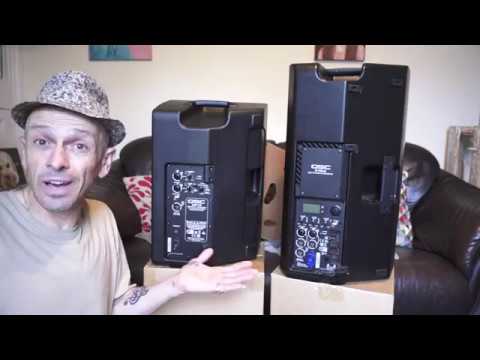
Alright guys, here's a side-by-side comparison in between the speakers, or a couple of speakers from QSC. We have their new CP12 and the K12.2. Now both of them house a 12 inch big speaker, also known as a woofer, and a 1.4 inch compression driver. So first noticeable difference is of course the size. Secondly, the 12.2 houses a Class D 2000 watt amplifier. CP houses a 1000 watt Class D amplifier. The CP will push out 126 decibels, and there's a dog, and the K12.2 will push out 132 decibels. So even though there's not much difference in those numbers, there is a reasonable difference in volume because as soon as you start increments of 1 decibel, you do get a noticeable difference in sound. Right, let's turn them around. Let's have a look. Okay, now both of them can be used as floor monitors, also known as wedges. So for example, if you are in a band, you'll know where I'm on about there. But simply this area here, you can place that on the ground and then the speaker itself will face you. It's about a sort of a 40 odd degree angle. So if you're a guitarist, a singer, you've got your monitor.
Let's have a look at the CP-12. Now, first of all, it's got a linear cooling system, so inside here you'll have some form of heat sink that will dissipate the heat. We have three inputs, A, B and C. Input A is for line in, so if you're, let's say, for example, a DJ, you'd go from your mixer straight into line in and you can go either via quarter inch jack in the centre or XLR around the outside. Let's just get a bit closer. Input B is microphone and line, and C is a small mini jack. So let's say for example you're at a gig and someone's asked you to play music in a separate room. You can go via in here using a mini jack and let's say for example you've got your iPhone, your iPod, you can play music via that.
2:21 To people that food's ready
But at the same time, this is the great feature here, you've got a volume control at the top, a gain control for the music. So you can set that according to how loud or quiet you want it. And at the same time... Let's say they want you to make some form of presentation or just explain to people that food's ready and you need to use a microphone. You can plug your microphone here into input B and use the gain control here. So you've got two gains, one for your music, one for the microphone. So in a way it's like a very simple sort of mixer. On the right hand side here we have this dial to set for the sound. We can set to default. It will pretty much give you a good round sound. Default external sub. So what that means is if you do have an external sub, the sub itself then should be able to do all the bass sounds and then leaving the CP12 to concentrate more on the mid and high. And when you do that, you will find you'll get a better quality and clarity of sound. Dance.
4:20 That same venue, press a couple
I used that earlier on and you get a warmer sound. It seems to remove a tiny bit of the mid so the bass and the high is more enhanced. We can have dance external sub so you get an even richer sound, floor monitor again for bands etc and speech. So there you go, a good group of settings for practically every single application. Then we look at the K12.2, again it's a Class D amplifier and it's 2000 watts. We have a screen here that will give you a readout of the settings. Now one of the great features of the K12.2 is let's say for example you're on the road all the time but there's a few venues where you're there practically every single week or month. And you're a bit of a junkie, a tech junkie for sound. You know, you have to get that good quality sound and you want it always the same at the same venue. Well, you can set the sound for say venue A, B, C and so on. So then when you go to that same venue, press a couple of buttons and you don't have to mess around getting the setting again. It's got a preset in there. Easy done. Okay, we also have A, B and C again, gain controls.
Very similar to the CP-12. C again is your mini jack input, so like the CP-12 you can use the K-12.2 separately, use a microphone and at the same time plug in an external source for some music. Now one of the features I do like, and some people still to this day don't do this, check those out. All in all, Two great speakers, reasonably priced and there will be information in the description on the CP12 along with the K12.2. Now this video is being uploaded in October 2018 and if you are around the Solihull area, on the 20th and 21st of October there is something called the BPM Show which is anything and everything to do with DJing. There will also be information in the description down there on the BPM Show.
I'll be there using the CP-12 and next door to me will be QSC. So if you want to ask them any questions about any of these speakers and more that they'll be taking them, then come along and you not only get to speak to someone who knows about the stuff, you actually get to speak to people who are completely involved with QSC. So questions can be answered. Alright, thank you for watching. Practice and enjoy. Cheers.
This transcript was produced automatically from the audio of the video and may contain mistakes.





