 5:04
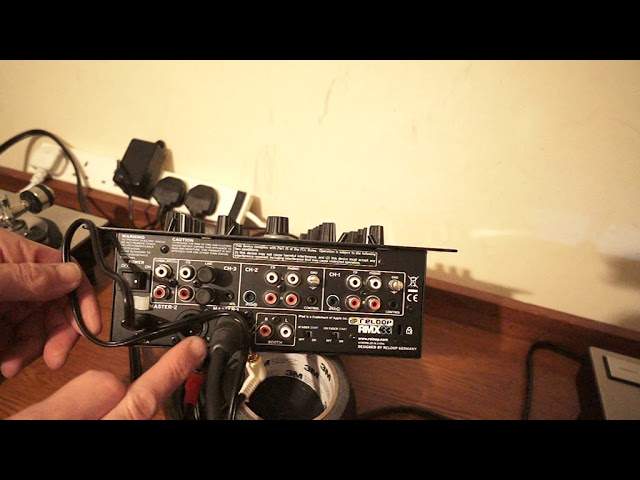
Reloop RMX33I DJ Mixer Part Two a Look at the Back
Contents of the video
0:00 This is a follow-on on the video I did on the mixer from ReLoop
Right, so this is a follow-on on the video I did on the mixer from ReLoop. It's the RMX33i. And as I said in the last video, I didn't really want to move the mixer around because I had all the cables plugged in but now I don't. So let's have a look at the back. Very simply on and off. We've got a small sort of plastic tab here. Now that's there for one good reason. Let's imagine you are in a nightclub environment or The mixer itself is set up and needs to stay there. Well that's there because the power in is via DC plug and the idea there is for you then to attach the cable from the plug in here so you need to unscrew that, attach that cable and then plug in. Now you may have to have the plug The DJ Tutor is available for purchase at Ellaskins.com.
1:40 I believe that is for your start-stop
So your outputs, very clear you have unbalanced which is RCA. Now if you're going to use the 33i let's say for your bedroom and your small monitor systems or for that matter relatively big PA whatever is quite close at hand then by all means go with the unbalanced. But ideally, if you're going to be in a nightclub environment or for that matter on the road and you want to make sure you have got some pucker sound, I always recommend to go balanced out which is of course XLR. Next to the unbalanced out we have CD in and line in for channel 3 and we also have a control input. Now I believe that is for your start-stop. So if you're going to be, please quote me on this if I'm wrong. We have the channel fader start and the, where are we? Sorry, the X fader which is the crossfade start here and the channel fader start. Now when they're on the off position that means that you are in complete control of the crossfade and the up-faders. When they're on the on position that means that if you do have some form of controllable device
Where as soon as you move the up-fader up or the crossfade, the track will start. Now what that means is from a mobile DJ's perspective is if you imagine if you've got one hand on the microphone and one hand on the up-fader, you don't have to then have a third hand to press play. You pretty much move the up-fader up and the track will start. So on channel 3, like I said, we have CD in and we have line in. Channel 2 we have CD and we have phono so you can switch from CD to phono. Also there's an input there for an iPad as well. The same with channel 1 we have iPad in, CD and phono. Now these small little things here, these screws are there for one purpose only, to make sure that you earth your turntables.
3:31 For the people who don't know, I'll explain
For the people who don't know, I'll explain. The ones who do, you do know so it's very obvious but it isn't for some. These are to attach the ground cables from your turntables. So for example here is the left and right from the vinyl turntable and that there is a ground cable that needs to be secured To that ground screw there. If it isn't, you will of course get audio so long as you've got your RCAs plugged in but you may get a sort of a humming sound in the background. That's because you haven't earthed the turntable correctly. So below channel 2 we have our booth in, RCA in and of course next to there as I explained we have the crossfader start which as default If I were you, set that to off, same as the channel fader, set that to off. And then far right, we have that small hole for locking your mixer in place. Alright, there you go, a small brief look at the Reloop RMX33i from the back end. And again, this mixer is very suitable for the likes of a bedroom DJ, a small to medium sized nightclub I would say.
And also a mobile DJ. There you go. Any more info, by all means check out the link in the description to reloop, practice and enjoy. Thank you very much.
This transcript was produced automatically from the audio of the video and may contain mistakes.





